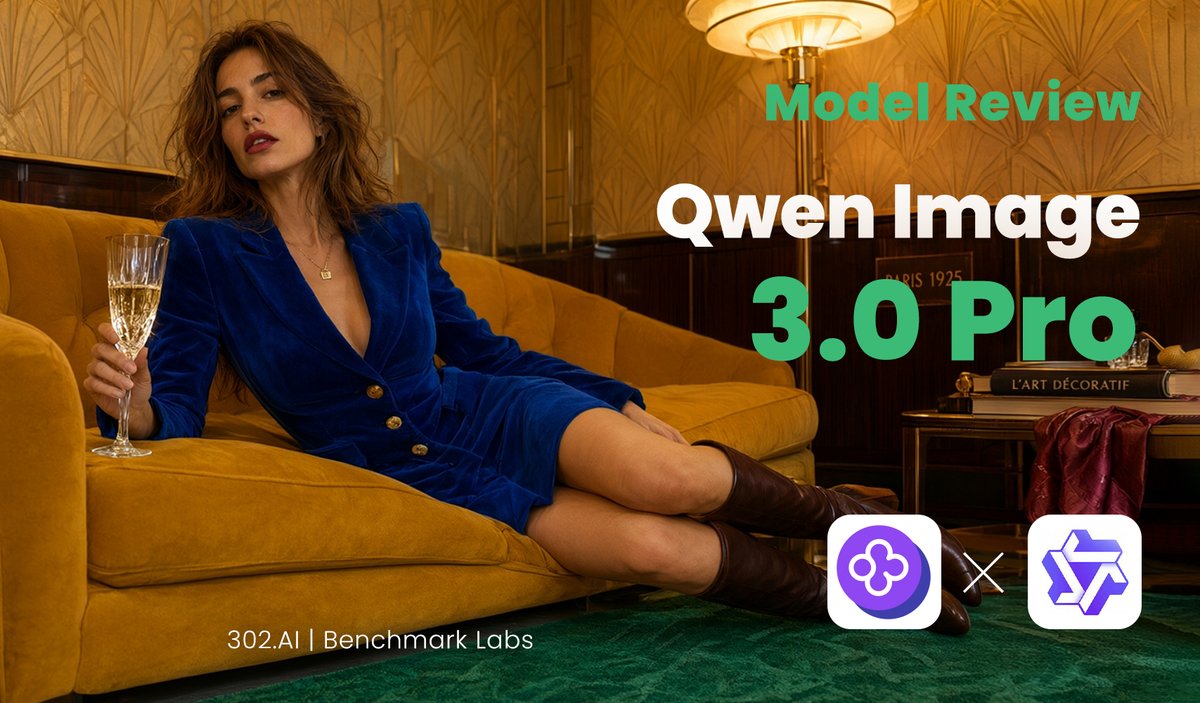
Qwen Image Model Review Banner
A luxury editorial social media banner template for promoting an AI image model review or benchmark comparison.
这是一个用于 平面设计和海报设计 的 GPT Image 2 提示词案例。你可以复制下方 prompt 生成相似图片;商用前请复核 Awesome GPT Image 2 Prompts 来源归因和原始权利。
需要完整提示词集合?请使用 平面设计和海报设计 主题页获取更多同类示例,或打开 GPT Image 2 提示词库 查看完整示例索引、可复用结构和来源归因。
免费 1K 极速预览
无需注册,立即生成一张预览图。
1027/4000
提示词
可复制提示词
目标:为 {argument name="model name" default="Qwen Image 3.0 Pro"} 的 AI 模型测评制作一张电影质感的编辑风格社交媒体横幅,将奢华的休息室时尚摄影与醒目的科技测评排版相结合。

画布:宽屏 16:9 横幅,尺寸约为 1200×675 像素,针对 X/Twitter 链接预览进行了优化。采用暖金色调,具有高对比度和浅景深的电影级灯光效果。

主体图像:一位时尚的成年女性斜倚在装饰艺术风格室内的芥末黄丝绒沙发上。她留着蓬松的棕色波浪卷发,涂着红唇,表情自信而放松,身穿深宝蓝色丝绒西装裙,配有金色纽扣,露着双腿,脚穿深棕色过膝长靴。她左侧面向观众;一只手拿着香槟杯靠近左边缘,双腿向右下方伸展。房间内有图案精美的金色壁纸、深色木质墙板、绿色地毯,右上角附近有一盏发光的复古落地灯。右侧放置一张小边桌,上面堆叠着艺术/设计书籍,并铺有酒红色织物,营造出 20 世纪 20 年代巴黎酒店休息室的氛围。

文字排版:将大号测评文字放置在右半部分,左侧保持人物主体清晰。仅使用 3 个主要文字元素:顶部标签“Model Review”采用粗体青绿色无衬线字体,主标题“Qwen Image”采用超大号粗体白色无衬线字体,版本行“3.0 Pro”采用特大号粗体青绿色无衬线字体。在左下中心附近添加一行小型页脚说明,文字为“{argument name="footer credit" default="302.AI | Benchmark Labs"}”,采用细体白色无衬线字体。

Logo 区域:在右下角,展示 3 个独立的 Logo/对比元素:左侧是一个包含紫色圆形三叶草状 AI 图标的圆角白色正方形,中间是一个白色“×”乘号,右侧是一个包含紫色几何星形/立方体状 Logo 的圆角白色正方形。

视觉风格:奢华编辑摄影与简洁的 SaaS 基准品牌风格融合;清晰的排版、温暖的琥珀色高光、青色强调文字、深绿色地板、芥末黄沙发、宝蓝色服装。使构图看起来像是一张精致的 {argument name="review topic" default="Qwen Image 3.0 Pro versus GPT-Image-2"} 测评缩略图。

约束:保持所有可见文字清晰可辨,拼写与指定内容完全一致。请勿添加额外的标题、水印、界面元素或额外的 Logo。保留宽屏横幅布局和三个 Logo 的对比组合。
提示词变量
从提示词中识别到的可编辑 argument 占位符及默认值。
变量
model name
默认值
Qwen Image 3.0 Pro
变量
footer credit
默认值
302.AI | Benchmark Labs
变量
review topic
默认值
Qwen Image 3.0 Pro versus GPT-Image-2
Best for
- - 平面海报 方向的视觉探索
- - 图片生成与参考图改写
- - 需要保留来源归因的可复用 brief
可以替换这些部分
- - 主体、产品、角色或场景
- - 画幅、镜头、光线和背景
- - 品牌、文字、颜色和输出限制
推荐模型与设置
- - 模型:gpt-image-2
- - 输入模式:文生图
- - 画幅:source
- - 商用状态:需复核原始来源
如何使用这个提示词
- 1. 复制提示词并先保留原始结构。
- 2. 替换主体、场景和输出渠道。
- 3. 每次只调整一个镜头、光线或风格变量。
- 4. 检查结果媒体、文字、来源和权利风险。
限制、来源与复用提醒
- - 生成结果是可编辑草稿,不是事实、法务或权利证明。
- - 商用前复核来源链接、人物、品牌、Logo、文字和第三方素材。
导入自 Awesome GPT Image 2 Prompts。需要保留来源归因。商业使用状态:allowed;付费使用前请复核原始权利。
同分类案例
优先推荐同分类、同输入模式且风险更低的案例。






复用与来源说明
看完案例后,再安全复用这个提示词。
- 1.复制 prompt,或点击生成入口在 Dovoo 中直接打开。
- 2.按你的用途调整变量、画面比例和参考图。
- 3.发布或商用前,复核来源权利、归因要求以及品牌、肖像或版权风险。
这个提示词可以商用吗?
当前商业使用状态为 allowed。付费或公开使用前,请复核原始来源、许可、品牌限制和法务要求。
这个案例来自哪里?
该案例导入自 Awesome GPT Image 2 Prompts;复用时请保留来源归因,并打开来源 URL 检查最新授权信息。