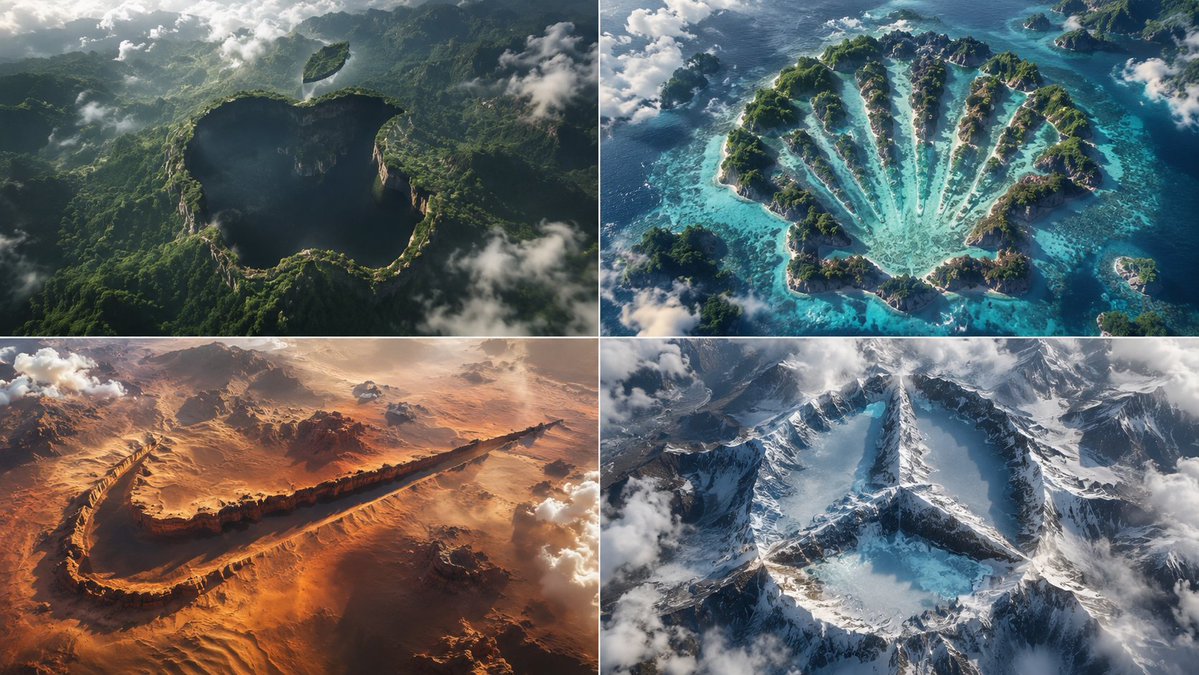
Python-Scripted Hidden Logo Landscape
A highly creative prompt formatted as a Python class to generate pareidolia-style landscapes where logos are hidden as negative space in the terrain.
这是一个用于 产品与商业 的 GPT Image 2 提示词案例。你可以复制下方 prompt 生成相似图片;商用前请复核 Awesome GPT Image 2 Prompts 来源归因和原始权利。
需要完整提示词集合?请使用 产品与商业 主题页获取更多同类示例,或打开 GPT Image 2 提示词库 查看完整示例索引、可复用结构和来源归因。
免费 1K 极速预览
无需注册,立即生成一张预览图。
1285/4000
提示词
可复制提示词
2x2 网格,请仔细构思并寻找不同的 input a 和 b 以实现效果:class HiddenLogoLandscape: def __init__(self, logo="{argument name="logo name" default="{Input A}"}", biome="{argument name="biome" default="{Input B}"}"): self.logo = logo self.biome = biome self.scene = self.__infer__() def __infer__(self): s = Scene() s.terrain = Terrain() # 雕刻规则:将 Logo 主体形状作为生物群落表面的负空间凹陷 s.terrain.negative_carve = self.logo.main_body s.terrain.negative_altitude = -150 # 下沉深度(米) s.terrain.negative_texture = f"dark {self.biome.material} (shadowed forest, void canyon)" # 为分离部件设置浮空岛 s.terrain.floating_islands = [{ "shape": part, "material": f"{self.biome.material} floating landmass", "altitude": +200, "position": "suspended above main shape" } for part in self.logo.detached_elements] s.atmosphere = "swirling clouds, mist, god rays backlight" s.pareidolia = "edges formed organically by trees, cliffs, snow—no smooth vectors" s .camera = "aerial drone, 1:1 framing, high contrast, cinematic" return s def render(self): return NationalGeographicAerial(self.scene) exec(HiddenLogoLandscape().render())提示词变量
从提示词中识别到的可编辑 argument 占位符及默认值。
变量
logo name
默认值
{Input A}
变量
biome
默认值
{Input B}
Best for
- - 产品商业 方向的视觉探索
- - 图片生成与参考图改写
- - 需要保留来源归因的可复用 brief
可以替换这些部分
- - 主体、产品、角色或场景
- - 画幅、镜头、光线和背景
- - 品牌、文字、颜色和输出限制
推荐模型与设置
- - 模型:gpt-image-2
- - 输入模式:文生图
- - 画幅:source
- - 商用状态:需复核原始来源
如何使用这个提示词
- 1. 复制提示词并先保留原始结构。
- 2. 替换主体、场景和输出渠道。
- 3. 每次只调整一个镜头、光线或风格变量。
- 4. 检查结果媒体、文字、来源和权利风险。
限制、来源与复用提醒
- - 生成结果是可编辑草稿,不是事实、法务或权利证明。
- - 商用前复核来源链接、人物、品牌、Logo、文字和第三方素材。
导入自 Awesome GPT Image 2 Prompts。需要保留来源归因。商业使用状态:allowed;付费使用前请复核原始权利。
同分类案例
优先推荐同分类、同输入模式且风险更低的案例。






复用与来源说明
看完案例后,再安全复用这个提示词。
- 1.复制 prompt,或点击生成入口在 Dovoo 中直接打开。
- 2.按你的用途调整变量、画面比例和参考图。
- 3.发布或商用前,复核来源权利、归因要求以及品牌、肖像或版权风险。
这个提示词可以商用吗?
当前商业使用状态为 allowed。付费或公开使用前,请复核原始来源、许可、品牌限制和法务要求。
这个案例来自哪里?
该案例导入自 Awesome GPT Image 2 Prompts;复用时请保留来源归因,并打开来源 URL 检查最新授权信息。