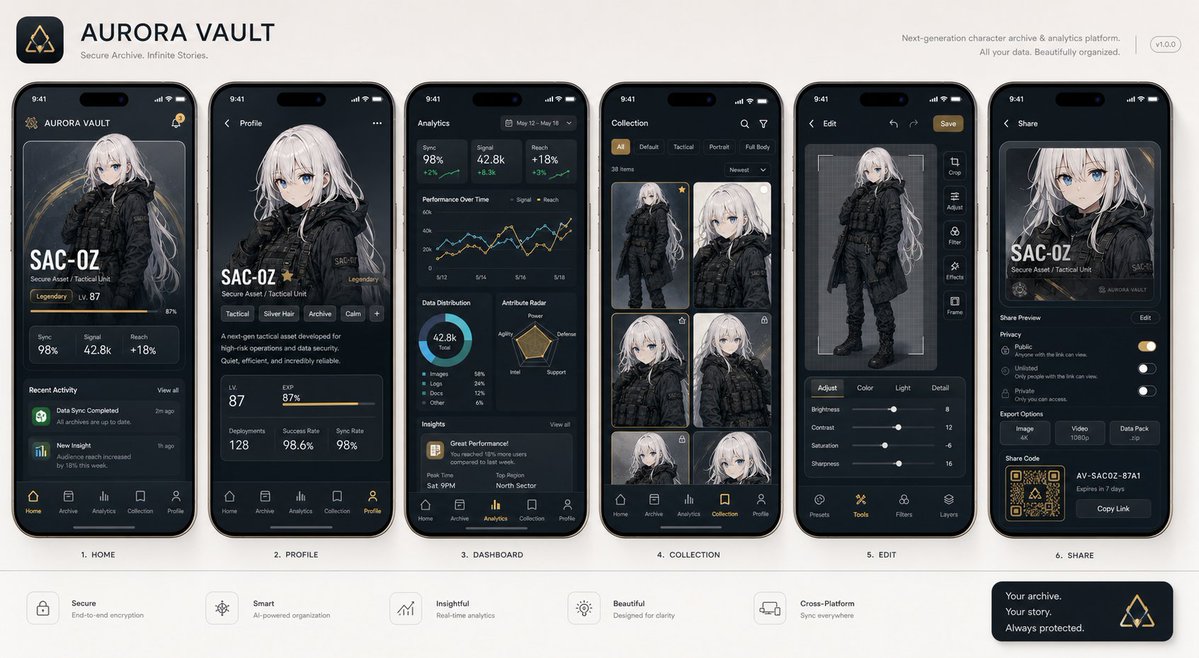
Next-Gen Mobile App UI Showcase
An image-to-image prompt designed to generate professional mobile app UI screenshots featuring a consistent subject across various screens, styled like a Product Hunt or Apple presentation.
这是一个用于 产品与商业 的 GPT Image 2 提示词案例。你可以复制下方 prompt 生成相似图片;商用前请复核 Awesome GPT Image 2 Prompts 来源归因和原始权利。
需要完整提示词集合?请使用 产品与商业 主题页获取更多同类示例,或打开 GPT Image 2 提示词库 查看完整示例索引、可复用结构和来源归因。
免费 1K 极速预览
无需注册,立即生成一张预览图。
免费文本预览不保留参考图一致性。
590/4000
提示词
可复制提示词
以附带的主体作为主角,请将“{argument name="app type" default="一套逼真的下一代移动应用截图"}”概括为一张图像。这不是广告海报,而是一张高质量的视觉图,例如 App Store 介绍图、产品设计公告或 UI 案例研究。请准确保持参考图像中主体的特征、颜色、形状、面部、服装和印象。将主体视为应用内的主要内容,不要将其更改为其他角色或产品。排列 {argument name="number of screens" default="4 到 6"} 个垂直智能手机屏幕,并确保每个屏幕各不相同。包含的屏幕:主屏幕、详细资料页、分析仪表板、收藏页、编辑页、分享页。UI 元素:虚构的应用名称、标签栏、卡片式 UI、按钮、图表、标签、简短描述、数字显示、图标、小型通知显示。设计风格为精致的 2026 年移动端 UI,简洁、实用,且具有清晰的信息设计。请勿过度使用磨砂玻璃效果(glassmorphism)。文字应易于阅读,主要使用英文且简短。请勿使用真实公司名称、应用名称或 Logo。背景为简洁的摄影棚背景。整体外观应像 Dribbble、Product Hunt 或 Apple 上的应用介绍图一样专业,但要使其看起来像一个自然的虚构产品。优先级:看起来真实的 UI、对参考图像特征的保留、作为截图的说服力,以及值得在社交媒体上保存的信息密度。提示词变量
从提示词中识别到的可编辑 argument 占位符及默认值。
变量
app type
默认值
一套逼真的下一代移动应用截图
变量
number of screens
默认值
4 到 6
Best for
- - 产品商业 方向的视觉探索
- - 图片生成与参考图改写
- - 需要保留来源归因的可复用 brief
可以替换这些部分
- - 主体、产品、角色或场景
- - 画幅、镜头、光线和背景
- - 品牌、文字、颜色和输出限制
推荐模型与设置
- - 模型:gpt-image-2
- - 输入模式:图生图
- - 画幅:source
- - 商用状态:需复核原始来源
如何使用这个提示词
- 1. 复制提示词并先保留原始结构。
- 2. 替换主体、场景和输出渠道。
- 3. 每次只调整一个镜头、光线或风格变量。
- 4. 检查结果媒体、文字、来源和权利风险。
限制、来源与复用提醒
- - 生成结果是可编辑草稿,不是事实、法务或权利证明。
- - 商用前复核来源链接、人物、品牌、Logo、文字和第三方素材。
导入自 Awesome GPT Image 2 Prompts。需要保留来源归因。商业使用状态:allowed;付费使用前请复核原始权利。
相关主题包
同分类案例
优先推荐同分类、同输入模式且风险更低的案例。






复用与来源说明
看完案例后,再安全复用这个提示词。
- 1.复制 prompt,或点击生成入口在 Dovoo 中直接打开。
- 2.按你的用途调整变量、画面比例和参考图。
- 3.发布或商用前,复核来源权利、归因要求以及品牌、肖像或版权风险。
这个提示词可以商用吗?
当前商业使用状态为 allowed。付费或公开使用前,请复核原始来源、许可、品牌限制和法务要求。
这个案例来自哪里?
该案例导入自 Awesome GPT Image 2 Prompts;复用时请保留来源归因,并打开来源 URL 检查最新授权信息。