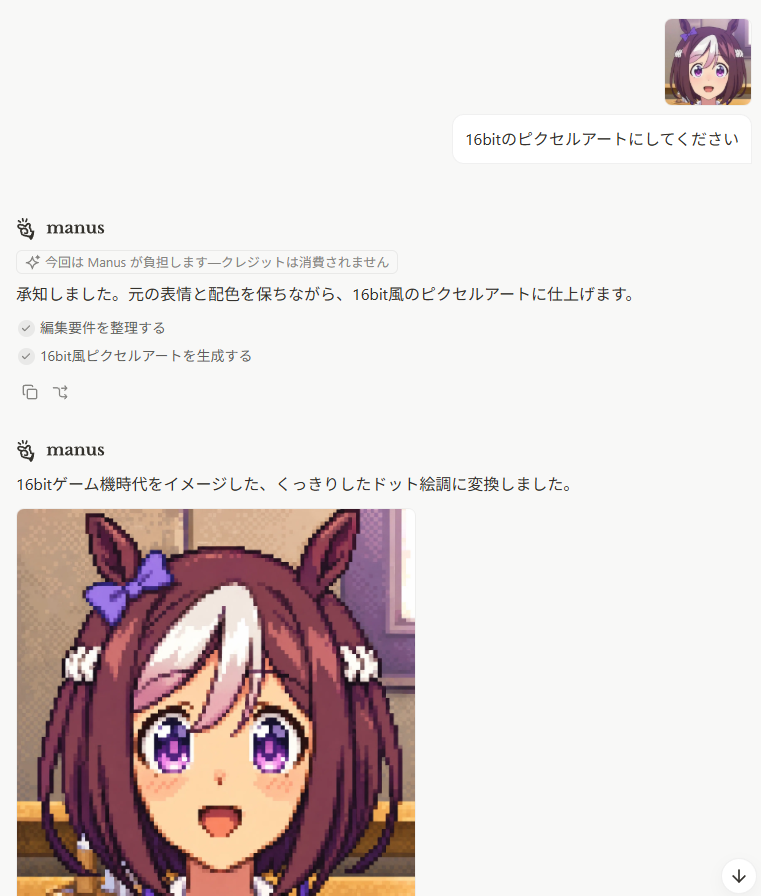
Japanese Manus Chat Pixel Art Screenshot
Generates a clean Japanese AI chat screenshot featuring Manus producing a 16-bit pixel-art anime horse-girl portrait.
这是一个用于 其他灵感 的 GPT Image 2 提示词案例。你可以复制下方 prompt 生成相似图片;商用前请复核 Awesome GPT Image 2 Prompts 来源归因和原始权利。
需要完整提示词集合?请使用 其他灵感 主题页获取更多同类示例,或打开 GPT Image 2 提示词库 查看完整示例索引、可复用结构和来源归因。
免费 1K 极速预览
无需注册,立即生成一张预览图。
3076/4000
提示词
可复制提示词
Goal: Create a realistic screenshot of a minimalist AI chat interface showing a Japanese conversation where a user asks for a 16-bit pixel-art conversion and the assistant responds with a generated image.

Canvas: Portrait screenshot, 768 x 896 px, white background, clean web-app UI with lots of empty space. No browser chrome, no visible sidebars. Use soft gray dividers, rounded cards, and small interface icons.

Layout: Top-right user area contains exactly 2 discrete elements: 1 small square anime avatar, and 1 rounded white chat bubble. The avatar is an anime horse-girl face with brown hair, white forelock, purple eyes, horse ears, and a purple ribbon. The user bubble text is {argument name="user request" default="16bitのピクセルアートにしてください"}.

Assistant message block 1: Place the Manus logo and the bold name “manus” on the left. Below it, show exactly 1 small rounded notice pill containing a sparkle icon and Japanese text {argument name="notice text" default="今回は Manus が負担します—クレジットは消費されません"}. Then show the assistant reply line: {argument name="first assistant reply" default="承知しました。元の表情と配色を保ちながら、16bit風のピクセルアートに仕上げます。"}. Under that, show exactly 2 checked task rows with gray circular check icons: 1) “編集要件を整理する” and 2) “16bit風ピクセルアートを生成する”. Beneath the tasks, show exactly 2 small action icons: a copy icon and a curved-arrow/regenerate-style icon.

Assistant message block 2: Lower on the page, repeat the Manus logo and bold name “manus”. Under it, show a single Japanese sentence: {argument name="second assistant reply" default="16bitゲーム機時代をイメージした、くっきりしたドット絵調に変換しました。"}. Below this sentence, align a large generated image preview to the left.

Generated image preview: The preview is a square-ish pixel-art portrait cropped by the screenshot bottom edge. It shows a cheerful anime horse-girl character in crisp 16-bit game style: brown bob-length hair with a large white forelock, tall horse ears, a purple bow on the left ear, purple sparkling eyes, small blush marks, open smiling mouth, and white hair ties near both sides. Use chunky pixel edges, visible dithering, limited retro palette, and dark outline pixels. Background inside the pixel-art image is a warm indoor room with beige wall, window light, and horizontal furniture/trim, all rendered in pixel art. The visible generated preview should occupy the lower-left portion and be cut off at the bottom of the screenshot.

Additional UI details: Add a small floating circular down-arrow button at the bottom-right corner. Keep the overall look like a Japanese Manus chat page, with generous margins, black body text, subtle gray UI accents, and no true transparency checkerboard. Count of visible repeated UI/content elements: 1 user avatar, 1 user message bubble, 2 Manus headers, 1 notice pill, 2 checked task rows, 2 small action icons, 1 generated image preview, and 1 floating down-arrow button.

Constraints: Preserve the Japanese text exactly where given in the default parameter values. Do not add extra messages, extra avatars, extra buttons, watermarks, browser tabs, or side navigation.
提示词变量
从提示词中识别到的可编辑 argument 占位符及默认值。
变量
user request
默认值
16bitのピクセルアートにしてください
变量
notice text
默认值
今回は Manus が負担します—クレジットは消費されません
变量
first assistant reply
默认值
承知しました。元の表情と配色を保ちながら、16bit風のピクセルアートに仕上げます。
变量
second assistant reply
默认值
16bitゲーム機時代をイメージした、くっきりしたドット絵調に変換しました。
Best for
- - 其他灵感 方向的视觉探索
- - 图片生成与参考图改写
- - 需要保留来源归因的可复用 brief
可以替换这些部分
- - 主体、产品、角色或场景
- - 画幅、镜头、光线和背景
- - 品牌、文字、颜色和输出限制
推荐模型与设置
- - 模型:gpt-image-2
- - 输入模式:文生图
- - 画幅:source
- - 商用状态:需复核原始来源
如何使用这个提示词
- 1. 复制提示词并先保留原始结构。
- 2. 替换主体、场景和输出渠道。
- 3. 每次只调整一个镜头、光线或风格变量。
- 4. 检查结果媒体、文字、来源和权利风险。
限制、来源与复用提醒
- - 生成结果是可编辑草稿,不是事实、法务或权利证明。
- - 商用前复核来源链接、人物、品牌、Logo、文字和第三方素材。
导入自 Awesome GPT Image 2 Prompts。需要保留来源归因。商业使用状态:allowed;付费使用前请复核原始权利。
同分类案例
优先推荐同分类、同输入模式且风险更低的案例。

复用与来源说明
看完案例后,再安全复用这个提示词。
- 1.复制 prompt,或点击生成入口在 Dovoo 中直接打开。
- 2.按你的用途调整变量、画面比例和参考图。
- 3.发布或商用前,复核来源权利、归因要求以及品牌、肖像或版权风险。
这个提示词可以商用吗?
当前商业使用状态为 allowed。付费或公开使用前,请复核原始来源、许可、品牌限制和法务要求。
这个案例来自哪里?
该案例导入自 Awesome GPT Image 2 Prompts;复用时请保留来源归因,并打开来源 URL 检查最新授权信息。