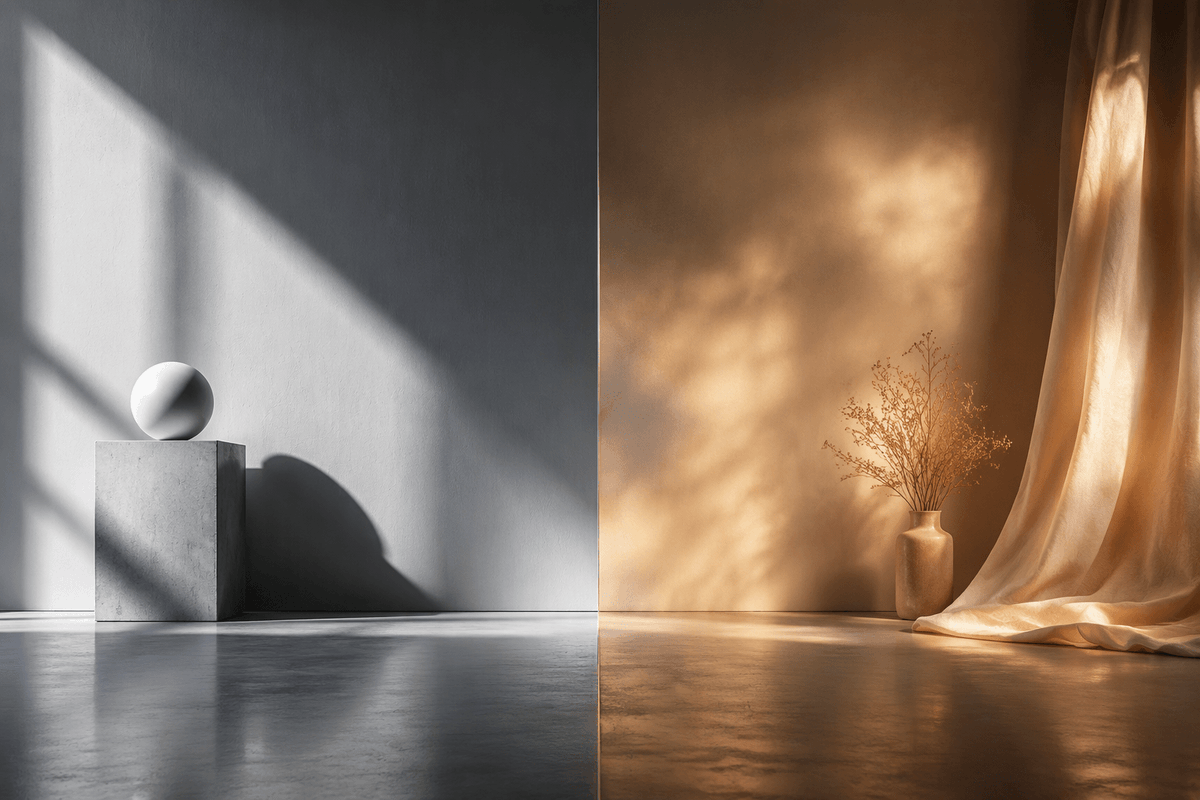
Split-Screen Hard vs Soft Light Interior
A photorealistic side-by-side studio scene comparing crisp cool hard sunlight with warm diffused atmospheric light for cinematic visual studies.
这是一个用于 室内与建筑 的 GPT Image 2 提示词案例。你可以复制下方 prompt 生成相似图片;商用前请复核 Awesome GPT Image 2 Prompts 来源归因和原始权利。
需要完整提示词集合?请使用 室内与建筑 主题页获取更多同类示例,或打开 GPT Image 2 提示词库 查看完整示例索引、可复用结构和来源归因。
免费 1K 极速预览
无需注册,立即生成一张预览图。
1554/4000
提示词
可复制提示词
Create a photorealistic cinematic split-screen interior still comparing two lighting moods, divided exactly down the vertical center by a thin straight seam. On the left half, show a cool monochrome minimalist studio corner with a smooth gray plaster wall and polished concrete floor; include exactly 2 geometric objects: a square concrete pedestal block near the lower left-center and a matte white sphere resting on top of it. Strong hard sunlight enters from an unseen window at the upper left, casting sharp diagonal window-frame shadows across the wall, the pedestal, and the floor, with a crisp oval shadow from the sphere. On the right half, show a warm amber-toned bohemian corner with a textured brown plaster wall and reflective concrete floor; include exactly 3 main objects: one small ceramic vase on the floor, one delicate bundle of dried branches inside the vase, and one sheer golden curtain hanging from the top right and pooling onto the floor. The right side lighting should be soft, diffused, glowing, and atmospheric, with mottled golden sunlight patterns on the wall and curtain. Use a wide 3:2 horizontal composition, symmetrical comparison layout, low camera height, realistic material textures, subtle floor reflections, no people, no text, no logos. The overall concept is {argument name="comparison theme" default="hard light versus soft light"}, with the left side in {argument name="left color mood" default="cool grayscale minimalism"} and the right side in {argument name="right color mood" default="warm golden ambience"}.提示词变量
从提示词中识别到的可编辑 argument 占位符及默认值。
变量
comparison theme
默认值
hard light versus soft light
变量
left color mood
默认值
cool grayscale minimalism
变量
right color mood
默认值
warm golden ambience
Best for
- - 室内建筑 方向的视觉探索
- - 图片生成与参考图改写
- - 需要保留来源归因的可复用 brief
可以替换这些部分
- - 主体、产品、角色或场景
- - 画幅、镜头、光线和背景
- - 品牌、文字、颜色和输出限制
推荐模型与设置
- - 模型:gpt-image-2
- - 输入模式:文生图
- - 画幅:source
- - 商用状态:需复核原始来源
如何使用这个提示词
- 1. 复制提示词并先保留原始结构。
- 2. 替换主体、场景和输出渠道。
- 3. 每次只调整一个镜头、光线或风格变量。
- 4. 检查结果媒体、文字、来源和权利风险。
限制、来源与复用提醒
- - 生成结果是可编辑草稿,不是事实、法务或权利证明。
- - 商用前复核来源链接、人物、品牌、Logo、文字和第三方素材。
导入自 Awesome GPT Image 2 Prompts。需要保留来源归因。商业使用状态:allowed;付费使用前请复核原始权利。
同分类案例
优先推荐同分类、同输入模式且风险更低的案例。






复用与来源说明
看完案例后,再安全复用这个提示词。
- 1.复制 prompt,或点击生成入口在 Dovoo 中直接打开。
- 2.按你的用途调整变量、画面比例和参考图。
- 3.发布或商用前,复核来源权利、归因要求以及品牌、肖像或版权风险。
这个提示词可以商用吗?
当前商业使用状态为 allowed。付费或公开使用前,请复核原始来源、许可、品牌限制和法务要求。
这个案例来自哪里?
该案例导入自 Awesome GPT Image 2 Prompts;复用时请保留来源归因,并打开来源 URL 检查最新授权信息。