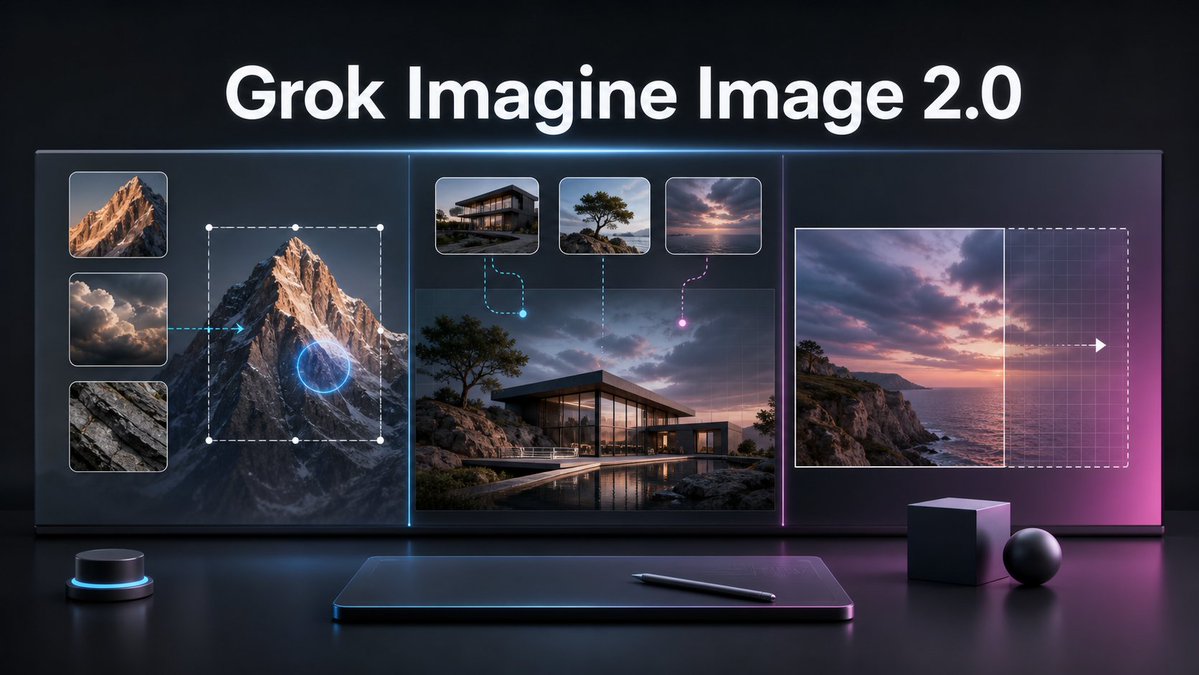
Grok Imagine Image 2.0 Launch Banner
A cinematic tech promo banner visualizing AI image editing, multi-reference generation, and smart resizing for a product launch.
这是一个用于 产品与商业 的 GPT Image 2 提示词案例。你可以复制下方 prompt 生成相似图片;商用前请复核 Awesome GPT Image 2 Prompts 来源归因和原始权利。
需要完整提示词集合?请使用 产品与商业 主题页获取更多同类示例,或打开 GPT Image 2 提示词库 查看完整示例索引、可复用结构和来源归因。
免费 1K 极速预览
无需注册,立即生成一张预览图。
免费文本预览不保留参考图一致性。
2997/4000
提示词
可复制提示词
Goal: Create a cinematic dark tech launch banner for {argument name="product name" default="Grok Imagine Image 2.0"}, showing an advanced AI image editing workflow on a large futuristic display.

Canvas: Wide 16:9 horizontal composition, glossy black studio environment, high contrast, premium product-announcement style. Use a deep charcoal background with subtle blue and magenta rim lighting, reflections on a polished desk surface, and a soft neon glow around interface elements.

Layout: Place a large bold white headline centered at the top reading “{argument name="product name" default="Grok Imagine Image 2.0"}”. Below it, create one continuous widescreen glass UI display divided into exactly 3 vertical sections by thin glowing separators: cyan separator between the left and center sections, magenta separator between the center and right sections.

Left section: Show local image editing. Include exactly 3 stacked reference thumbnails on the far left: 1) sunlit mountain peak, 2) dramatic clouds, 3) gray rock texture. To the right of these thumbnails, show a large mountain image with a dashed rectangular selection box, white corner/edge handles, and a glowing blue circular edit target over the mountain. Add a cyan arrow pointing from the cloud thumbnail area toward the mountain, implying guided editing.

Center section: Show multi-image reference generation. Use a large realistic image of a modern glass house on a rocky coastal landscape at dusk, with a pool reflection in the foreground. Above it, include exactly 3 small rounded reference cards: 1) modern house exterior, 2) lone windswept tree on rocks, 3) pink-purple sunset sky over water. Connect the first card with a cyan dashed curved line ending in a glowing cyan dot, connect the second card with a vertical dotted line, and connect the third card with a magenta dashed curved line ending in a glowing magenta dot.

Right section: Show intelligent resizing or outpainting. Include a sunset seascape image on the left side of the panel, a vertical boundary line at its right edge, and a larger dashed rectangular extension area to the right with a faint grid overlay. Add a white arrow pointing right across the extension area to indicate expansion. The right side should fade into a magenta glow.

Foreground objects: On the desk below the display, include exactly 4 objects: 1) a small black cylindrical control puck with a cyan light ring on the left, 2) a slim dark drawing tablet centered with a soft blue rim glow, 3) a black stylus lying diagonally on the tablet, 4) two matte geometric props on the right consisting of one cube and one sphere.

Visual style: Ultra-polished 3D render mixed with realistic UI mockup, dramatic cinematic lighting, glass panels, crisp rounded thumbnails, subtle grid textures, neon cyan and magenta accents, shallow reflections, high-resolution product keynote aesthetic. Keep the typography clean, bold, and sans-serif. No extra logos, watermarks, people, or additional text.
提示词变量
从提示词中识别到的可编辑 argument 占位符及默认值。
变量
product name
默认值
Grok Imagine Image 2.0
Best for
- - 产品商业 方向的视觉探索
- - 图片生成与参考图改写
- - 需要保留来源归因的可复用 brief
可以替换这些部分
- - 主体、产品、角色或场景
- - 画幅、镜头、光线和背景
- - 品牌、文字、颜色和输出限制
推荐模型与设置
- - 模型:gpt-image-2
- - 输入模式:图生图
- - 画幅:source
- - 商用状态:需复核原始来源
如何使用这个提示词
- 1. 复制提示词并先保留原始结构。
- 2. 替换主体、场景和输出渠道。
- 3. 每次只调整一个镜头、光线或风格变量。
- 4. 检查结果媒体、文字、来源和权利风险。
限制、来源与复用提醒
- - 生成结果是可编辑草稿,不是事实、法务或权利证明。
- - 商用前复核来源链接、人物、品牌、Logo、文字和第三方素材。
导入自 Awesome GPT Image 2 Prompts。需要保留来源归因。商业使用状态:allowed;付费使用前请复核原始权利。
同分类案例
优先推荐同分类、同输入模式且风险更低的案例。






复用与来源说明
看完案例后,再安全复用这个提示词。
- 1.复制 prompt,或点击生成入口在 Dovoo 中直接打开。
- 2.按你的用途调整变量、画面比例和参考图。
- 3.发布或商用前,复核来源权利、归因要求以及品牌、肖像或版权风险。
这个提示词可以商用吗?
当前商业使用状态为 allowed。付费或公开使用前,请复核原始来源、许可、品牌限制和法务要求。
这个案例来自哪里?
该案例导入自 Awesome GPT Image 2 Prompts;复用时请保留来源归因,并打开来源 URL 检查最新授权信息。