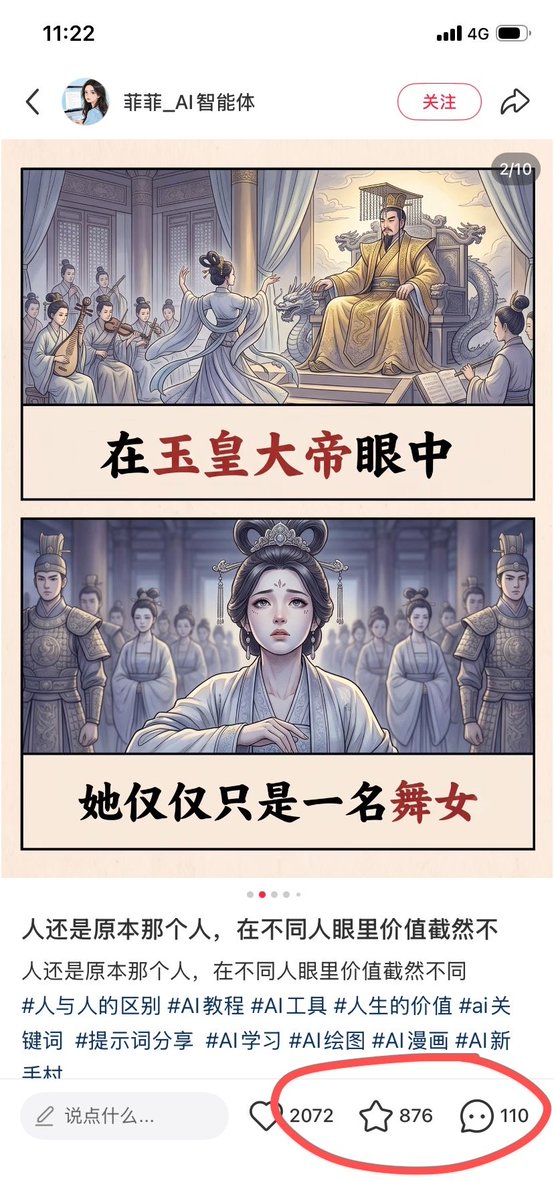
Chinese Viral AI Comic Post Screenshot
Creates a smartphone screenshot of a Chinese social media post featuring a two-panel ancient palace AI comic with circled engagement metrics.
这是一个用于 平面设计和海报设计 的 GPT Image 2 提示词案例。你可以复制下方 prompt 生成相似图片;商用前请复核 Awesome GPT Image 2 Prompts 来源归因和原始权利。
需要完整提示词集合?请使用 平面设计和海报设计 主题页获取更多同类示例,或打开 GPT Image 2 提示词库 查看完整示例索引、可复用结构和来源归因。
免费 1K 极速预览
无需注册,立即生成一张预览图。
3129/4000
提示词
可复制提示词
Goal: Create a realistic screenshot of a Chinese social media post on a smartphone, showing a viral AI-generated illustrated story card about an ancient palace dancer and an emperor, with engagement metrics circled in red.

Canvas: Vertical smartphone screenshot, 9:16 aspect ratio, white app interface background, clean mobile UI. The status bar at the top shows 11:22, 4G signal, and battery icon.

Top app header: Include a back arrow on the left, a small circular female profile avatar, the account name {argument name="account name" default="菲菲_AI智能体"}, a rounded pink outline follow button labeled “关注”, and a share arrow icon on the right.

Main image post: A beige comic-style image card centered below the header, with a small dark rounded page indicator at the top-right reading “2/10”. The card contains exactly 2 stacked illustrated panels, each bordered in black, separated by large cream caption bands with bold Chinese brush-calligraphy text.

Panel 1: Ancient Chinese imperial palace scene in soft muted watercolor comic style. On the right, a stern emperor in ornate golden robes sits on a dragon-carved throne under curtains, with palace architecture behind him. In the center foreground, a graceful female dancer in pale flowing robes performs with her back partially turned. On the left, exactly 5 seated female musicians in traditional robes play instruments, including pipa and string instruments. The caption band below reads “在玉皇大帝眼中”, with “玉皇大帝” emphasized in dark red and the rest in black.

Panel 2: Frontal dramatic portrait of the same dancer standing in a palace hall, looking sad and vulnerable, wearing pale white-blue hanfu, ornate hair accessories, and delicate makeup. Behind her are exactly 2 armored palace guards, one on each side, plus a blurred group of palace women in the background. Cool blue-gray lighting creates a solemn atmosphere. The caption band below reads “她仅仅只是一名舞女”, with “舞女” emphasized in dark red and the rest in black.

Post text below image: Show a carousel dot row with exactly 5 dots, the second dot red and the other 4 light gray. Then display the Chinese caption text in two lines: “人还是原本那个人,在不同人眼里价值截然不” and “人还是原本那个人,在不同人眼里价值截然不同”. Beneath it, show hashtags in blue-gray text: “#人与人的区别 #AI教程 #AI工具 #人生的价值 #ai关键词 #提示词分享 #AI学习 #AI绘图 #AI漫画 #AI新手村”.

Bottom interaction bar: Include a rounded comment input field labeled “说点什么...”. To the right, show exactly 3 engagement items: a heart icon with {argument name="like count" default="2072"}, a star/favorite icon with {argument name="favorite count" default="876"}, and a comment bubble icon with {argument name="comment count" default="110"}. Draw a thick hand-drawn red oval around these 3 metrics only.

Visual style: The app UI should look like a real screenshot, while the embedded artwork should look like polished AI comic illustration with ink outlines, soft watercolor shading, muted palace colors, and cinematic ancient Chinese drama atmosphere.

Constraints: Keep all visible Chinese text legible and accurately placed. Do not add extra panels, extra engagement icons, watermarks, or unrelated UI elements.
提示词变量
从提示词中识别到的可编辑 argument 占位符及默认值。
变量
account name
默认值
菲菲_AI智能体
变量
like count
默认值
2072
变量
favorite count
默认值
876
变量
comment count
默认值
110
Best for
- - 平面海报 方向的视觉探索
- - 图片生成与参考图改写
- - 需要保留来源归因的可复用 brief
可以替换这些部分
- - 主体、产品、角色或场景
- - 画幅、镜头、光线和背景
- - 品牌、文字、颜色和输出限制
推荐模型与设置
- - 模型:gpt-image-2
- - 输入模式:文生图
- - 画幅:source
- - 商用状态:需复核原始来源
如何使用这个提示词
- 1. 复制提示词并先保留原始结构。
- 2. 替换主体、场景和输出渠道。
- 3. 每次只调整一个镜头、光线或风格变量。
- 4. 检查结果媒体、文字、来源和权利风险。
限制、来源与复用提醒
- - 生成结果是可编辑草稿,不是事实、法务或权利证明。
- - 商用前复核来源链接、人物、品牌、Logo、文字和第三方素材。
导入自 Awesome GPT Image 2 Prompts。需要保留来源归因。商业使用状态:allowed;付费使用前请复核原始权利。
同分类案例
优先推荐同分类、同输入模式且风险更低的案例。






复用与来源说明
看完案例后,再安全复用这个提示词。
- 1.复制 prompt,或点击生成入口在 Dovoo 中直接打开。
- 2.按你的用途调整变量、画面比例和参考图。
- 3.发布或商用前,复核来源权利、归因要求以及品牌、肖像或版权风险。
这个提示词可以商用吗?
当前商业使用状态为 allowed。付费或公开使用前,请复核原始来源、许可、品牌限制和法务要求。
这个案例来自哪里?
该案例导入自 Awesome GPT Image 2 Prompts;复用时请保留来源归因,并打开来源 URL 检查最新授权信息。