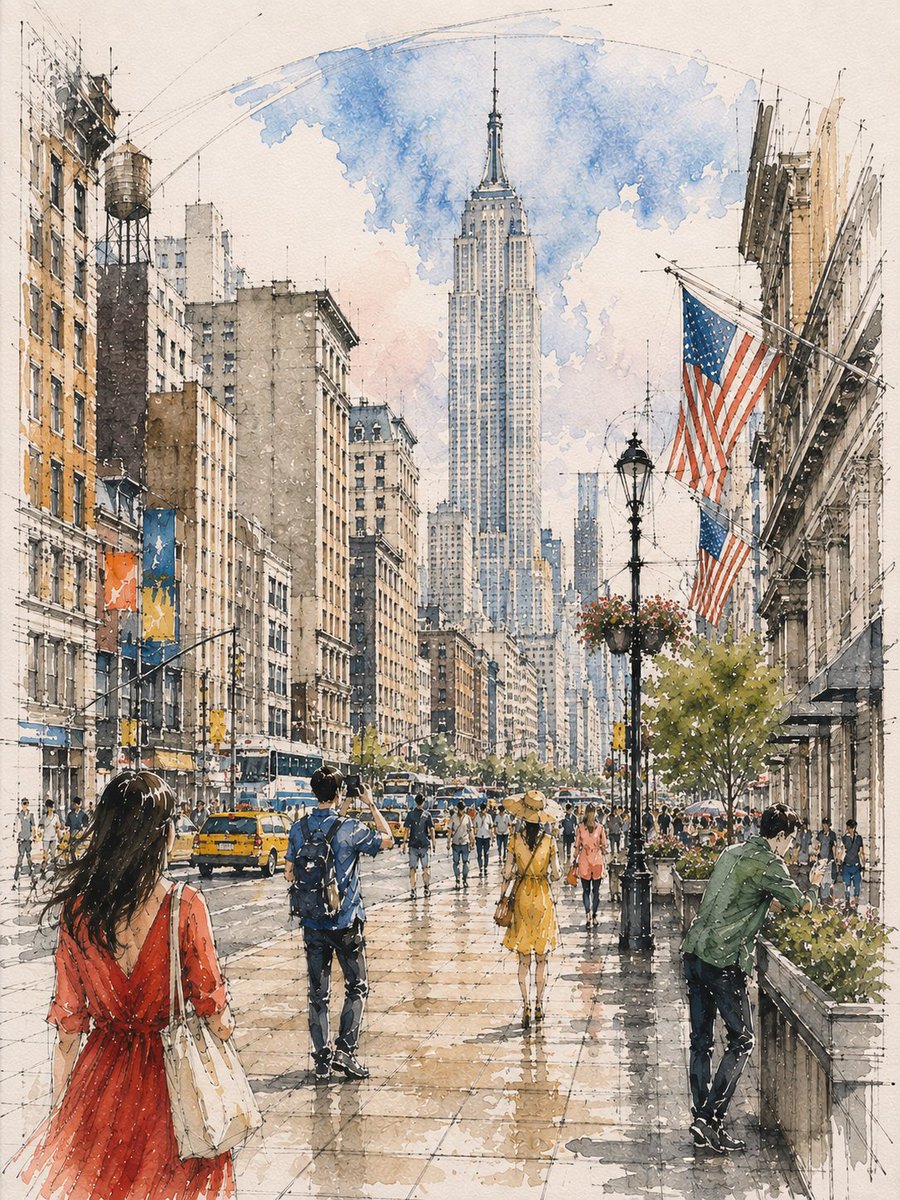
Architectural Watercolor Sketch
A customizable architectural sketching prompt that combines ink linework with loose watercolor washes to create vibrant, atmospheric interiors.
这是一个用于 插画与艺术 的 GPT Image 2 提示词案例。你可以复制下方 prompt 生成相似图片;商用前请复核 Awesome GPT Image 2 Prompts 来源归因和原始权利。
需要完整提示词集合?请使用 插画与艺术 主题页获取更多同类示例,或打开 GPT Image 2 提示词库 查看完整示例索引、可复用结构和来源归因。
免费 1K 极速预览
无需注册,立即生成一张预览图。
1880/4000
提示词
可复制提示词
Loose watercolor and pen sketch inside {argument name="location" default="[LOCATION / SUBJECT]"}, seen from {argument name="viewpoint" default="[VIEWPOINT]"} toward {argument name="focal point" default="[ARCHITECTURAL FOCAL POINT]"}, {argument name="central feature" default="[CENTRAL FEATURE]"} at center, {argument name="overhead structure" default="[OVERHEAD ARCHITECTURAL FEATURE]"} overhead. Ink line drawn first and left visible through every wash — {argument name="linework details" default="[ARCHITECTURAL LINEWORK]"} and {argument name="floor grid" default="[GROUND / FLOOR GRID]"} overshooting into blank paper, one long confident arc for {argument name="major curve" default="[MAJOR CURVE]"}. Wash about 65%, warm below and cool above: {argument name="warm palette" default="[WARM ARCHITECTURAL PALETTE]"} on {argument name="lower elements" default="[LOWER ARCHITECTURAL ELEMENTS]"}, {argument name="cool palette" default="[COOL PALETTE]"} over {argument name="upper feature" default="[UPPER ARCHITECTURAL FEATURE]"} thinning to bare line at the crown. Diagonal light shafts left as reserved white paper, the brightest value. Floor in {argument name="floor wash" default="[FLOOR COLOR / WASH]"} with a backrun. Figures in three depth bands, clustered and gapped, never in a row: {argument name="near figures" default="[NEAR FIGURES AND SCALE]"}, one cropped by the bottom edge; {argument name="mid figures" default="[MID FIGURES AND SCALE]"} scattered at different distances, {argument name="midground cluster" default="[MIDGROUND CLUSTER]"} clustered at {argument name="focal point" default="[FOCAL POINT]"}; {argument name="far figures" default="[FAR FIGURES AND SCALE]"} dissolving into strokes. Different actions each — {argument name="action 1" default="[ACTION 1]"}, {argument name="action 2" default="[ACTION 2]"}, {argument name="action 3" default="[ACTION 3]"}提示词变量
从提示词中识别到的可编辑 argument 占位符及默认值。
变量
location
默认值
[LOCATION / SUBJECT]
变量
viewpoint
默认值
[VIEWPOINT]
变量
focal point
默认值
[ARCHITECTURAL FOCAL POINT]
变量
central feature
默认值
[CENTRAL FEATURE]
变量
overhead structure
默认值
[OVERHEAD ARCHITECTURAL FEATURE]
变量
linework details
默认值
[ARCHITECTURAL LINEWORK]
变量
floor grid
默认值
[GROUND / FLOOR GRID]
变量
major curve
默认值
[MAJOR CURVE]
变量
warm palette
默认值
[WARM ARCHITECTURAL PALETTE]
变量
lower elements
默认值
[LOWER ARCHITECTURAL ELEMENTS]
变量
cool palette
默认值
[COOL PALETTE]
变量
upper feature
默认值
[UPPER ARCHITECTURAL FEATURE]
变量
floor wash
默认值
[FLOOR COLOR / WASH]
变量
near figures
默认值
[NEAR FIGURES AND SCALE]
变量
mid figures
默认值
[MID FIGURES AND SCALE]
变量
midground cluster
默认值
[MIDGROUND CLUSTER]
变量
far figures
默认值
[FAR FIGURES AND SCALE]
变量
action 1
默认值
[ACTION 1]
变量
action 2
默认值
[ACTION 2]
变量
action 3
默认值
[ACTION 3]
Best for
- - 插画艺术 方向的视觉探索
- - 图片生成与参考图改写
- - 需要保留来源归因的可复用 brief
可以替换这些部分
- - 主体、产品、角色或场景
- - 画幅、镜头、光线和背景
- - 品牌、文字、颜色和输出限制
推荐模型与设置
- - 模型:gpt-image-2
- - 输入模式:文生图
- - 画幅:source
- - 商用状态:需复核原始来源
如何使用这个提示词
- 1. 复制提示词并先保留原始结构。
- 2. 替换主体、场景和输出渠道。
- 3. 每次只调整一个镜头、光线或风格变量。
- 4. 检查结果媒体、文字、来源和权利风险。
限制、来源与复用提醒
- - 生成结果是可编辑草稿,不是事实、法务或权利证明。
- - 商用前复核来源链接、人物、品牌、Logo、文字和第三方素材。
导入自 Awesome GPT Image 2 Prompts。需要保留来源归因。商业使用状态:allowed;付费使用前请复核原始权利。
同分类案例
优先推荐同分类、同输入模式且风险更低的案例。






复用与来源说明
看完案例后,再安全复用这个提示词。
- 1.复制 prompt,或点击生成入口在 Dovoo 中直接打开。
- 2.按你的用途调整变量、画面比例和参考图。
- 3.发布或商用前,复核来源权利、归因要求以及品牌、肖像或版权风险。
这个提示词可以商用吗?
当前商业使用状态为 allowed。付费或公开使用前,请复核原始来源、许可、品牌限制和法务要求。
这个案例来自哪里?
该案例导入自 Awesome GPT Image 2 Prompts;复用时请保留来源归因,并打开来源 URL 检查最新授权信息。