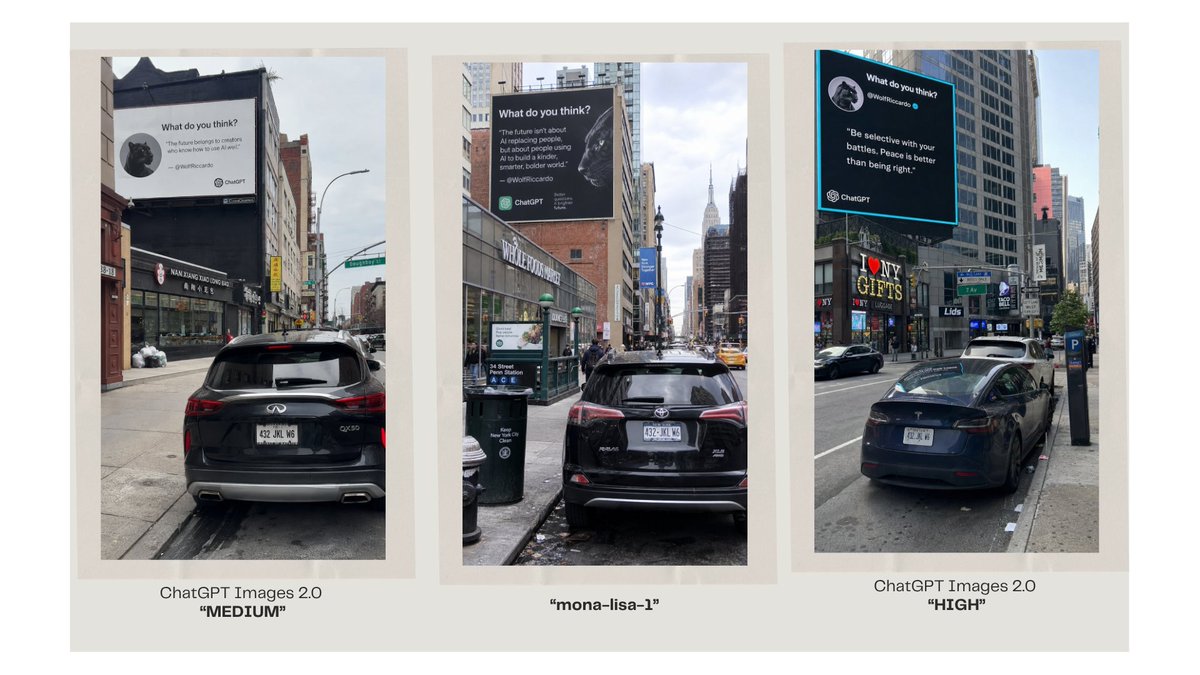
Three-Panel AI Billboard Comparison
A wide comparison slide showing three photorealistic NYC billboard street scenes labeled as different image model outputs.
这是一个用于 平面设计和海报设计 的 GPT Image 2 提示词案例。你可以复制下方 prompt 生成相似图片;商用前请复核 Awesome GPT Image 2 Prompts 来源归因和原始权利。
需要完整提示词集合?请使用 平面设计和海报设计 主题页获取更多同类示例,或打开 GPT Image 2 提示词库 查看完整示例索引、可复用结构和来源归因。
免费 1K 极速预览
无需注册,立即生成一张预览图。
2721/4000
提示词
可复制提示词
Goal: Create a clean comparison graphic showing three AI-generated urban billboard photos side by side, as if comparing image model outputs.

Canvas: Wide 16:9 presentation slide with a warm off-white background and generous margins. Place three tall vertical photo panels evenly spaced across the canvas, each framed by a pale beige mat/border. Under each panel, add a centered caption.

Layout: Exactly 3 vertical street-photo panels in one row. Panel 1 on the left, Panel 2 in the center, Panel 3 on the right. Each panel shows a realistic New York City street scene with parked cars in the foreground, tall buildings, sidewalks, traffic signs, and a large square billboard mounted high on a building. Use slightly different street angles and lighting in each panel, like three separate model outputs of the same concept.

Panel details: Left panel: a rear view of a black SUV parked on a city street, looking toward storefronts and buildings; a large white billboard above the street reads like a social-media quote card with a small circular animal avatar, the heading “What do you think?”, a short quote, and small ChatGPT branding. Center panel: a black SUV parked on a narrow Manhattan street with the Empire State Building visible in the distance; a large dark billboard with white text, a circular animal avatar, and ChatGPT branding. Right panel: a black sedan parked along a busier avenue with storefront signs such as “I ♥ NY GIFTS”; a large black billboard with a bright cyan border, white quote text, a circular animal avatar, and ChatGPT branding.

Caption text: Use exactly 3 captions beneath the panels. Left caption: “ChatGPT Images 2.0” on the first line and “MEDIUM” in bold quotation marks on the second line. Center caption: “mona-lisa-1” in bold quotation marks. Right caption: “ChatGPT Images 2.0” on the first line and “HIGH” in bold quotation marks on the second line.

Customizable text slots: The comparison labels should read {argument name="left model label" default="ChatGPT Images 2.0"}, {argument name="center model label" default="mona-lisa-1"}, and {argument name="right model label" default="ChatGPT Images 2.0"}. The left quality tag should be {argument name="left quality tag" default="MEDIUM"} and the right quality tag should be {argument name="right quality tag" default="HIGH"}.

Visual style: Photorealistic smartphone street photography inside each panel, but arranged as a polished social-media comparison slide. Keep the overall slide minimal, with no decorative graphics beyond the three framed images and their captions. The billboard text inside the photos may be small and partially imperfect, but it should clearly resemble AI quote-card advertising with ChatGPT logos.
提示词变量
从提示词中识别到的可编辑 argument 占位符及默认值。
变量
left model label
默认值
ChatGPT Images 2.0
变量
center model label
默认值
mona-lisa-1
变量
right model label
默认值
ChatGPT Images 2.0
变量
left quality tag
默认值
MEDIUM
变量
right quality tag
默认值
HIGH
Best for
- - 平面海报 方向的视觉探索
- - 图片生成与参考图改写
- - 需要保留来源归因的可复用 brief
可以替换这些部分
- - 主体、产品、角色或场景
- - 画幅、镜头、光线和背景
- - 品牌、文字、颜色和输出限制
推荐模型与设置
- - 模型:gpt-image-2
- - 输入模式:文生图
- - 画幅:source
- - 商用状态:需复核原始来源
如何使用这个提示词
- 1. 复制提示词并先保留原始结构。
- 2. 替换主体、场景和输出渠道。
- 3. 每次只调整一个镜头、光线或风格变量。
- 4. 检查结果媒体、文字、来源和权利风险。
限制、来源与复用提醒
- - 生成结果是可编辑草稿,不是事实、法务或权利证明。
- - 商用前复核来源链接、人物、品牌、Logo、文字和第三方素材。
导入自 Awesome GPT Image 2 Prompts。需要保留来源归因。商业使用状态:allowed;付费使用前请复核原始权利。
同分类案例
优先推荐同分类、同输入模式且风险更低的案例。






复用与来源说明
看完案例后,再安全复用这个提示词。
- 1.复制 prompt,或点击生成入口在 Dovoo 中直接打开。
- 2.按你的用途调整变量、画面比例和参考图。
- 3.发布或商用前,复核来源权利、归因要求以及品牌、肖像或版权风险。
这个提示词可以商用吗?
当前商业使用状态为 allowed。付费或公开使用前,请复核原始来源、许可、品牌限制和法务要求。
这个案例来自哪里?
该案例导入自 Awesome GPT Image 2 Prompts;复用时请保留来源归因,并打开来源 URL 检查最新授权信息。