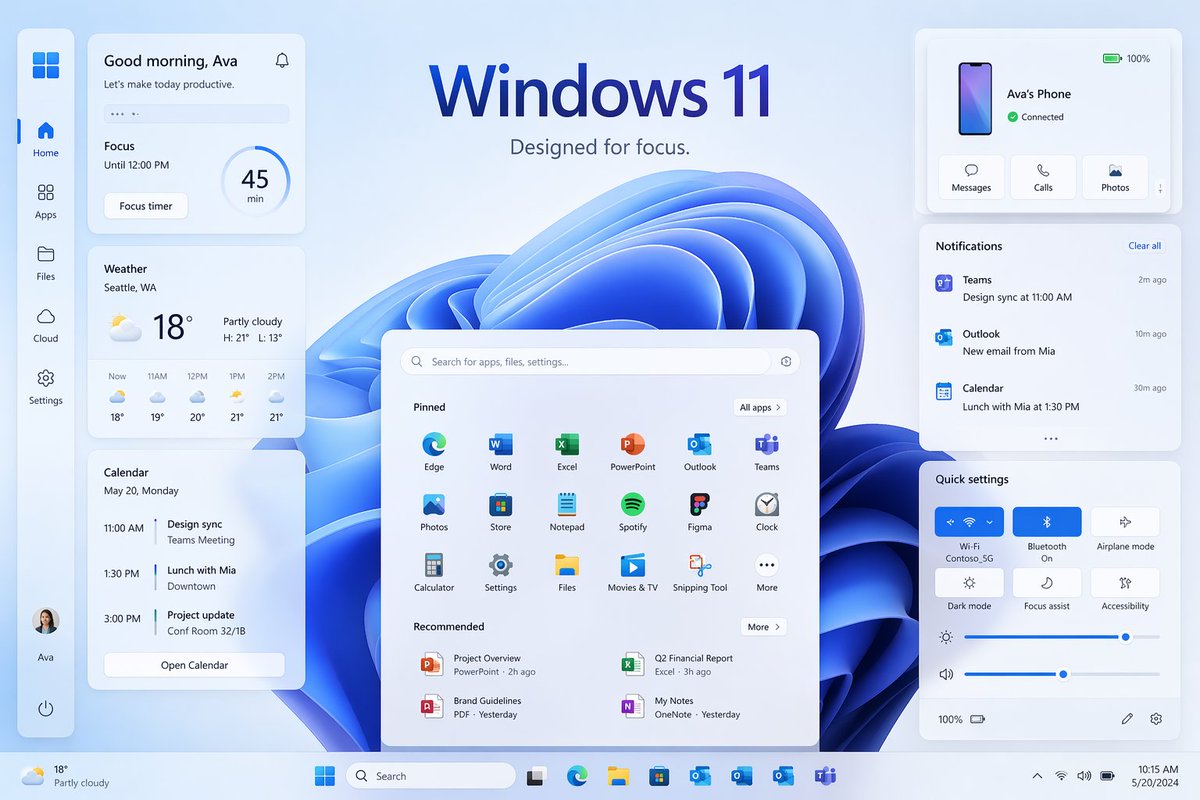
Windows 11 Focus UI 展示
一款精美的 Windows 11 風格宣傳桌面模型,帶有多個小部件和麵板,非常適合用來重現現代作業系統行銷視覺效果。
這是一個產品與商業的GPT Image 2範例。請使用下方可直接使用的提示資訊產生類似的視覺素材,並在重複使用前查看Awesome GPT Image 2 Prompts署名和商業用途授權資訊。
需要完整的提示符號集?請使用 產品與商業 主題中心提供更多相關範例,或打開 GPT Image 2 提示庫 有關完整範例索引、可重複使用結構和來源歸屬的資訊。
Free 1K preview
Generate one preview image instantly, no sign-up required.
4000/4000
提示詞
可直接複製的提示
{
  "type": "Windows 11 促銷 UI 模型",
  "style": "簡潔現代的產品行銷渲染,柔和的玻璃形態卡片,微妙的陰影,圓角,淺藍色和白色調色盤,清晰的向量化介面,精緻的演示文稿幻燈片美感",
  "scene": {
    "background": "淺冰藍色漸變背景,介面後方中央有大型抽象的 Windows 11 藍色緞帶漩渦壁紙",
    "headline": {
      "text": "{argument name=\"headline text\" default=\"Windows 11\"}",
      "subtext": "{argument name=\"tagline\" default=\"專注設計。\"}",
      "position": "頂部中央"
    }
  },
  "layout": {
    "type": "桌面 UI 展示",
    "sections": [
      {
        "title": "左側邊欄",
        "position": "極左垂直停靠",
        "count": 8,
        "labels": [
          "Windows 標誌",
          "主頁",
          "應用程式",
          "檔案",
          "雲端",
          "設定",
          "Ava 個人檔案",
          "電源"
        ]
      },
      {
        "title": "生產力小工具",
        "position": "左欄卡片",
        "count": 3,
        "labels": [
          "早安,Ava",
          "天氣",
          "日曆"
        ]
      },
      {
        "title": "中央開始功能表",
        "position": "底部中央",
        "count": 3,
        "labels": [
          "搜尋欄",
          "已固定",
          "推薦"
        ]
      },
      {
        "title": "右欄卡片",
        "position": "上、中、下方的右側",
        "count": 3,
        "labels": [
          "Ava 的手機",
          "通知",
          "快速設定"
        ]
      },
      {
        "title": "工作列",
        "position": "底部全寬",
        "count": 10,
        "labels": [
          "天氣摘要",
          "開始",
          "搜尋",
          "工作檢視",
          "Microsoft Edge",
          "檔案總管",
          "Microsoft Store",
          "Outlook",
          "OneDrive",
          "Teams"
        ]
      }
    ],
    "centerpiece": "大型 Windows 11 開始功能表漂浮在藍色抽象壁紙前方"
  },
  "widgets": {
    "greeting_card": {
      "title": "早安,Ava",
      "subtitle": "讓我們今天保持高效。",
      "focus_block": {
        "label": "專注",
        "time": "至下午 12:00",
        "timer": "45 分鐘",
        "button": "專注計時器"
      }
    },
    "weather_card": {
      "location": "{argument name=\"weather location\" default=\"Seattle, WA\"}",
      "temperature": "18°",
      "condition": "多雲",
      "range": "高:21°  低:13°",
      "forecast_count": 5,
      "forecast_labels": [
        "現在 18°",
        "上午 11 點 19°",
        "中午 12 點 20°",
        "下午 1 點 21°",
        "下午 2 點 21°"
      ]
    },
    "calendar_card": {
      "date": "5 月 20 日,星期一",
      "events_count": 3,
      "event_labels": [
        "上午 11:00 設計同步,Teams 會議",
        "下午 1:30 與 Mia 共進午餐,市區",
        "下午 3:00 專案更新,32/1B 會議室"
      ],
      "button": "開啟日曆"
    },
    "phone_card": {
      "device_name": "{argument name=\"device name\" default=\"Ava 的手機\"}",
      "status": "已連線",
      "actions_count": 3,
      "action_labels": [
        "訊息",
        "通話",
        "照片"
      ],
      "battery": "100%"
    },
    "notifications_card": {
      "title": "通知",
      "action": "清除全部",
      "items_count": 3,
      "item_labels": [
        "Teams — 設計同步於上午 11:00 — 2 分鐘前",
        "Outlook — Mia 的新電子郵件 — 10 分鐘前",
        "日曆 — 與 Mia 共進午餐於下午 1:30 — 30 分鐘前"
      ]
    },
    "quick_settings_card": {
      "title": "快速設定",
      "toggles_count": 6,
      "toggle_labels": [
        "Wi‑Fi",
        "藍牙",
        "飛航模式",
        "深色模式",
        "專注協助",
        "輔助功能"
      ],
      "active_toggles": [
        "Wi‑Fi",
        "藍牙"
      ],
      "sliders_count": 2,
      "slider_labels": [
        "亮度",
        "音量"
      ],
      "wifi_network": "Contoso_5G"
    },
    "start_menu": {
      "search_placeholder": "搜尋應用程式、檔案、設定...",
      "pinned_count": 18,
      "pinned_labels": [
        "Edge",
        "Word",
        "Excel",
        "PowerPoint",
        "Outlook",
        "Teams",
        "照片",
        "市集",
        "記事本",
        "Spotify",
        "Figma",
        "時鐘",
        "計算機",
        "設定",
        "檔案",
        "電影與電視",
        "擷取工具",
        "更多"
      ],
      "recommended_count": 4,
      "recommended_labels": [
        "專案概觀",
        "第二季財務報告",
        "品牌指南",
        "我的筆記"
      ]
    }
  },
  "composition": "對稱的產品展示,開始功能表置中,左側堆疊三個卡片,右側三個卡片,寬敞的間距,所有元素略微漂浮在背景上方,底部工作列橫跨邊緣",
  "rendering": "高解析度 UI 概念藝術,用於桌面作業系統啟動頁面,完美排版,受 Microsoft 啟發的圖示,沒有額外的品牌混亂"
}
提示變數
提示符號中可編輯的參數佔位符及其預設值。
多變的
headline text
預設
Windows 11
多變的
tagline
預設
Designed for focus.
多變的
weather location
預設
Seattle, WA
多變的
device name
預設
Ava's Phone
Best for
- - 產品與商業 visual exploration
- - Image generation and reference-image edits
- - Reusable briefs that keep source attribution visible
Change these parts
- - Subject, product, character, or scene
- - Aspect ratio, camera, lighting, and background
- - Brand, text, color, and output constraints
Recommended model and settings
- - Model: gpt-image-2
- - Input mode: 文生圖
- - Aspect ratio: source
- - Commercial status: review original source
How to use this prompt
- 1. Copy the prompt and preserve its structure for the first test.
- 2. Replace the subject, context, and publishing channel.
- 3. Change one camera, lighting, or style variable per iteration.
- 4. Inspect the output, source, text, and rights before reuse.
Limitations, source, and reuse cautions
- - Generated output is an editable draft, not factual, legal, or rights evidence.
- - Review the linked source, people, brands, logos, text, and third-party media before commercial use.
內容來自Awesome GPT Image 2 Prompts 。必須註明出處。商業用途狀態為allowed ;付費使用前請查看來源版權資訊。
此類案例更多
按類別、輸入模式相容性、品質和低風險進行優先排序。






重用和來源註釋
預覽案例後,請謹慎使用此提示。
- 1.複製提示或直接在 Dovoo 中使用生成按鈕開啟提示。
- 2.根據您的實際使用情況調整變數、寬高比和參考影像。
- 3.發布或付費使用前,請確認版權、署名要求以及品牌或肖像權風險。