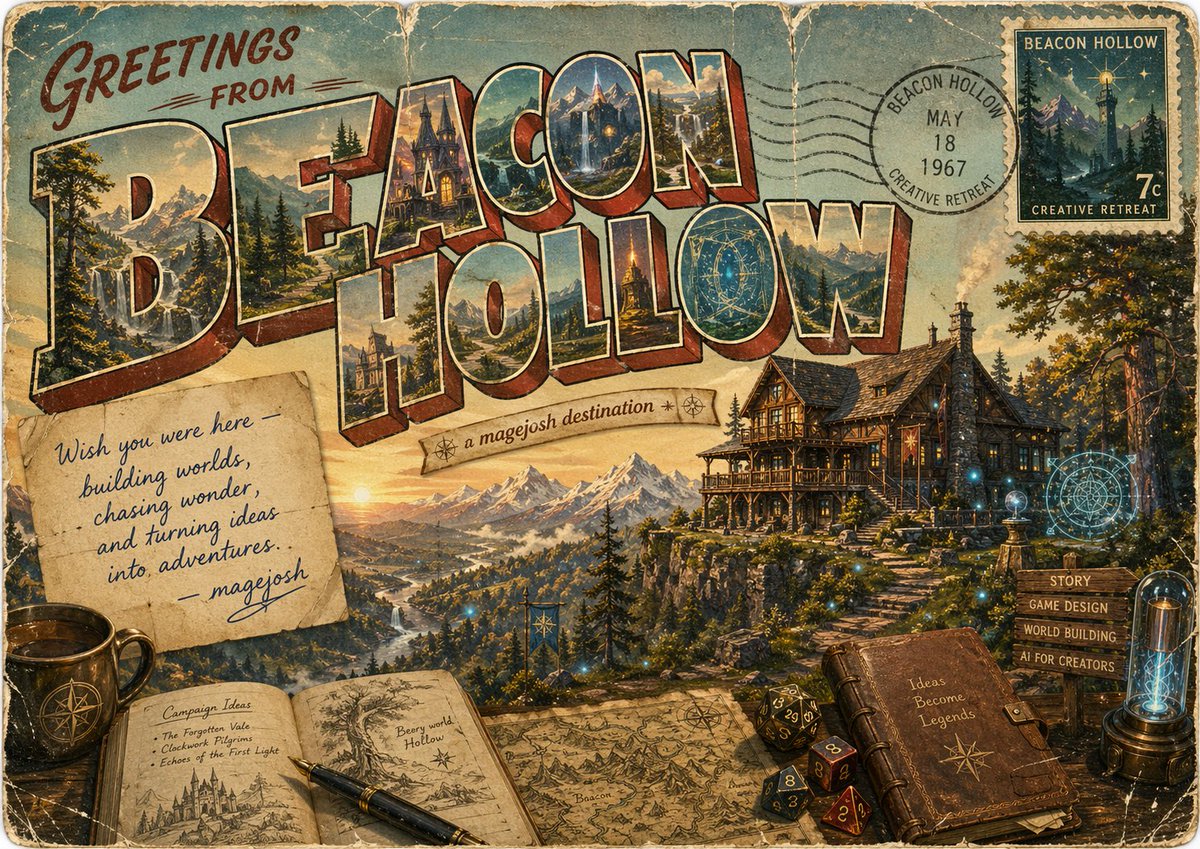
燈塔谷的復古奇幻明信片
這個提示會產生一張帶有歲月痕蹟的復古旅行明信片插圖,適用於奇幻目的地,非常適合用於創意世界構建推廣、虛構旅遊藝術或懷舊品牌概念作品。
這是一個插畫與藝術的GPT Image 2範例。請使用下方可直接使用的提示資訊產生類似的視覺素材,並在重複使用前查看Awesome GPT Image 2 Prompts署名和商業用途授權資訊。
需要完整的提示符號集?請使用 插畫與藝術 主題中心提供更多相關範例,或打開 GPT Image 2 提示庫 有關完整範例索引、可重複使用結構和來源歸屬的資訊。
Free 1K preview
Generate one preview image instantly, no sign-up required.
3084/4000
提示詞
可直接複製的提示
Create a vintage fantasy travel postcard poster for {argument name="location name" default="BEACON HOLLOW"}, designed like a large-letter souvenir postcard from the 1950s–1960s. The composition is a single richly detailed horizontal scene with heavily weathered paper texture, rounded postcard corners, faded inks, creases, scratches, foxing, and worn edges. Across the top and center, huge dimensional block letters spell “BEACON HOLLOW” in classic retro postcard style, with warm cream outlines and red-brown extruded shadows; each letter contains miniature painted scenic vignettes of the destination, including alpine peaks, waterfalls, pine forests, a magical manor, glowing towers, and valley landscapes. In the upper left, hand-painted script text reads “GREETINGS FROM” in dark red. In the upper right, include a circular black postal cancellation stamp reading “BEACON HOLLOW / MAY 18 / 1967 / CREATIVE RETREAT,” overlapping a vintage postage stamp labeled “BEACON HOLLOW” and “CREATIVE RETREAT” with “7c,” depicting a moonlit mountain and a lighthouse-like beacon tower. Beneath the title, place a small curved ribbon banner reading {argument name="tagline" default="a magejosh destination"} with tiny compass-star ornaments. The main background should show a majestic golden-hour mountain valley with a winding river, distant snowy peaks, dense evergreen forests, and on the right a large timber-and-stone fantasy lodge perched on a cliff, warmly lit from within, with stairs descending the slope. Scatter subtle magical blue lights and faint arcane circular glyphs around the lodge and foreground for a worldbuilding-meets-magic atmosphere. In the lower left, place exactly 3 foreground desk objects: a dark ceramic mug with a compass emblem, an open sketchbook spread, and a fountain pen resting diagonally across the pages. The left page of the sketchbook is titled “Campaign Ideas” and lists 3 bullets: “The Forgotten Vale,” “Clockwork Pilgrims,” and “Echoes of the First Light,” with a small castle drawing below; the right page shows a tree illustration and the handwritten text “Beery world Hollow.” Across the lower center, add an old illustrated map spread out on the table, showing mountain icons and hand-drawn cartographic details. In the lower right, place exactly 5 more foreground elements: a closed leather journal embossed with a star compass and the phrase “Ideas Become Legends,” a cluster of 4 polyhedral dice, a rustic wooden signpost with 4 directional slats reading “STORY,” “GAME DESIGN,” “WORLD BUILDING,” and “AI FOR CREATORS,” a glowing glass lamp or tube device, and a nearby floating arcane target-like sigil. Add a pinned handwritten note left of center on aged paper reading, “Wish you were here — building worlds, chasing wonder, and turning ideas into adventures. — {argument name="signature name" default="magejosh"}” in blue cursive. Use painterly illustration with high detail, nostalgic Americana postcard design, fantasy concept art sensibility, warm sunset lighting, muted teal sky, sepia aging, and an inviting creative-retreat mood.提示變數
提示符號中可編輯的參數佔位符及其預設值。
多變的
location name
預設
BEACON HOLLOW
多變的
tagline
預設
a magejosh destination
多變的
signature name
預設
magejosh
Best for
- - 插畫與藝術 visual exploration
- - Image generation and reference-image edits
- - Reusable briefs that keep source attribution visible
Change these parts
- - Subject, product, character, or scene
- - Aspect ratio, camera, lighting, and background
- - Brand, text, color, and output constraints
Recommended model and settings
- - Model: gpt-image-2
- - Input mode: 文生圖
- - Aspect ratio: source
- - Commercial status: review original source
How to use this prompt
- 1. Copy the prompt and preserve its structure for the first test.
- 2. Replace the subject, context, and publishing channel.
- 3. Change one camera, lighting, or style variable per iteration.
- 4. Inspect the output, source, text, and rights before reuse.
Limitations, source, and reuse cautions
- - Generated output is an editable draft, not factual, legal, or rights evidence.
- - Review the linked source, people, brands, logos, text, and third-party media before commercial use.
內容來自Awesome GPT Image 2 Prompts 。必須註明出處。商業用途狀態為allowed ;付費使用前請查看來源版權資訊。
此類案例更多
按類別、輸入模式相容性、品質和低風險進行優先排序。






重用和來源註釋
預覽案例後,請謹慎使用此提示。
- 1.複製提示或直接在 Dovoo 中使用生成按鈕開啟提示。
- 2.根據您的實際使用情況調整變數、寬高比和參考影像。
- 3.發布或付費使用前,請確認版權、署名要求以及品牌或肖像權風險。