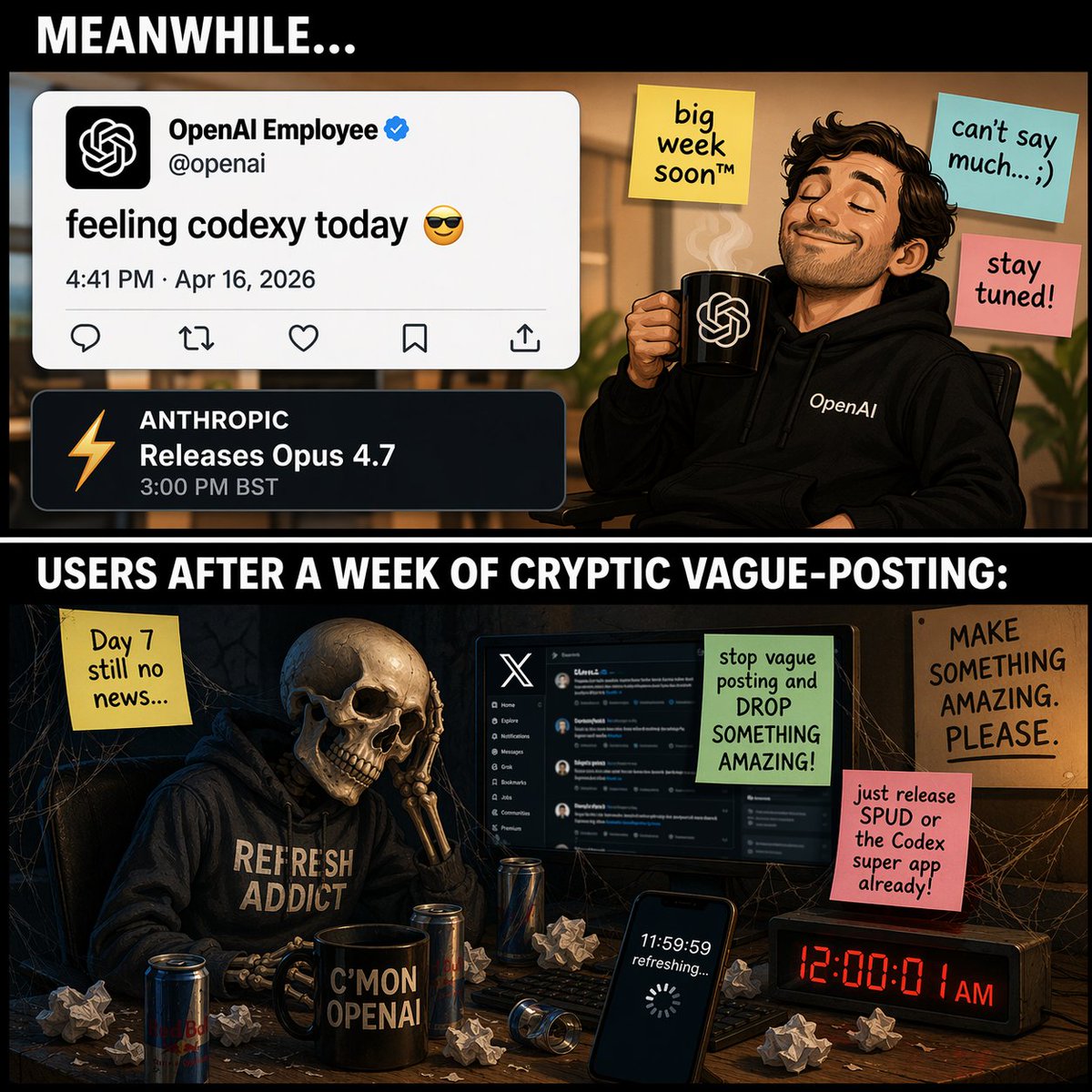
雙格科技版漫畫
產生一個雙格表情包,對比一個自鳴得意的科技員工含糊其辭地發文和一個骷髏用戶無休止地等待版本發布。
這是一個插畫與藝術的GPT Image 2範例。請使用下方可直接使用的提示資訊產生類似的視覺素材,並在重複使用前查看Awesome GPT Image 2 Prompts署名和商業用途授權資訊。
需要完整的提示符號集?請使用 插畫與藝術 主題中心提供更多相關範例,或打開 GPT Image 2 提示庫 有關完整範例索引、可重複使用結構和來源歸屬的資訊。
Free 1K preview
Generate one preview image instantly, no sign-up required.
1694/4000
提示詞
可直接複製的提示
{
  "type": "雙面板迷因漫畫",
  "layout": {
    "structure": "垂直分割,帶有白色文字的黑色分隔條",
    "top_header_text": "{argument name=\"top panel header\" default=\"同時...\"}",
    "middle_divider_text": "{argument name=\"bottom panel header\" default=\"一個星期神秘模糊發文後的用戶:\"}"
  },
  "panels": [
    {
      "position": "頂部",
      "setting": "明亮的辦公環境",
      "character": "留著鬍鬚、穿著帶有 'OpenAI' 文字的黑色連帽衫、閉著眼睛、微笑、拿著帶有 OpenAI 標誌和上升蒸汽的黑色杯子的得意男子",
      "ui_elements": {
        "count": 2,
        "items": [
          "推文模擬:個人檔案 'OpenAI Employee' 帶有已驗證的勾號,帳號 '@openai',文字 '{argument name=\"tweet text\" default=\"今天感覺像編碼員 😎\"}',日期 '2026 年 4 月 16 日下午 4:41'",
          "通知模擬:深色主題,橙色閃電圖示,文字 'ANTHROPIC 發布 Opus 4.7 下午 3:00 BST'"
        ]
      },
      "sticky_notes": {
        "count": 3,
        "items": [
          "黃色便條:'大週即將到來™'",
          "淺藍色便條:'不能多說... ;)'",
          "粉紅色便條:'敬請期待!'"
        ]
      }
    },
    {
      "position": "底部",
      "setting": "黑暗、佈滿蜘蛛網的房間,凌亂的書桌",
      "character": "穿著帶有 '{argument name=\"skeleton hoodie text\" default=\"REFRESH ADDICT\"}' 的黑色連帽衫的骷髏,絕望地將頭骨靠在骨瘦如柴的手上",
      "desk_objects": {
        "count": 6,
        "items": [
          "顯示 X (Twitter) 深色模式介面的電腦螢幕",
          "帶有文字 'C'MON OPENAI' 的黑色杯子",
          "顯示 '11:59:59 正在刷新...' 和加載旋轉器的智慧型手機螢幕",
          "顯示紅色文字 '凌晨 12:00:01' 的數位時鐘",
          "3 罐能量飲料",
          "散落的揉皺的紙球"
        ]
      },
      "sticky_notes_and_signs": {
        "count": 4,
        "items": [
          "黃色便條(左):'第 7 天仍然沒有消息...'",
          "綠色便條(在螢幕上):'停止模糊發文並推出一些了不起的東西!'",
          "粉紅色便條(右):'{argument name=\"user complaint note\" default=\"快點發布 SPUD 或編碼超應用程式!\"}'",
          "紙板標誌(遠右):'做出一些了不起的東西。拜託。'"
        ]
      }
    }
  ]
}
提示變數
提示符號中可編輯的參數佔位符及其預設值。
多變的
top panel header
預設
MEANWHILE...
多變的
bottom panel header
預設
USERS AFTER A WEEK OF CRYPTIC VAGUE-POSTING:
多變的
tweet text
預設
feeling codexy today 😎
多變的
skeleton hoodie text
預設
REFRESH ADDICT
多變的
user complaint note
預設
just release SPUD or the Codex super app already!
Best for
- - 插畫與藝術 visual exploration
- - Image generation and reference-image edits
- - Reusable briefs that keep source attribution visible
Change these parts
- - Subject, product, character, or scene
- - Aspect ratio, camera, lighting, and background
- - Brand, text, color, and output constraints
Recommended model and settings
- - Model: gpt-image-2
- - Input mode: 文生圖
- - Aspect ratio: source
- - Commercial status: review original source
How to use this prompt
- 1. Copy the prompt and preserve its structure for the first test.
- 2. Replace the subject, context, and publishing channel.
- 3. Change one camera, lighting, or style variable per iteration.
- 4. Inspect the output, source, text, and rights before reuse.
Limitations, source, and reuse cautions
- - Generated output is an editable draft, not factual, legal, or rights evidence.
- - Review the linked source, people, brands, logos, text, and third-party media before commercial use.
內容來自Awesome GPT Image 2 Prompts 。必須註明出處。商業用途狀態為allowed ;付費使用前請查看來源版權資訊。
此類案例更多
按類別、輸入模式相容性、品質和低風險進行優先排序。






重用和來源註釋
預覽案例後,請謹慎使用此提示。
- 1.複製提示或直接在 Dovoo 中使用生成按鈕開啟提示。
- 2.根據您的實際使用情況調整變數、寬高比和參考影像。
- 3.發布或付費使用前,請確認版權、署名要求以及品牌或肖像權風險。