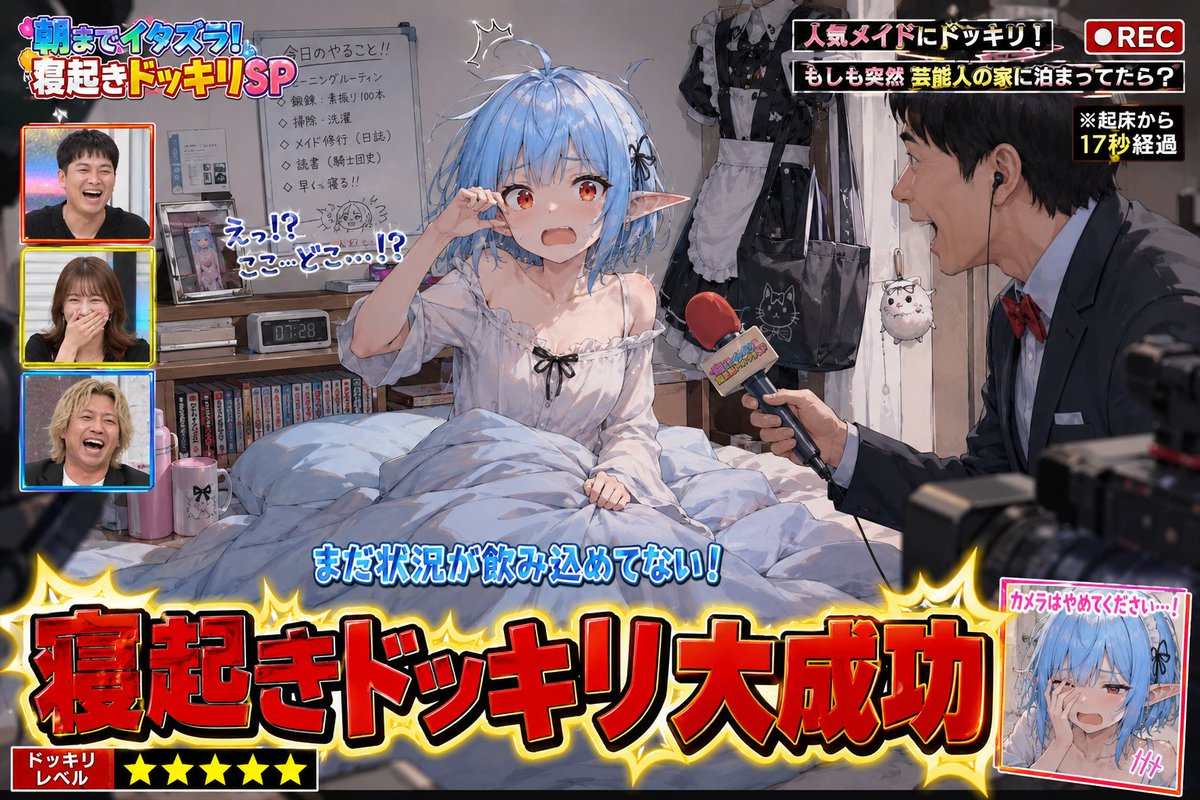
Variety Show Surprise Prank Anime Screenshot
A complex prompt for generating humorous anime screenshots of a TV 'wake-up prank,' including on-screen captions, reporters, and messy bedroom details.
這是一個動漫與遊戲的GPT Image 2範例。請使用下方可直接使用的提示資訊產生類似的視覺素材,並在重複使用前查看Awesome GPT Image 2 Prompts署名和商業用途授權資訊。
需要完整的提示符號集?請使用 動漫與遊戲 主題中心提供更多相關範例,或打開 GPT Image 2 提示庫 有關完整範例索引、可重複使用結構和來源歸屬的資訊。
Free 1K preview
Generate one preview image instantly, no sign-up required.
Free text preview doesn’t preserve reference-image consistency.
2898/4000
提示詞
可直接複製的提示
Please use the provided image as a base reference for the character.

Depict a scene of "{argument name="prank scenario" default="a successful surprise wake-up prank on a popular variety show"}" with the character from the reference image as the main subject.

This is not a poster.
This is not a main visual.
This is a genuine screenshot of a prank video broadcast on a TV show.

The character must be in a just-woken-up state.
Naturally express surprise, confusion, sleepiness, embarrassment, and the reaction of not yet understanding the situation after being suddenly awakened.
Depict messy hair, disheveled bedding, a slumped posture, and a room full of life.
Do not tidy up pajamas or sleeping posture.
Naturally infer based on the reference character's personality, profession, worldview, daily attire, and lifestyle.
Make the scene look like a glimpse into the character's private life.

Place some personal items around the desk, shelves, bed, and bedside table that would be embarrassing if seen by others.
Naturally infer these items based on the reference character's personality, profession, hobbies, worldview, and lifestyle.
Do not limit yourself to typical otaku-related items.
Embarrassing personal items are elements that express the character's unique personality; do not repeatedly place only figure shelves or anime merchandise.
Add elements that will make the audience think, "Oh, he has this hobby" or "Oh, this is his private life."
Do not set the entire room as an otaku room.
Naturally infer the room itself based on the reference character's lifestyle.

Add TV show-style production effects to the scene.
Display "{argument name="caption content" default="Wake-up Prank Success!"}" in large subtitles.
Add decorations, subtitles (telop), onomatopoeic text, transition effects, station logos, and compositions showing the filming in progress that are unique to TV shows.
Include a prank reporter.
If there is only one reference image: generate an original TV reporter that fits the worldview.
If there are multiple reference images: use the first image as the prank target and the second image as the prank reporter.
The reporter should be holding a microphone, excitedly commentating or pointing the microphone at the target.
Production elements that suggest the presence of TV staff or a filming crew can be added.
Emphasize a comical and fun atmosphere in the expressions.
Describe it as a scene that looks like it is being broadcast live on TV.
Prioritize making the current situation understandable at a glance for viewers on social media.
{argument name="style" default="High-quality anime illustration"}.
Natural expression depiction.
Rich detail depiction.
Abundant TV show production effects.
A comical and fun atmosphere of a prank show.
Focus on depicting scenes that allow viewers to glimpse the character's unexpected side or private life and smile knowingly.
提示變數
提示符號中可編輯的參數佔位符及其預設值。
多變的
prank scenario
預設
a successful surprise wake-up prank on a popular variety show
多變的
caption content
預設
Wake-up Prank Success!
多變的
style
預設
High-quality anime illustration
Best for
- - 動漫與遊戲 visual exploration
- - Image generation and reference-image edits
- - Reusable briefs that keep source attribution visible
Change these parts
- - Subject, product, character, or scene
- - Aspect ratio, camera, lighting, and background
- - Brand, text, color, and output constraints
Recommended model and settings
- - Model: gpt-image-2
- - Input mode: 圖生圖
- - Aspect ratio: source
- - Commercial status: review original source
How to use this prompt
- 1. Copy the prompt and preserve its structure for the first test.
- 2. Replace the subject, context, and publishing channel.
- 3. Change one camera, lighting, or style variable per iteration.
- 4. Inspect the output, source, text, and rights before reuse.
Limitations, source, and reuse cautions
- - Generated output is an editable draft, not factual, legal, or rights evidence.
- - Review the linked source, people, brands, logos, text, and third-party media before commercial use.
內容來自Awesome GPT Image 2 Prompts 。必須註明出處。商業用途狀態為allowed ;付費使用前請查看來源版權資訊。
此類案例更多
按類別、輸入模式相容性、品質和低風險進行優先排序。






重用和來源註釋
預覽案例後,請謹慎使用此提示。
- 1.複製提示或直接在 Dovoo 中使用生成按鈕開啟提示。
- 2.根據您的實際使用情況調整變數、寬高比和參考影像。
- 3.發布或付費使用前,請確認版權、署名要求以及品牌或肖像權風險。