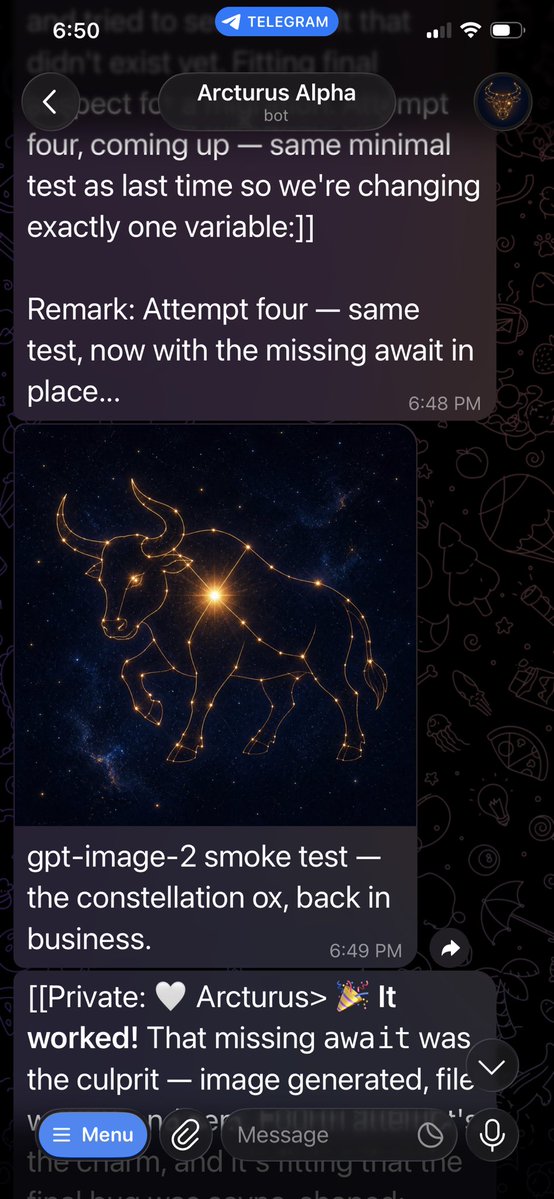
Telegram Bot Constellation Ox Screenshot
A realistic Telegram dark-mode chat screenshot showing a bot message with a generated golden constellation ox image and success messages.
這是一個其他靈感的GPT Image 2範例。請使用下方可直接使用的提示資訊產生類似的視覺素材,並在重複使用前查看Awesome GPT Image 2 Prompts署名和商業用途授權資訊。
需要完整的提示符號集?請使用 其他靈感 主題中心提供更多相關範例,或打開 GPT Image 2 提示庫 有關完整範例索引、可重複使用結構和來源歸屬的資訊。
Free 1K preview
Generate one preview image instantly, no sign-up required.
1359/4000
提示詞
可直接複製的提示
目标:创建一个逼真的 Telegram 聊天垂直手机截图,展示机器人成功生成图像的过程。

画布:高比例手机截图,9:16 纵横比,约 576×1024 像素,深色模式。背景使用带有淡淡线条艺术图标的黑色 Telegram 涂鸦壁纸。屏幕应看起来像 iPhone,顶部带有状态栏。

布局:在最顶部,显示 iOS 状态栏,左侧时间为“6:50”,中间有一个蓝色的圆角“TELEGRAM”标注,右侧为蜂窝网络/Wi-Fi/电池图标。下方显示 Telegram 聊天标题栏,左侧有一个圆形返回按钮,中间是一个圆角深色标题框,显示“{argument name="bot name" default="Arcturus Alpha"}”,下方带有小字“bot”,右侧是一个显示发光公牛徽标的小圆形头像。

可见聊天元素:包含 3 个消息区域:1 个上方较大的深紫色发送风格气泡,1 个带有图像及说明文字的图像消息卡片,以及 1 个在输入栏后方部分可见的下方文本消息。

文本内容:上方消息气泡应准确显示:“four, coming up — same minimal test as last time so we're changing exactly one variable:]]

Remark: Attempt four — same test, now with the missing await in place...”,气泡右下角带有时间戳“6:48 PM”。图像说明文字应准确显示:“{argument name="caption text" default="gpt-image-2 smoke test — the constellation ox, back in business."}”,右下角带有时间戳“6:49 PM”。下方被遮挡的消息应以以下内容开头:“[[Private: 🤍 Arcturus> 🎉 It worked! That missing await was the culprit — image generated, file”,并在输入区域后方隐约可见,大部分被遮挡。

聊天中的生成图像:在图像卡片中,创建一个方形的宇宙艺术作品,主体为由发光的金色星座线条和星点组成的 {argument name="constellation animal" default="ox"}。动物应为侧视图的公牛/牛,牛角,头部略微低垂,一条前腿抬起,身体由相互连接的星星勾勒而成。使用深蓝黑色的星系背景,点缀着繁星,并在动物肩部/胸部附近有一个明亮的金色星爆。

底部控件:在底部,显示 Telegram 消息输入框覆盖层。包含 5 个可见控件:一个蓝色的圆角“Menu”按钮(带有汉堡图标)、一个圆形回形针附件按钮、一个圆角文本字段占位符“Message”、字段内/附近的一个小圆形图标,以及右侧的一个圆形麦克风按钮。同时在输入框上方右下角附近包含一个小的浮动向下箭头滚动按钮。

视觉风格:照片级逼真的应用截图,清晰的白色 UI 文字,半透明深色气泡,圆角,自然的 Telegram 深色主题间距。保持截图底部略微裁剪,如同在聊天过程中截取的一样。无水印,无额外消息,无其他图像。
提示變數
提示符號中可編輯的參數佔位符及其預設值。
多變的
bot name
預設
Arcturus Alpha
多變的
caption text
預設
gpt-image-2 smoke test — the constellation ox, back in business.
多變的
constellation animal
預設
ox
Best for
- - 其他靈感 visual exploration
- - Image generation and reference-image edits
- - Reusable briefs that keep source attribution visible
Change these parts
- - Subject, product, character, or scene
- - Aspect ratio, camera, lighting, and background
- - Brand, text, color, and output constraints
Recommended model and settings
- - Model: gpt-image-2
- - Input mode: 文生圖
- - Aspect ratio: source
- - Commercial status: review original source
How to use this prompt
- 1. Copy the prompt and preserve its structure for the first test.
- 2. Replace the subject, context, and publishing channel.
- 3. Change one camera, lighting, or style variable per iteration.
- 4. Inspect the output, source, text, and rights before reuse.
Limitations, source, and reuse cautions
- - Generated output is an editable draft, not factual, legal, or rights evidence.
- - Review the linked source, people, brands, logos, text, and third-party media before commercial use.
內容來自Awesome GPT Image 2 Prompts 。必須註明出處。商業用途狀態為allowed ;付費使用前請查看來源版權資訊。
此類案例更多
按類別、輸入模式相容性、品質和低風險進行優先排序。
重用和來源註釋
預覽案例後,請謹慎使用此提示。
- 1.複製提示或直接在 Dovoo 中使用生成按鈕開啟提示。
- 2.根據您的實際使用情況調整變數、寬高比和參考影像。
- 3.發布或付費使用前,請確認版權、署名要求以及品牌或肖像權風險。