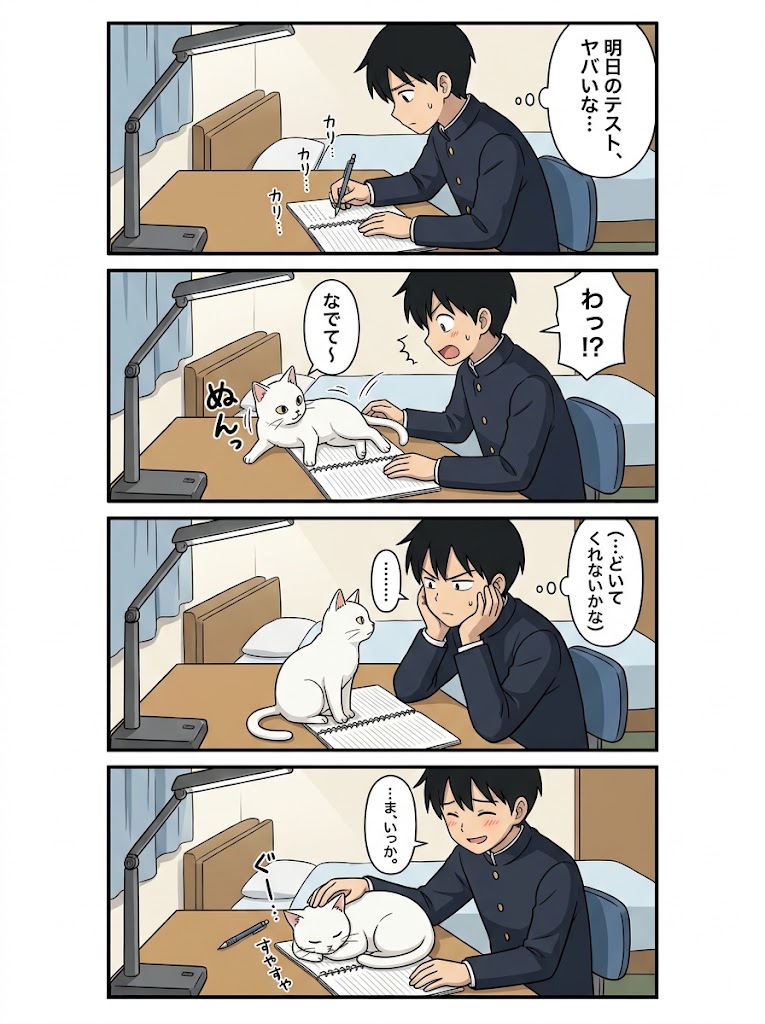
Four-Panel Study Cat Manga
A vertical four-panel Japanese manga page showing a schoolboy’s study session derailed by a cute white cat.
這是一個動漫與遊戲的GPT Image 2範例。請使用下方可直接使用的提示資訊產生類似的視覺素材,並在重複使用前查看Awesome GPT Image 2 Prompts署名和商業用途授權資訊。
需要完整的提示符號集?請使用 動漫與遊戲 主題中心提供更多相關範例,或打開 GPT Image 2 提示庫 有關完整範例索引、可重複使用結構和來源歸屬的資訊。
Free 1K preview
Generate one preview image instantly, no sign-up required.
3133/4000
提示詞
可直接複製的提示
Goal: Create a clean anime-style vertical 4-panel Japanese manga comic about a schoolboy trying to study while a cat interrupts him, ending with him happily petting the cat instead of studying.

Canvas: Vertical manga page, white outer margin, four horizontal rectangular panels stacked top to bottom with thick black borders and narrow white gutters. Soft cel-shaded anime coloring, simple clean line art, cozy bedroom setting, slightly polished AI-anime look.

Characters: A teenage Japanese schoolboy named {argument name="character name" default="unnamed boy"}, short black hair, navy gakuran school uniform with gold buttons, expressive face. A white domestic cat with pink inner ears and pale yellow eyes, cute and mischievous.

Setting: Same bedroom desk in all 4 panels. Wooden desk at left/center, gray adjustable desk lamp on the left, open spiral notebook and pencil on the desk, bed with pale blue blanket and pillow in the background, light blue curtain, beige wall, blue desk chair. Keep camera mostly side-facing and consistent across panels.

Panel count and layout: Exactly 4 panels.
1. Panel 1: The boy sits at the desk writing seriously in a spiral notebook with a pencil, looking worried and sweating slightly. The desk lamp shines over the desk. Add one thought bubble at the upper right containing {argument name="panel 1 thought" default="明日のテスト、ヤバいな…"}. Add three small writing sound effects near the notebook, reading 「カリ…」, 「カリ…」, 「カリッ…」.
2. Panel 2: The white cat suddenly jumps or climbs onto the open notebook, stretching across the page and blocking the boy's writing. The boy recoils in surprise with mouth open and blush/sweat. Add one jagged speech bubble at the right containing {argument name="panel 2 shout" default="わっ!?"}. Add one rounded speech bubble near the cat containing 「なでて〜」. Add one large cat sound effect near the cat reading 「ぬんっ」.
3. Panel 3: The cat sits upright on the notebook facing the boy. The boy leans forward with both cheeks resting in his hands, looking conflicted and slightly annoyed but softening. Add one thought bubble at the right containing {argument name="panel 3 thought" default="…どいてくれないかな"}. Add one small vertical speech bubble between boy and cat containing 「……」.
4. Panel 4: The boy gives in and pets the cat, smiling warmly with blush while the cat lies curled contentedly on top of the notebook. Pencil lies unused on the desk. Add one speech bubble near the boy containing {argument name="panel 4 line" default="…ま、いっか。"}. Add two petting/satisfaction sound effects: 「ぐ!」 near the cat's head and 「すやすや」 near the sleeping cat.

Visible text count: Include exactly 12 visible text elements total: 4 main boy bubbles/thoughts, 1 cat speech bubble, 1 ellipsis bubble, 3 writing SFX, 1 cat entrance SFX, and 2 final petting/sleeping SFX. Use Japanese vertical manga lettering inside bubbles where appropriate.

Visual style: Cute slice-of-life school manga, clear readable panel composition, expressive faces, modest motion lines, light shadows, warm indoor colors, no halftone texture, no heavy rendering, no watermark, no extra panels, no extra characters.
提示變數
提示符號中可編輯的參數佔位符及其預設值。
多變的
character name
預設
unnamed boy
多變的
panel 1 thought
預設
明日のテスト、ヤバいな…
多變的
panel 2 shout
預設
わっ!?
多變的
panel 3 thought
預設
…どいてくれないかな
多變的
panel 4 line
預設
…ま、いっか。
Best for
- - 動漫與遊戲 visual exploration
- - Image generation and reference-image edits
- - Reusable briefs that keep source attribution visible
Change these parts
- - Subject, product, character, or scene
- - Aspect ratio, camera, lighting, and background
- - Brand, text, color, and output constraints
Recommended model and settings
- - Model: gpt-image-2
- - Input mode: 文生圖
- - Aspect ratio: source
- - Commercial status: review original source
How to use this prompt
- 1. Copy the prompt and preserve its structure for the first test.
- 2. Replace the subject, context, and publishing channel.
- 3. Change one camera, lighting, or style variable per iteration.
- 4. Inspect the output, source, text, and rights before reuse.
Limitations, source, and reuse cautions
- - Generated output is an editable draft, not factual, legal, or rights evidence.
- - Review the linked source, people, brands, logos, text, and third-party media before commercial use.
內容來自Awesome GPT Image 2 Prompts 。必須註明出處。商業用途狀態為allowed ;付費使用前請查看來源版權資訊。
此類案例更多
按類別、輸入模式相容性、品質和低風險進行優先排序。


重用和來源註釋
預覽案例後,請謹慎使用此提示。
- 1.複製提示或直接在 Dovoo 中使用生成按鈕開啟提示。
- 2.根據您的實際使用情況調整變數、寬高比和參考影像。
- 3.發布或付費使用前,請確認版權、署名要求以及品牌或肖像權風險。