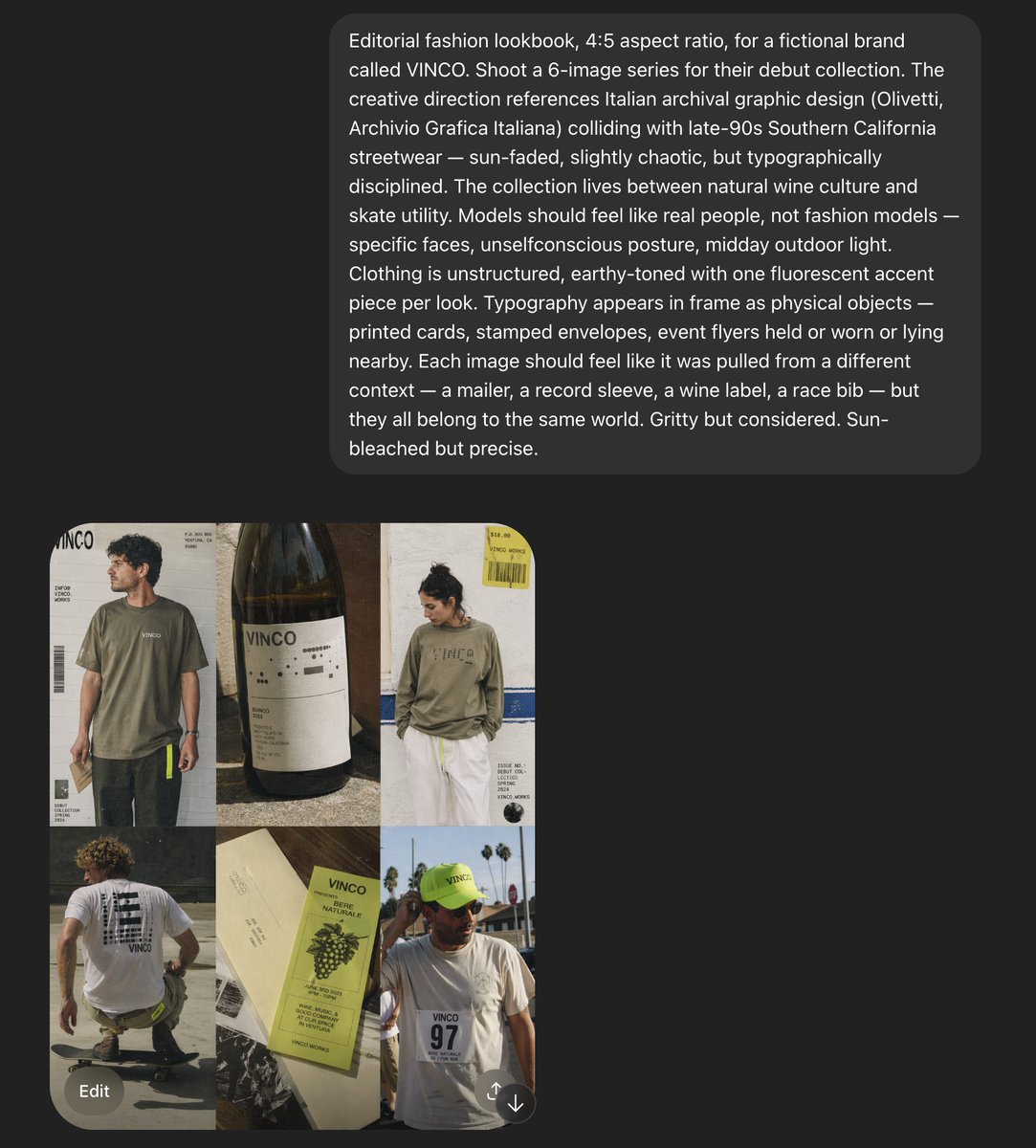
VINCO 編輯情緒板截圖
這是一個截圖風格的 AI 情緒板,展示了一個虛構的街頭服飾和天然葡萄酒品牌的六張圖片時尚概念,可用於重新創建藝術指導演示文稿或活動參考板。
這是一個時尚與美妝的GPT Image 2範例。請使用下方可直接使用的提示資訊產生類似的視覺素材,並在重複使用前查看Awesome GPT Image 2 Prompts署名和商業用途授權資訊。
需要完整的提示符號集?請使用 時尚與美妝 主題中心提供更多相關範例,或打開 GPT Image 2 提示庫 有關完整範例索引、可重複使用結構和來源歸屬的資訊。
Free 1K preview
Generate one preview image instantly, no sign-up required.
Free text preview doesn’t preserve reference-image consistency.
2968/4000
提示詞
可直接複製的提示
Create a 4:5 editorial fashion lookbook moodboard for a fictional brand called {argument name="brand name" default="VINCO"}. The image is a dark-interface screenshot-style composition with a large rounded charcoal text panel across the upper half and a 2-by-3 grid of six fashion/editorial images in the lower left quadrant. The overall aesthetic blends Italian archival graphic design with late-1990s Southern California streetwear, mixing natural wine culture, skate utility, and sun-faded documentary fashion photography. Use gritty but precise art direction, midday outdoor light, slightly chaotic but disciplined typography, and real-person casting rather than polished fashion-model energy. In the top text panel, show a long white sans-serif creative-direction paragraph describing the shoot, with multiple lines of copy, like an AI prompt or design brief displayed inside a rounded dark gray bubble on a near-black background. In the image grid, include exactly 6 tiles: tile 1 shows a young man in an oversized faded olive T-shirt and dark pants standing in front of an off-white poster-like backdrop with bold {argument name="logo text" default="VINCO"} branding, barcode graphics, and small editorial text; tile 2 is a close-up still life of a dark wine bottle with a minimalist white label reading {argument name="bottle label" default="VINCO"}, photographed in warm sunlight with tactile paper texture and shadow; tile 3 shows a person from the back in a washed olive long-sleeve shirt with large subtle chest or back branding, white shorts, and a yellow hanging tag or sticker element near the top right, posed against a pale wall with blue stripe detail and editorial layout text; tile 4 shows a skateboarder crouching or riding away, photographed from behind, wearing a white T-shirt with a large black graphic block on the back and dark shorts, in golden sun on pavement; tile 5 is a printed wine ephemera flat lay with cream paper and a pale chartreuse-green wine label or booklet reading {argument name="product text" default="Vino Naturale"}, featuring grape illustration, small black text, and layered paper pieces; tile 6 shows a person facing camera in a white T-shirt with a race-bib style chest print reading 97, wearing a fluorescent yellow-green cap with small brand text, standing outdoors with palm trees and bright sky behind them. Keep the six images slightly imperfect and collage-like, as if pulled from a campaign deck or saved references. Use earthy tones throughout: olive, cream, charcoal, sun-bleached white, asphalt gray, muted brown, and one fluorescent yellow-green accent repeated in small details. Include visible interface framing around the composition: a dark app-like background, the lower image grid aligned left, and a rounded gray “Edit” button near the bottom left, plus a small circular icon near the bottom right, reinforcing that this is a screenshot of a generated moodboard rather than a clean standalone poster.提示變數
提示符號中可編輯的參數佔位符及其預設值。
多變的
brand name
預設
VINCO
多變的
logo text
預設
VINCO
多變的
bottle label
預設
VINCO
多變的
product text
預設
Vino Naturale
Best for
- - 時尚與美妝 visual exploration
- - Image generation and reference-image edits
- - Reusable briefs that keep source attribution visible
Change these parts
- - Subject, product, character, or scene
- - Aspect ratio, camera, lighting, and background
- - Brand, text, color, and output constraints
Recommended model and settings
- - Model: gpt-image-2
- - Input mode: 圖生圖
- - Aspect ratio: source
- - Commercial status: review original source
How to use this prompt
- 1. Copy the prompt and preserve its structure for the first test.
- 2. Replace the subject, context, and publishing channel.
- 3. Change one camera, lighting, or style variable per iteration.
- 4. Inspect the output, source, text, and rights before reuse.
Limitations, source, and reuse cautions
- - Generated output is an editable draft, not factual, legal, or rights evidence.
- - Review the linked source, people, brands, logos, text, and third-party media before commercial use.
內容來自Awesome GPT Image 2 Prompts 。必須註明出處。商業用途狀態為allowed ;付費使用前請查看來源版權資訊。
此類案例更多
按類別、輸入模式相容性、品質和低風險進行優先排序。






重用和來源註釋
預覽案例後,請謹慎使用此提示。
- 1.複製提示或直接在 Dovoo 中使用生成按鈕開啟提示。
- 2.根據您的實際使用情況調整變數、寬高比和參考影像。
- 3.發布或付費使用前,請確認版權、署名要求以及品牌或肖像權風險。