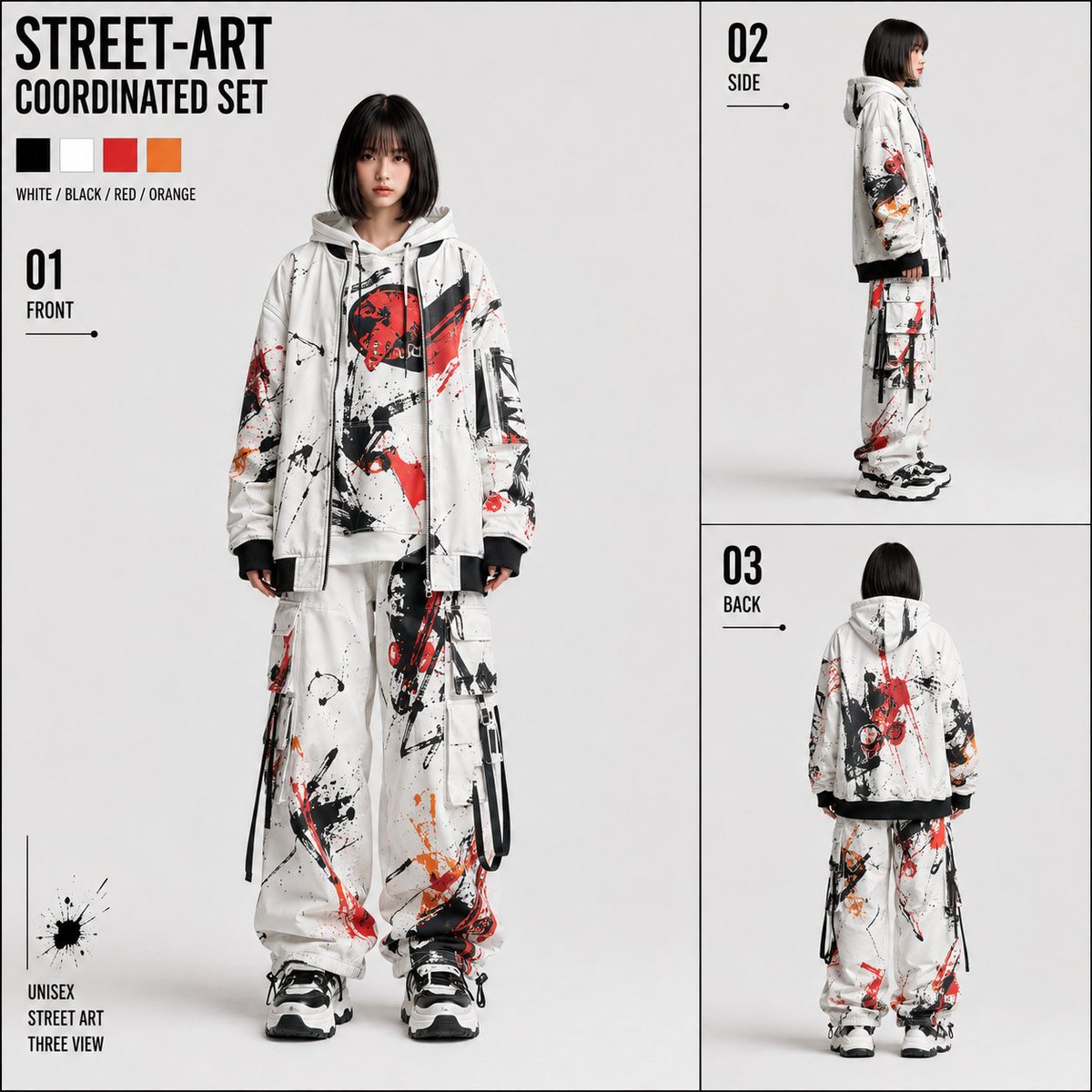
Street Art Three View Design Sheet
A comprehensive prompt for creating a professional three-view character design sheet with a street art aesthetic, maintaining character consistency across views.
這是一個肖像與人物的GPT Image 2範例。請使用下方可直接使用的提示資訊產生類似的視覺素材,並在重複使用前查看Awesome GPT Image 2 Prompts署名和商業用途授權資訊。
需要完整的提示符號集?請使用 肖像與人物 主題中心提供更多相關範例,或打開 GPT Image 2 提示庫 有關完整範例索引、可重複使用結構和來源歸屬的資訊。
Free 1K preview
Generate one preview image instantly, no sign-up required.
4000/4000
提示詞
可直接複製的提示
# CUSTOM_STREET_ART_THREE_VIEW_SHEET ## [Purpose] Use one full-body image of a person attached simultaneously with this instruction as the sole person reference, and create one high-quality square three-view design sheet for sharing, dressed in a fixed street art system setup costume. Rather than a simple character sheet for video, emphasis is placed on establishing it as a three-view drawing for person confirmation while making the sheet itself look like a highly complete fashion design work. ## [Input] Expression: {argument name="style" default="Photorealistic"} If blank, it is [photorealistic]. Gender is naturally inherited from the attached person image. ## [Absolute Fixed] Aspect ratio is 1:1 square. Background is light neutral gray close to white. Sheet density, paper design, layout, and costume design are fixed, and only the person and the person's drawing method are variable. ## [Person Reference] Use one attached full-body person image as the sole person reference, and make all three FRONT/SIDE/BACK figures the same person. Maintain facial features, eyes, nose, mouth, contours, hairstyle, hair color, hair length, bangs, parting, sense of age, skin color, sense of height, shoulder width, thorax, waist position, torso-to-leg ratio, leg length, overall body ratio, body type, and gender expression. ## [Expression] Photorealistic: High-quality photorealistic fashion shooting. Provide natural skin/hair, thickness of clothing materials, drape, sewing, wrinkles, and shadows. Anime: High-quality anime expression that maintains the face, hair, body type, and overall body ratio of the reference person. Make the costume pattern, layers, and silhouette clear, and do not perform extreme deformation. ## [Fixed Costume] A unisex street art setup using {argument name="primary color" default="white"} as the primary color, with {argument name="accent colors" default="black, vivid red, and limited orange"} in black, vivid red, and limited orange. Treat the outer jacket, inner hoodie, and cargo pants as a single coordination set sharing the same design language rather than separate clothes. ### Outer Jacket White-based oversized zip-up. Drop shoulders, voluminous sleeves, black cuff ribs, and hem ribs. The front is slightly open, showing the inner hoodie. While leaving enough white space, asymmetrically place black rough brush strokes, ink splashes, large sharp red paint and splatters, limited orange, and thin drips. ### Inner Hoodie White-based hooded sweatshirt. With a density slightly more reserved than the jacket, must include the same system of black, red, and orange brushes, splashes, splatters, and drips. ### Cargo Pants/Shoes White-dominant wide cargo pants. Large cargo pockets, thin black straps or cords, lightly narrowed hems. Asymmetrically place black, red, and orange abstract paint, leaving large white spaces. Shoes are thick-soled volume sneakers in black and white. ## [Three-Side Costume Continuity] FRONT/SIDE/BACK are states where the same costume is viewed from different directions. Do not recreate the pattern in each view; ensure the red paint, black brushes, and patterns on the shoulders, sleeves, pants, and hood connect naturally from the front to the side and back along the three-dimensional structure of the clothing. ## [Pose] FRONT: Directly in front. Face, shoulders, waist, and toes facing front, arms down naturally. SIDE: Completely 90-degree true side. Do not face the camera, and do not use a diagonal posture or fashion pose. BACK: Completely back view. Without looking back, the back of the jacket, hood, back of the pants, and shoes can be confirmed. ## [Fixed Layout] Divide the square into a main area on the left and a vertical sub-area on the right. Place a large FRONT in approximately 60% of the left, and divide the approximately 40% on the right into upper and lower sections, placing 02 SIDE on top and 03 BACK on bottom. Make the two panels on the right identical in width and nearly identical in height, organized with thin black frame lines on the periphery and upper/lower boundaries to appear as one vertical block. ## [Fixed Graphics] Fix a two-line title in the upper left. STREET-ART COORDINATED SET Fix 01 FRONT, 02 SIDE, and 03 BACK on each view.提示變數
提示符號中可編輯的參數佔位符及其預設值。
多變的
style
預設
Photorealistic
多變的
primary color
預設
white
多變的
accent colors
預設
black, vivid red, and limited orange
Best for
- - 肖像與人物 visual exploration
- - Image generation and reference-image edits
- - Reusable briefs that keep source attribution visible
Change these parts
- - Subject, product, character, or scene
- - Aspect ratio, camera, lighting, and background
- - Brand, text, color, and output constraints
Recommended model and settings
- - Model: gpt-image-2
- - Input mode: 文生圖
- - Aspect ratio: source
- - Commercial status: review original source
How to use this prompt
- 1. Copy the prompt and preserve its structure for the first test.
- 2. Replace the subject, context, and publishing channel.
- 3. Change one camera, lighting, or style variable per iteration.
- 4. Inspect the output, source, text, and rights before reuse.
Limitations, source, and reuse cautions
- - Generated output is an editable draft, not factual, legal, or rights evidence.
- - Review the linked source, people, brands, logos, text, and third-party media before commercial use.
內容來自Awesome GPT Image 2 Prompts 。必須註明出處。商業用途狀態為allowed ;付費使用前請查看來源版權資訊。
此類案例更多
按類別、輸入模式相容性、品質和低風險進行優先排序。




重用和來源註釋
預覽案例後,請謹慎使用此提示。
- 1.複製提示或直接在 Dovoo 中使用生成按鈕開啟提示。
- 2.根據您的實際使用情況調整變數、寬高比和參考影像。
- 3.發布或付費使用前,請確認版權、署名要求以及品牌或肖像權風險。