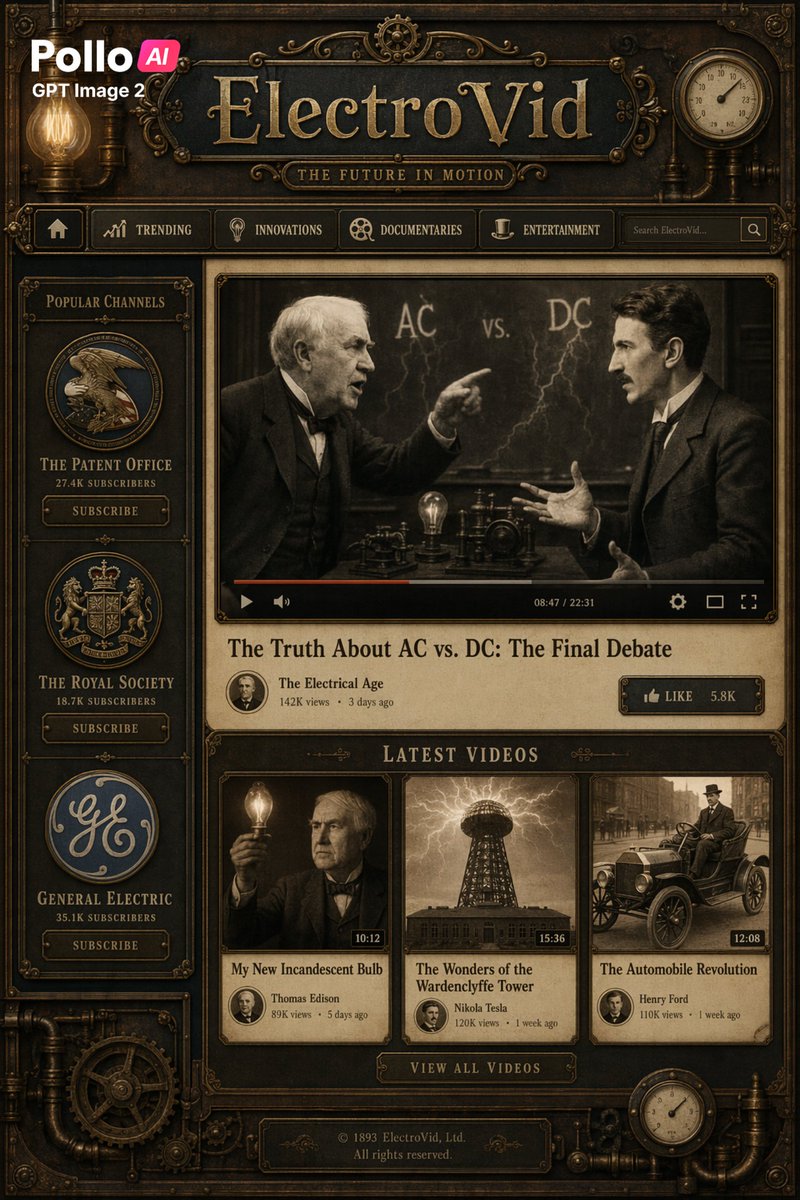
蒸氣龐克風格的 ElectroVid 影片平台使用者介面
一個精細的古董工業風格串流媒體網站模型,可用於創建復古蒸氣龐克介面、戲仿平台或風格化的歷史科技登陸頁面。
這是一個平面設計和海報設計的GPT Image 2範例。請使用下方可直接使用的提示資訊產生類似的視覺素材,並在重複使用前查看Awesome GPT Image 2 Prompts署名和商業用途授權資訊。
需要完整的提示符號集?請使用 平面設計和海報設計 主題中心提供更多相關範例,或打開 GPT Image 2 提示庫 有關完整範例索引、可重複使用結構和來源歸屬的資訊。
Free 1K preview
Generate one preview image instantly, no sign-up required.
Free text preview doesn’t preserve reference-image consistency.
3460/4000
提示詞
可直接複製的提示
Create a full-screen, fictional video streaming website homepage in a detailed steampunk Victorian retro-futuristic style, designed as an interface resembling antique brass and wooden machinery. The page includes 1 main header bar, 1 top navigation bar, 1 left sidebar, 1 featured video panel, 1 latest videos area with 3 thumbnails, 1 central call-to-action button, and 1 footer plaque. The overall color scheme is dark bronze, tarnished brass, browns, blackened steel, and parchment beige, with warm amber lighting, engraved borders, piping, gears, rivets, decorative filigree, and simulated gauge details. In the upper left corner, place a modern brand badge displaying “Pika {argument name="brand tag" default="AI"}”, with “GPT Image 2” above or next to it, contrasting with the antique interface. Centered on a dark plaque, place a large website title in embossed serif gold metal style, “{argument name="site name" default="ElectroVid"}”, with the subtitle “THE FUTURE IN MOTION” below it. Add a glowing Edison bulb to the upper left and a circular pressure gauge or clock face to the upper right. Below the title, include a horizontal navigation bar with 6 elements: a home icon, “TRENDING”, “INNOVATIONS”, “DOCUMENTARIES”, “ENTERTAINMENT”, a search box with placeholder text “Search ElectroVid…” and a search button. In the left sidebar, add a framed area titled “POPULAR CHANNELS”, vertically stacking 3 channel cards, each containing a circular logo, channel name, subscriber count, and a subscribe button: “THE PATENT OFFICE” & “27.4K SUBSCRIBERS”, “THE ROYAL SOCIETY” & “18.7K SUBSCRIBERS”, “GENERAL ELECTRIC” & “35.1K SUBSCRIBERS”. In the main content area, showcase a large featured video player playing a sepia-toned video clip of two early electrical pioneers debating in front of a blackboard with “AC vs. DC” and lightning bolt patterns; Show every face clearly with natural, detailed facial features. Include a realistic video player control bar with play icon, progress bar, volume, settings, full screen, and timestamp “08:47 / 22:31”. Below the player, display the title “{argument name="featured title" default="The Truth About AC vs. DC: The Final Debate"}” in a large serif font. Below that, display the channel line “The Electrical Age” with a small circular avatar, “142K views”, and “3 days ago”, and a brass button on the right that reads “LIKE 5.8K”. Create an area below labeled “LATEST VIDEOS” containing 3 video cards: 1) “Thomas Edison”’s “My New Incandescent Bulb”, “89K views”, “5 days ago”, duration “10:12”, Show every face clearly with natural, detailed facial features; 2) “Nikola Tesla”’s “The Wonders of the Wardenclyffe Tower”, “120K views”, “1 week ago”, duration “15:36”, thumbnail showing the Tesla Tower under storm clouds; 3) “Henry Ford”’s “The Automobile Revolution”, “110K views”, “1 week ago”, duration “12:08”, thumbnail showing early vintage cars on a city street. Center a metal button below the cards that reads “VIEW ALL VIDEOS”. At the bottom, add a dark engraved footer plaque with the text “© 1893 ElectroVid, Ltd. All rights reserved.” Frame the entire composition with decorative brass corners, piping, gears, screws, and small gauges to make it look like a functional Victorian industrial dashboard. The image should have a refined, cinematic-grade website design draft feel, symmetrical and highly detailed, with realistic textures, layered depth, subtle grime, and high-poster-quality rendering.提示變數
提示符號中可編輯的參數佔位符及其預設值。
多變的
brand tag
預設
AI
多變的
site name
預設
ElectroVid
多變的
featured title
預設
The Truth About AC vs. DC: The Final Debate
Best for
- - 平面設計和海報設計 visual exploration
- - Image generation and reference-image edits
- - Reusable briefs that keep source attribution visible
Change these parts
- - Subject, product, character, or scene
- - Aspect ratio, camera, lighting, and background
- - Brand, text, color, and output constraints
Recommended model and settings
- - Model: gpt-image-2
- - Input mode: 圖生圖
- - Aspect ratio: source
- - Commercial status: review original source
How to use this prompt
- 1. Copy the prompt and preserve its structure for the first test.
- 2. Replace the subject, context, and publishing channel.
- 3. Change one camera, lighting, or style variable per iteration.
- 4. Inspect the output, source, text, and rights before reuse.
Limitations, source, and reuse cautions
- - Generated output is an editable draft, not factual, legal, or rights evidence.
- - Review the linked source, people, brands, logos, text, and third-party media before commercial use.
內容來自Awesome GPT Image 2 Prompts 。必須註明出處。商業用途狀態為allowed ;付費使用前請查看來源版權資訊。
此類案例更多
按類別、輸入模式相容性、品質和低風險進行優先排序。






重用和來源註釋
預覽案例後,請謹慎使用此提示。
- 1.複製提示或直接在 Dovoo 中使用生成按鈕開啟提示。
- 2.根據您的實際使用情況調整變數、寬高比和參考影像。
- 3.發布或付費使用前,請確認版權、署名要求以及品牌或肖像權風險。