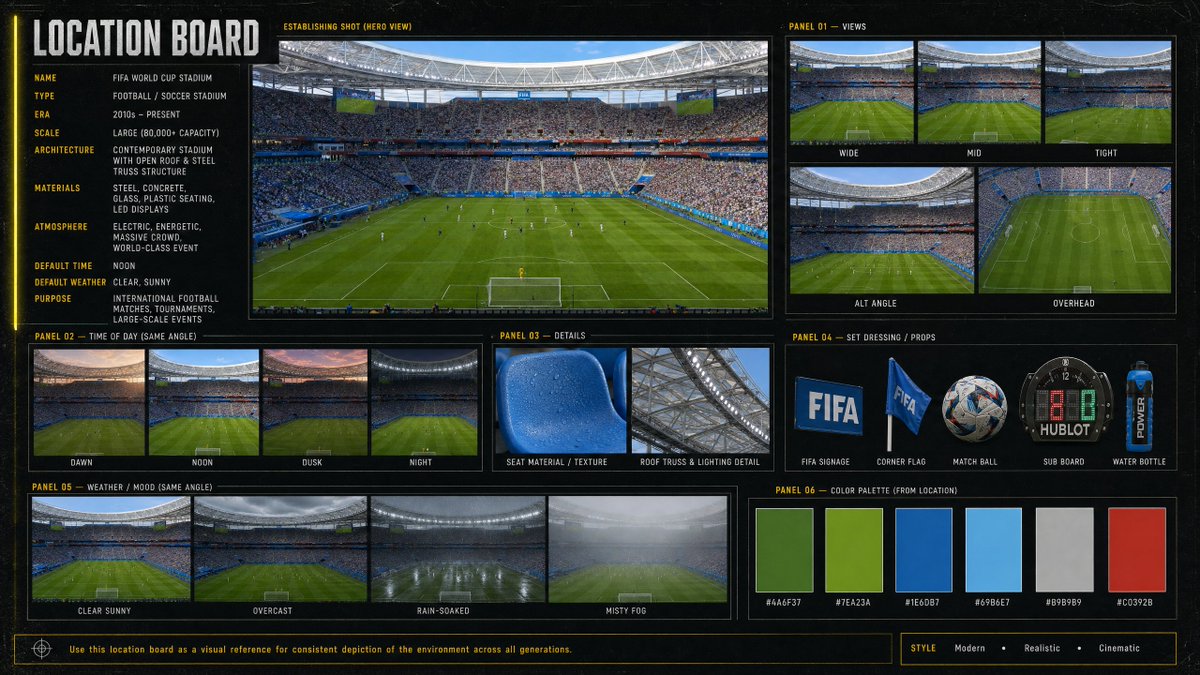
Cinematic Stadium Location Board
Generates a professional visual reference board for a modern World Cup soccer stadium with views, lighting, weather, props, details, and palette.
這是一個平面設計和海報設計的GPT Image 2範例。請使用下方可直接使用的提示資訊產生類似的視覺素材,並在重複使用前查看Awesome GPT Image 2 Prompts署名和商業用途授權資訊。
需要完整的提示符號集?請使用 平面設計和海報設計 主題中心提供更多相關範例,或打開 GPT Image 2 提示庫 有關完整範例索引、可重複使用結構和來源歸屬的資訊。
Free 1K preview
Generate one preview image instantly, no sign-up required.
3379/4000
提示詞
可直接複製的提示
Goal: Create a cinematic, information-dense location board for a {argument name="venue name" default="FIFA World Cup Stadium"}, designed as a professional film/game environment reference sheet.

Canvas: Wide 16:9 horizontal board with a dark charcoal/black textured background, thin yellow guide lines, subtle grid marks, and a modern sports-broadcast production design feel. Use crisp photo-realistic stadium imagery inside bordered panels, with condensed uppercase typography in white and yellow.

Main title: Large vertical-left header reading “LOCATION BOARD”.

Left information column: Include 10 labeled metadata rows: Name: {argument name="venue name" default="FIFA World Cup Stadium"}; Type: Football / Soccer Stadium; Era: 2010s – Present; Scale: Large (80,000+ capacity); Architecture: Contemporary stadium with open roof & steel truss structure; Materials: Steel, concrete, glass, plastic seating, LED displays; Atmosphere: Electric, energetic, massive crowd, world-class event; Default time: Noon; Default weather: Clear, sunny; Purpose: International football matches, tournaments, large-scale events.

Central hero panel: One large establishing shot labeled “ESTABLISHING SHOT (HERO VIEW)”, showing a packed modern soccer stadium from behind one goal, lush green pitch, players tiny on the field, bright daylight, steel roof ring, giant screens, blue seating accents, and a dense crowd.

Panel 01 — Views: Show exactly 5 view thumbnails labeled Wide, Mid, Tight, Alt Angle, and Overhead. Wide shows the full field and stands; Mid is closer to the pitch and crowd; Tight focuses more on field/crowd detail; Alt Angle is a diagonal stadium view; Overhead is a high top-down view of the pitch.

Panel 02 — Time of Day (Same Angle): Show exactly 4 thumbnails labeled Dawn, Noon, Dusk, and Night, each using the same stadium angle with different lighting conditions.

Panel 03 — Details: Show exactly 2 close-up detail images labeled Seat Material / Texture and Roof Truss & Lighting Detail. Seat material should be a blue plastic stadium seat with droplets/texture; roof detail should show steel trusses and stadium lighting.

Panel 04 — Set Dressing / Props: Show exactly 5 isolated prop images labeled FIFA Signage, Corner Flag, Match Ball, Sub Board, and Water Bottle. Include a blue FIFA sign, a blue corner flag, a patterned soccer ball, a digital substitution board, and a blue sports water bottle.

Panel 05 — Weather / Mood (Same Angle): Show exactly 4 thumbnails labeled Clear Sunny, Overcast, Rain-Soaked, and Misty Fog, all from the same stadium angle.

Panel 06 — Color Palette (From Location): Show exactly 6 rectangular color swatches with hex labels: #4A6F37 deep field green, #7EA23A bright grass green, #1E6DB7 stadium blue, #69B6E7 sky blue, #B9B9B9 concrete gray, and #C0392B red accent.

Footer: Add a thin boxed note reading “Use this location board as a visual reference for consistent depiction of the environment across all generations.” On the bottom right, add a style tag row reading “STYLE  Modern  •  Realistic  •  Cinematic”.

Visual style: Photorealistic sports venue imagery, high-detail architectural reference board, cinematic realism, clean grid layout, consistent panel borders, subtle grunge texture, yellow technical annotations, no people in close-up foreground except distant crowd and players. Keep all text legible and aligned.
提示變數
提示符號中可編輯的參數佔位符及其預設值。
多變的
venue name
預設
FIFA World Cup Stadium
Best for
- - 平面設計和海報設計 visual exploration
- - Image generation and reference-image edits
- - Reusable briefs that keep source attribution visible
Change these parts
- - Subject, product, character, or scene
- - Aspect ratio, camera, lighting, and background
- - Brand, text, color, and output constraints
Recommended model and settings
- - Model: gpt-image-2
- - Input mode: 文生圖
- - Aspect ratio: source
- - Commercial status: review original source
How to use this prompt
- 1. Copy the prompt and preserve its structure for the first test.
- 2. Replace the subject, context, and publishing channel.
- 3. Change one camera, lighting, or style variable per iteration.
- 4. Inspect the output, source, text, and rights before reuse.
Limitations, source, and reuse cautions
- - Generated output is an editable draft, not factual, legal, or rights evidence.
- - Review the linked source, people, brands, logos, text, and third-party media before commercial use.
內容來自Awesome GPT Image 2 Prompts 。必須註明出處。商業用途狀態為allowed ;付費使用前請查看來源版權資訊。
此類案例更多
按類別、輸入模式相容性、品質和低風險進行優先排序。






重用和來源註釋
預覽案例後,請謹慎使用此提示。
- 1.複製提示或直接在 Dovoo 中使用生成按鈕開啟提示。
- 2.根據您的實際使用情況調整變數、寬高比和參考影像。
- 3.發布或付費使用前,請確認版權、署名要求以及品牌或肖像權風險。