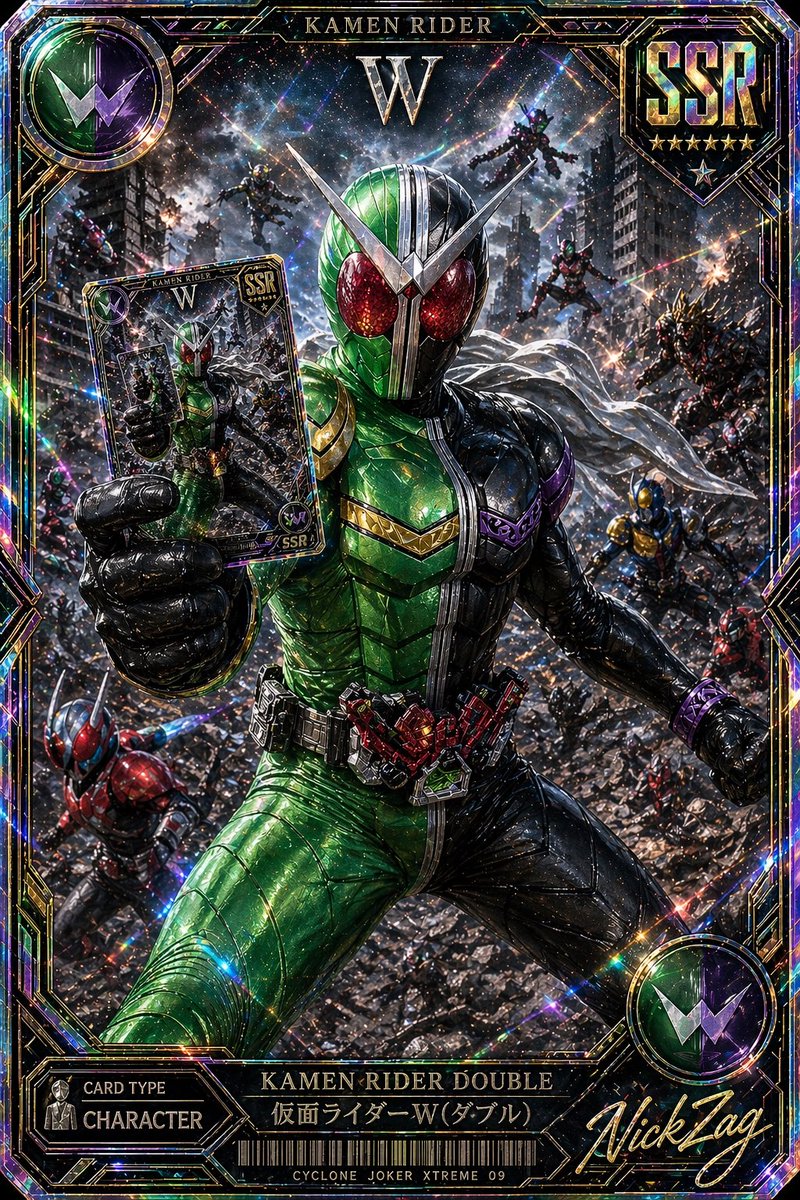
SSR假面騎士雙卡
一張閃閃發光的超稀有特攝交易卡圖片,描繪了假面騎士Double在電影般的戰鬥場景中,非常適合作為收藏卡藝術或高級遊戲卡設計。
這是一個動漫與遊戲的GPT Image 2範例。請使用下方可直接使用的提示資訊產生類似的視覺素材,並在重複使用前查看Awesome GPT Image 2 Prompts署名和商業用途授權資訊。
需要完整的提示符號集?請使用 動漫與遊戲 主題中心提供更多相關範例,或打開 GPT Image 2 提示庫 有關完整範例索引、可重複使用結構和來源歸屬的資訊。
Free 1K preview
Generate one preview image instantly, no sign-up required.
Free text preview doesn’t preserve reference-image consistency.
2340/4000
提示詞
可直接複製的提示
A hyper-detailed premium Japanese trading card illustration in the style of an ultra-rare tokusatsu collectible, vertical composition with an ornate holographic foil border and explosive cinematic action. Center the armored hero {argument name="character name" default="Kamen Rider Double"} in a dramatic low-angle full-body pose, lunging forward through a ruined city battlefield while thrusting a trading card toward the viewer in his left hand. His suit is sharply split down the middle: vivid metallic green on the left half and glossy black on the right half, with large glittering red compound eyes, a silver V-shaped crest, segmented insect-like armor plating, a white scarf flowing behind him, and a highly detailed transformation belt with red mechanical components. The card he holds should show a smaller image of the same hero and match the premium collectible design. Surround him with exactly 8 background riders or enemies in dynamic combat positions across the destroyed urban warzone: 2 flying figures near the upper background, 3 mid-ground combatants on the right side, 1 blue-and-gold figure on the lower right, 1 red-and-blue rider on the lower left, and 1 additional partially visible fighter near the left edge. Fill the environment with shattered rubble, damaged skyscrapers, sparks, smoke, debris, and streaks of energy, creating a chaotic apocalyptic battle scene. Use intense prismatic holographic effects, rainbow diffraction, glitter, lens flares, starbursts, and reflective foil textures across the entire image. Frame the artwork like an SSR rarity game card with visible text elements: top center title "KAMEN RIDER", a large "W" beneath it, a top-right shield emblem reading {argument name="rarity label" default="SSR"} with 6 stars below, a top-left circular green-and-purple W insignia, a bottom-left panel reading "CARD TYPE" and "CHARACTER", a bottom center nameplate reading "KAMEN RIDER DOUBLE" and "仮面ライダーW(ダブル)", a barcode beneath, small bottom text "CYCLONE JOKER XTREME 09", and a large gold script signature at bottom right reading {argument name="signature text" default="NickTag"}. Make the whole card look like a luxurious, foil-stamped, ultra-rare, officially licensed tokusatsu collector card with razor-sharp detail, rich metallic highlights, dense particles, and maximal dramatic contrast.提示變數
提示符號中可編輯的參數佔位符及其預設值。
多變的
character name
預設
Kamen Rider Double
多變的
rarity label
預設
SSR
多變的
signature text
預設
NickTag
Best for
- - 動漫與遊戲 visual exploration
- - Image generation and reference-image edits
- - Reusable briefs that keep source attribution visible
Change these parts
- - Subject, product, character, or scene
- - Aspect ratio, camera, lighting, and background
- - Brand, text, color, and output constraints
Recommended model and settings
- - Model: gpt-image-2
- - Input mode: 圖生圖
- - Aspect ratio: source
- - Commercial status: review original source
How to use this prompt
- 1. Copy the prompt and preserve its structure for the first test.
- 2. Replace the subject, context, and publishing channel.
- 3. Change one camera, lighting, or style variable per iteration.
- 4. Inspect the output, source, text, and rights before reuse.
Limitations, source, and reuse cautions
- - Generated output is an editable draft, not factual, legal, or rights evidence.
- - Review the linked source, people, brands, logos, text, and third-party media before commercial use.
內容來自Awesome GPT Image 2 Prompts 。必須註明出處。商業用途狀態為allowed ;付費使用前請查看來源版權資訊。
此類案例更多
按類別、輸入模式相容性、品質和低風險進行優先排序。






重用和來源註釋
預覽案例後,請謹慎使用此提示。
- 1.複製提示或直接在 Dovoo 中使用生成按鈕開啟提示。
- 2.根據您的實際使用情況調整變數、寬高比和參考影像。
- 3.發布或付費使用前,請確認版權、署名要求以及品牌或肖像權風險。