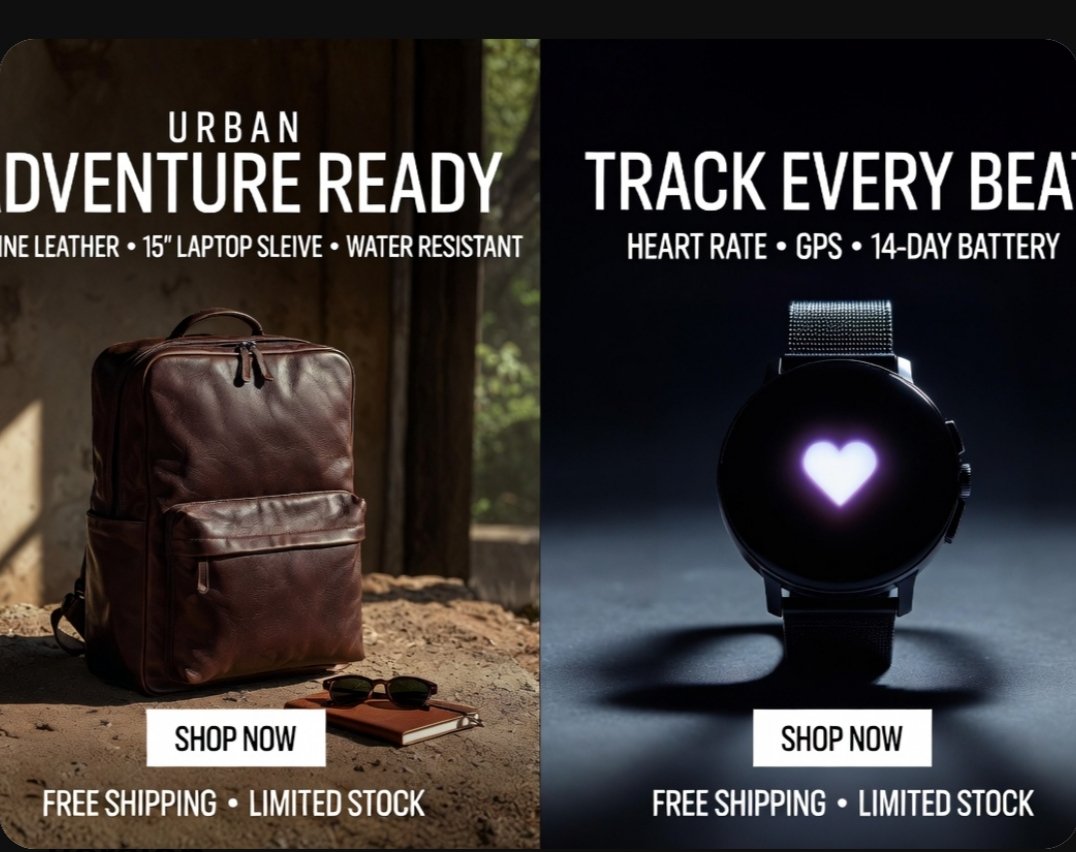
分割畫面產品廣告海報
逼真的雙螢幕電子商務廣告,展示了一款皮革背包和一款智慧手錶,非常適合社交推廣、市場橫幅廣告和線上商店行銷。
這是一個產品與商業的GPT Image 2範例。請使用下方可直接使用的提示資訊產生類似的視覺素材,並在重複使用前查看Awesome GPT Image 2 Prompts署名和商業用途授權資訊。
需要完整的提示符號集?請使用 產品與商業 主題中心提供更多相關範例,或打開 GPT Image 2 提示庫 有關完整範例索引、可重複使用結構和來源歸屬的資訊。
Free 1K preview
Generate one preview image instantly, no sign-up required.
3779/4000
提示詞
可直接複製的提示
{
  "type": "split-screen e-commerce advertisement poster",
  "style": "premium photorealistic retail marketing graphic, high contrast, polished commercial lighting, clean bold typography, modern direct-response ad design",
  "canvas": {
    "aspect_ratio": "4:3",
    "background": "black outer border with rounded-corner poster"
  },
  "layout": {
    "orientation": "vertical split",
    "sections": [
      {
        "title": "left product ad",
        "position": "left half",
        "count": 1,
        "product": "backpack",
        "headline_lines_count": 2,
        "cta_count": 1,
        "footer_count": 1
      },
      {
        "title": "right product ad",
        "position": "right half",
        "count": 1,
        "product": "smartwatch",
        "headline_lines_count": 2,
        "cta_count": 1,
        "footer_count": 1
      }
    ],
    "divider": "hard vertical split down the center"
  },
  "text": {
    "left": {
      "eyebrow": "{argument name=\"left eyebrow text\" default=\"URBAN\"}",
      "headline": "{argument name=\"left headline text\" default=\"ADVENTURE READY\"}",
      "features": "GENUINE LEATHER • 15\" LAPTOP SLEEVE • WATER RESISTANT",
      "button": "SHOP NOW",
      "footer": "FREE SHIPPING • LIMITED STOCK"
    },
    "right": {
      "headline": "{argument name=\"right headline text\" default=\"TRACK EVERY BEAT\"}",
      "features": "HEART RATE • GPS • 14-DAY BATTERY",
      "button": "SHOP NOW",
      "footer": "FREE SHIPPING • LIMITED STOCK"
    }
  },
  "left_panel": {
    "scene": "rustic indoor setting with warm natural sunlight entering from the side",
    "background_details_count": 3,
    "background_details": [
      "aged wall or wooden interior surface",
      "window opening with soft greenery visible outside",
      "dusty textured ground floor"
    ],
    "product": {
      "type": "{argument name=\"left product\" default=\"brown leather backpack\"}",
      "position": "lower left-center standing upright on the ground",
      "material": "rich polished leather",
      "color": "dark brown",
      "details_count": 5,
      "details": [
        "top carry handle",
        "double zipper top opening",
        "large front zip pocket",
        "side pocket visible on the left",
        "structured rectangular silhouette"
      ]
    },
    "supporting_props_count": 2,
    "supporting_props": [
      "a pair of dark sunglasses",
      "a small brown notebook placed near the backpack"
    ],
    "lighting": "warm cinematic sunlight from upper left creating soft highlights and earthy shadows",
    "button_style": "white rectangular button centered near lower middle of the left panel with black uppercase text"
  },
  "right_panel": {
    "scene": "dark studio product shot with cool moody spotlight",
    "background": "deep navy-to-black gradient",
    "product": {
      "type": "round black smartwatch",
      "position": "centered vertically and horizontally in right half",
      "details_count": 5,
      "details": [
        "circular black face",
        "glowing white-purple heart icon in the center of the screen",
        "dark metal case",
        "two side buttons visible on the right edge",
        "fine mesh metal strap"
      ]
    },
    "surface": "smooth studio floor with a soft circular shadow beneath the watch",
    "lighting": "cool spotlight from above and slightly behind, creating rim light and dramatic shadow",
    "button_style": "white rectangular button centered near lower middle of the right panel with black uppercase text"
  },
  "typography": {
    "font": "bold condensed sans-serif uppercase",
    "color": "white",
    "alignment": "centered within each panel",
    "feature_line_style": "smaller uppercase subheadline with bullet separators"
  }
}
提示變數
提示符號中可編輯的參數佔位符及其預設值。
多變的
left eyebrow text
預設
URBAN
多變的
left headline text
預設
ADVENTURE READY
多變的
right headline text
預設
TRACK EVERY BEAT
多變的
left product
預設
brown leather backpack
Best for
- - 產品與商業 visual exploration
- - Image generation and reference-image edits
- - Reusable briefs that keep source attribution visible
Change these parts
- - Subject, product, character, or scene
- - Aspect ratio, camera, lighting, and background
- - Brand, text, color, and output constraints
Recommended model and settings
- - Model: gpt-image-2
- - Input mode: 文生圖
- - Aspect ratio: source
- - Commercial status: review original source
How to use this prompt
- 1. Copy the prompt and preserve its structure for the first test.
- 2. Replace the subject, context, and publishing channel.
- 3. Change one camera, lighting, or style variable per iteration.
- 4. Inspect the output, source, text, and rights before reuse.
Limitations, source, and reuse cautions
- - Generated output is an editable draft, not factual, legal, or rights evidence.
- - Review the linked source, people, brands, logos, text, and third-party media before commercial use.
內容來自Awesome GPT Image 2 Prompts 。必須註明出處。商業用途狀態為allowed ;付費使用前請查看來源版權資訊。
此類案例更多
按類別、輸入模式相容性、品質和低風險進行優先排序。






重用和來源註釋
預覽案例後,請謹慎使用此提示。
- 1.複製提示或直接在 Dovoo 中使用生成按鈕開啟提示。
- 2.根據您的實際使用情況調整變數、寬高比和參考影像。
- 3.發布或付費使用前,請確認版權、署名要求以及品牌或肖像權風險。