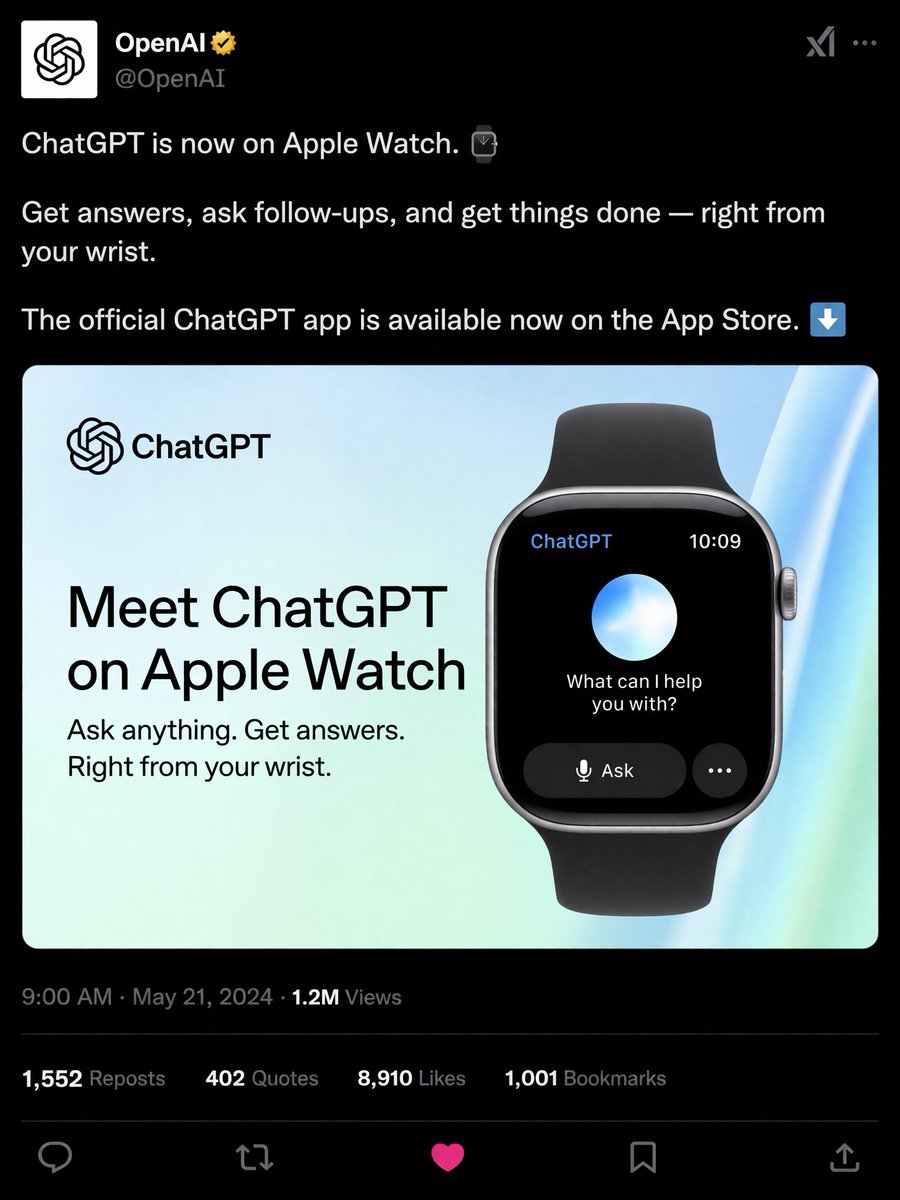
社群媒體產品發布模擬圖
產生逼真的深色模式社交媒體帖子,其中包含智慧手錶應用程式的宣傳圖片。
這是一個產品與商業的GPT Image 2範例。請使用下方可直接使用的提示資訊產生類似的視覺素材,並在重複使用前查看Awesome GPT Image 2 Prompts署名和商業用途授權資訊。
需要完整的提示符號集?請使用 產品與商業 主題中心提供更多相關範例,或打開 GPT Image 2 提示庫 有關完整範例索引、可重複使用結構和來源歸屬的資訊。
Free 1K preview
Generate one preview image instantly, no sign-up required.
1444/4000
提示詞
可直接複製的提示
{
  "type": "社交媒體帖子模擬圖",
  "theme": "深色模式",
  "header": {
    "avatar": "OpenAI 標誌",
    "account_name": "{argument name=\"account name\" default=\"OpenAI\"}",
    "badge": "金色勾選標記",
    "handle": "@OpenAI"
  },
  "post_text": [
    "{argument name=\"post text\" default=\"ChatGPT 現在已在 Apple Watch 上推出。\"}",
    "從您的手腕上獲取答案、提出後續問題並完成任務。",
    "官方 ChatGPT 應用程式現已在 App Store 上提供。"
  ],
  "embedded_card": {
    "background": "淺藍色和綠色漸變",
    "left_column": {
      "logo": "ChatGPT",
      "headline": "{argument name=\"card headline\" default=\"在 Apple Watch 上認識 ChatGPT\"}",
      "subheadline": "隨心所欲地提問。獲取答案。就在您的手腕上。"
    },
    "right_column": {
      "device": "配有黑色錶帶的智慧手錶",
      "screen_elements": {
        "top_bar": 2,
        "top_bar_labels": [
          "ChatGPT",
          "10:09"
        ],
        "center": "發光的藍色和白色光球",
        "text": "{argument name=\"watch screen text\" default=\"我可以為您做些什麼?\"}",
        "buttons": 2,
        "button_labels": [
          "提問",
          "..."
        ]
      }
    }
  },
  "footer": {
    "metadata": "上午 9:00 · 2024 年 5 月 21 日 · 120 萬觀看次數",
    "engagement_stats": {
      "count": 4,
      "labels": [
        "1,552 次轉發",
        "402 次引用",
        "{argument name=\"likes count\" default=\"8,910\"} 個讚",
        "1,001 個書籤"
      ]
    },
    "action_icons": {
      "count": 5,
      "types": [
        "回覆",
        "轉發",
        "讚",
        "書籤",
        "分享"
      ]
    }
  }
}
提示變數
提示符號中可編輯的參數佔位符及其預設值。
多變的
account name
預設
OpenAI
多變的
post text
預設
ChatGPT is now on Apple Watch.
多變的
card headline
預設
Meet ChatGPT on Apple Watch
多變的
watch screen text
預設
What can I help you with?
多變的
likes count
預設
8,910
Best for
- - 產品與商業 visual exploration
- - Image generation and reference-image edits
- - Reusable briefs that keep source attribution visible
Change these parts
- - Subject, product, character, or scene
- - Aspect ratio, camera, lighting, and background
- - Brand, text, color, and output constraints
Recommended model and settings
- - Model: gpt-image-2
- - Input mode: 文生圖
- - Aspect ratio: source
- - Commercial status: review original source
How to use this prompt
- 1. Copy the prompt and preserve its structure for the first test.
- 2. Replace the subject, context, and publishing channel.
- 3. Change one camera, lighting, or style variable per iteration.
- 4. Inspect the output, source, text, and rights before reuse.
Limitations, source, and reuse cautions
- - Generated output is an editable draft, not factual, legal, or rights evidence.
- - Review the linked source, people, brands, logos, text, and third-party media before commercial use.
內容來自Awesome GPT Image 2 Prompts 。必須註明出處。商業用途狀態為allowed ;付費使用前請查看來源版權資訊。
此類案例更多
按類別、輸入模式相容性、品質和低風險進行優先排序。






重用和來源註釋
預覽案例後,請謹慎使用此提示。
- 1.複製提示或直接在 Dovoo 中使用生成按鈕開啟提示。
- 2.根據您的實際使用情況調整變數、寬高比和參考影像。
- 3.發布或付費使用前,請確認版權、署名要求以及品牌或肖像權風險。