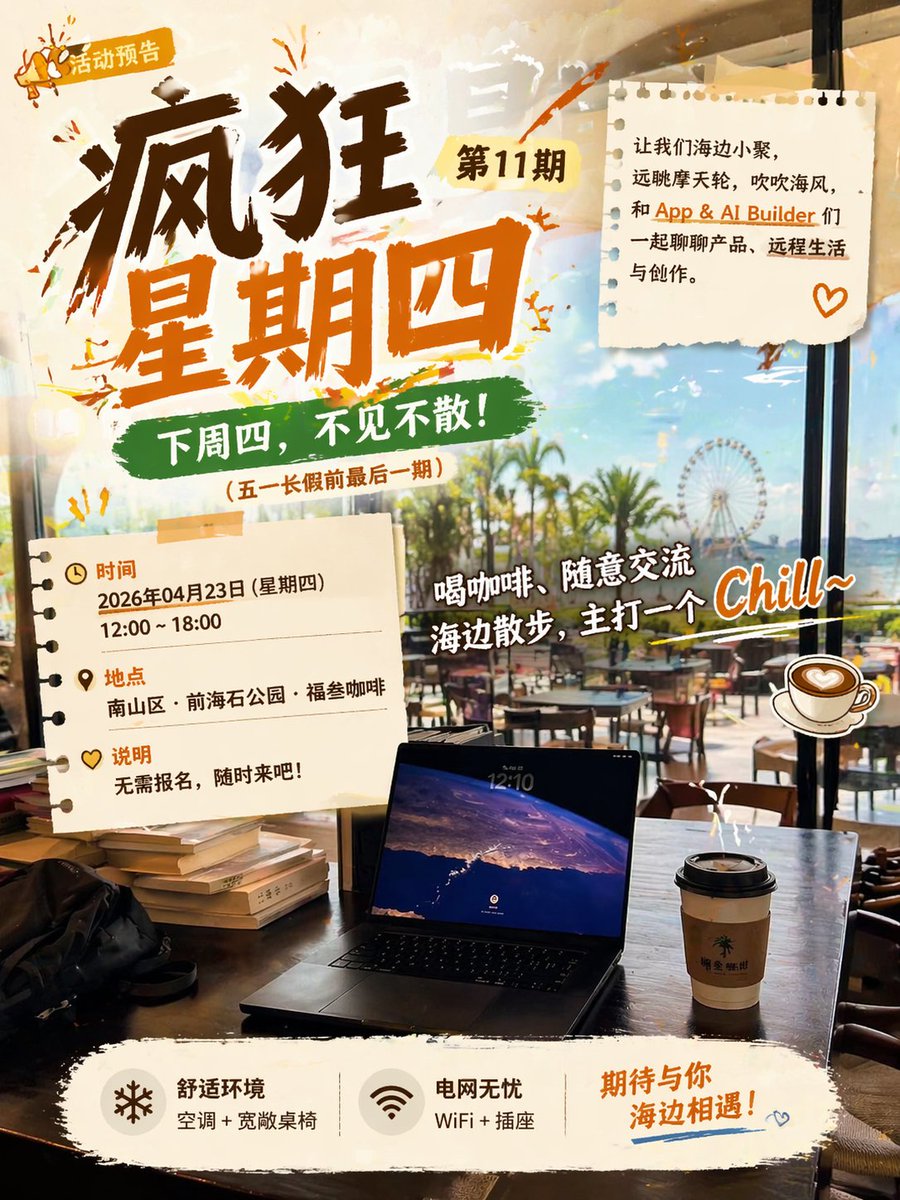
海濱咖啡館活動海報
一張色彩鮮豔的中文宣傳海報,適用於輕鬆的海邊咖啡聚會,可用於社交活動公告、社區聚會和生活方式行銷。
這是一個平面設計和海報設計的GPT Image 2範例。請使用下方可直接使用的提示資訊產生類似的視覺素材,並在重複使用前查看Awesome GPT Image 2 Prompts署名和商業用途授權資訊。
需要完整的提示符號集?請使用 平面設計和海報設計 主題中心提供更多相關範例,或打開 GPT Image 2 提示庫 有關完整範例索引、可重複使用結構和來源歸屬的資訊。
Free 1K preview
Generate one preview image instantly, no sign-up required.
3257/4000
提示詞
可直接複製的提示
Create a vibrant Chinese event poster with a warm, fashionable café aesthetic. The perspective should be from inside a seaside café looking outwards, with a view through large floor-to-ceiling windows of palm trees, a bright blue sky, outdoor seating, and a distant Ferris wheel. The composition should combine a sense of real-life scene with energetic graphic design. In the foreground, place a dark wood table with 1 open laptop in the center at the bottom, 1 to-go coffee cup with a black lid to the right, 1 black bag to the left, and a small stack of books near the left edge. Use a bright, slightly golden afternoon atmosphere with reflections on the glass to create a relaxed vacation vibe.

Overlay the poster graphics in a collage style, using elements like torn paper, brushstroke scribbles, stickers, and washi tape. The main title in the upper left corner should be in large, deep brown and orange handwritten calligraphy, reading “Crazy Thursday,” with a small yellow tag next to it reading “Issue 11,” and an even smaller badge in the upper left corner reading “Event Preview” with a miniature megaphone icon. Below the main title, add a green brushstroke banner with the text “See you next Thursday!” and a smaller line of text in brackets below: “ (Last issue before the May Day holiday).”

Add 2 torn notebook paper cards: one in the upper right corner and one in the lower left corner. The paper in the upper right corner should contain a concise Chinese invitation copy, using black and orange typography, reading: “Let’s gather by the sea, gaze at the Ferris wheel, feel the sea breeze, and chat about products, remote life, and creation with App & AI Builder friends.” and add a small orange heart doodle in the lower right corner of the paper. The paper in the lower left corner should list 3 information blocks with icons and orange titles: “Time,” “Location,” and “Description.” Under “Time,” write “April 23, 2026 (Thursday)” and “12:00 ~ 18:00.” Under “Location,” write “Nanshan District · Qianhai Stone Park · Fu San Coffee.” Under “Description,” write “No registration required, come anytime!”

In the right-center area, place a large, white handwritten-style playful slogan with a dark outline, slightly tilted upwards, reading “Drink coffee, chat casually, stroll along the beach, aiming for a Chill~ vibe.” Add 1 illustration-style coffee cup sticker to the right of this slogan. Use vibrant orange paint splatters and sketch doodles around the titles and paper notes to make the poster look young and casual.

At the bottom, place a wide, off-white torn paper-style footer with 3 functional blocks arranged horizontally. Block 1: a snowflake icon with the text “Comfortable Environment” and small text “Air conditioning + spacious tables and chairs.” Block 2: a Wi-Fi icon with the text “Worry-free Power” and small text “WiFi + outlets.” Block 3: larger orange handwritten text “Looking forward to meeting you by the sea!” with a blue underline decoration and a miniature heart doodle below. The overall design should integrate realistic photography with poster elements, featuring strong contrast, calligraphy strokes, scrapbook texture, café life atmosphere, and a fashionable AI-generated social media event poster style.
Best for
- - 平面設計和海報設計 visual exploration
- - Image generation and reference-image edits
- - Reusable briefs that keep source attribution visible
Change these parts
- - Subject, product, character, or scene
- - Aspect ratio, camera, lighting, and background
- - Brand, text, color, and output constraints
Recommended model and settings
- - Model: gpt-image-2
- - Input mode: 文生圖
- - Aspect ratio: source
- - Commercial status: review original source
How to use this prompt
- 1. Copy the prompt and preserve its structure for the first test.
- 2. Replace the subject, context, and publishing channel.
- 3. Change one camera, lighting, or style variable per iteration.
- 4. Inspect the output, source, text, and rights before reuse.
Limitations, source, and reuse cautions
- - Generated output is an editable draft, not factual, legal, or rights evidence.
- - Review the linked source, people, brands, logos, text, and third-party media before commercial use.
內容來自Awesome GPT Image 2 Prompts 。必須註明出處。商業用途狀態為allowed ;付費使用前請查看來源版權資訊。
此類案例更多
按類別、輸入模式相容性、品質和低風險進行優先排序。






重用和來源註釋
預覽案例後,請謹慎使用此提示。
- 1.複製提示或直接在 Dovoo 中使用生成按鈕開啟提示。
- 2.根據您的實際使用情況調整變數、寬高比和參考影像。
- 3.發布或付費使用前,請確認版權、署名要求以及品牌或肖像權風險。