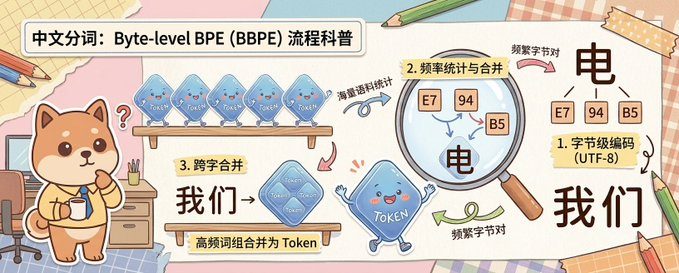
剪貼簿位元組級 BPE 解釋器
此提示會產生一張寬幅手繪教育資訊圖,其中包含可愛的吉祥物角色,以友善的中國科普風格解釋位元組級 BPE 標記化。
這是一個插畫與藝術的GPT Image 2範例。請使用下方可直接使用的提示資訊產生類似的視覺素材,並在重複使用前查看Awesome GPT Image 2 Prompts署名和商業用途授權資訊。
需要完整的提示符號集?請使用 插畫與藝術 主題中心提供更多相關範例,或打開 GPT Image 2 提示庫 有關完整範例索引、可重複使用結構和來源歸屬的資訊。
Free 1K preview
Generate one preview image instantly, no sign-up required.
2500/4000
提示詞
可直接複製的提示
A cute horizontal educational infographic in a hand-drawn scrapbook style, with a soft desktop and paper collage background, designed to explain the principle of Chinese word segmentation based on byte-level BPE. The picture is divided into 3 clear teaching areas, spanning the entire width of the banner from left to right. On the far left stands a cute Shiba Inu mascot, {argument name="character name" default="Chai Xiaoqi"}, with warm brown and cream fur, a round face, small triangular ears, rosy cheeks, and a curious expression, holding a cup and standing next to a desk with drawers, pencils, and a chair. Above the Shiba Inu is a bold, rounded white title box containing black Chinese characters: {argument name="headline text" default="Chinese Word Segmentation: A Popular Science Explanation of Byte-level BPE (BBPE) Process"}. In the first teaching area near the top, 4 translucent blue Token-shaped squares are displayed on a wooden shelf, each labeled “Token” and accompanied by a curved arrow and handwritten Chinese annotation “word frequency corpus statistics” pointing to the next step. In the second area, a large magnifying glass highlights 3 frequency squares labeled “E7”, “94”, and “B5”, with a regional label written on a yellow sticky note that reads “2. Frequency Statistics and Merging”; below and inside the magnified area is a large black Chinese character “electricity”, accompanied by handwritten notes “frequent byte pairs”. In the lower middle of the third area, add a wooden sign and a larger merged translucent blue Token square labeled “Token”, with a yellow sticky note that reads “3. Cross-word Merging”, large black Chinese characters “we→”, and a description strip below “high-frequency word combinations are merged into Tokens”. On the far right, the final explanation result is displayed, with 3 small byte squares labeled “E7”, “94”, and “B5” located above a large black Chinese character “electricity”, next to a sticky note card that reads “1. Byte-level Encoding (UTF-8)”, and below a large black Chinese vocabulary “we”. Connect the areas with pink, blue, and green curved arrows to show the process flow. Near the bottom center, include a blue Token mascot with small limbs, a smiling face, and waving hands. Use soft cream, pink, beige, and light blue colors, with thick and clear lines, sticker-like cut-out shapes, tape corners, notebook textures, scattered pencils, and a friendly handwritten illustration style suitable for popular science charts.提示變數
提示符號中可編輯的參數佔位符及其預設值。
多變的
character name
預設
Chai Xiaoqi
多變的
headline text
預設
Chinese Word Segmentation: A Popular Science Explanation of Byte-level BPE (BBPE) Process
Best for
- - 插畫與藝術 visual exploration
- - Image generation and reference-image edits
- - Reusable briefs that keep source attribution visible
Change these parts
- - Subject, product, character, or scene
- - Aspect ratio, camera, lighting, and background
- - Brand, text, color, and output constraints
Recommended model and settings
- - Model: gpt-image-2
- - Input mode: 文生圖
- - Aspect ratio: source
- - Commercial status: review original source
How to use this prompt
- 1. Copy the prompt and preserve its structure for the first test.
- 2. Replace the subject, context, and publishing channel.
- 3. Change one camera, lighting, or style variable per iteration.
- 4. Inspect the output, source, text, and rights before reuse.
Limitations, source, and reuse cautions
- - Generated output is an editable draft, not factual, legal, or rights evidence.
- - Review the linked source, people, brands, logos, text, and third-party media before commercial use.
內容來自Awesome GPT Image 2 Prompts 。必須註明出處。商業用途狀態為allowed ;付費使用前請查看來源版權資訊。
此類案例更多
按類別、輸入模式相容性、品質和低風險進行優先排序。






重用和來源註釋
預覽案例後,請謹慎使用此提示。
- 1.複製提示或直接在 Dovoo 中使用生成按鈕開啟提示。
- 2.根據您的實際使用情況調整變數、寬高比和參考影像。
- 3.發布或付費使用前,請確認版權、署名要求以及品牌或肖像權風險。