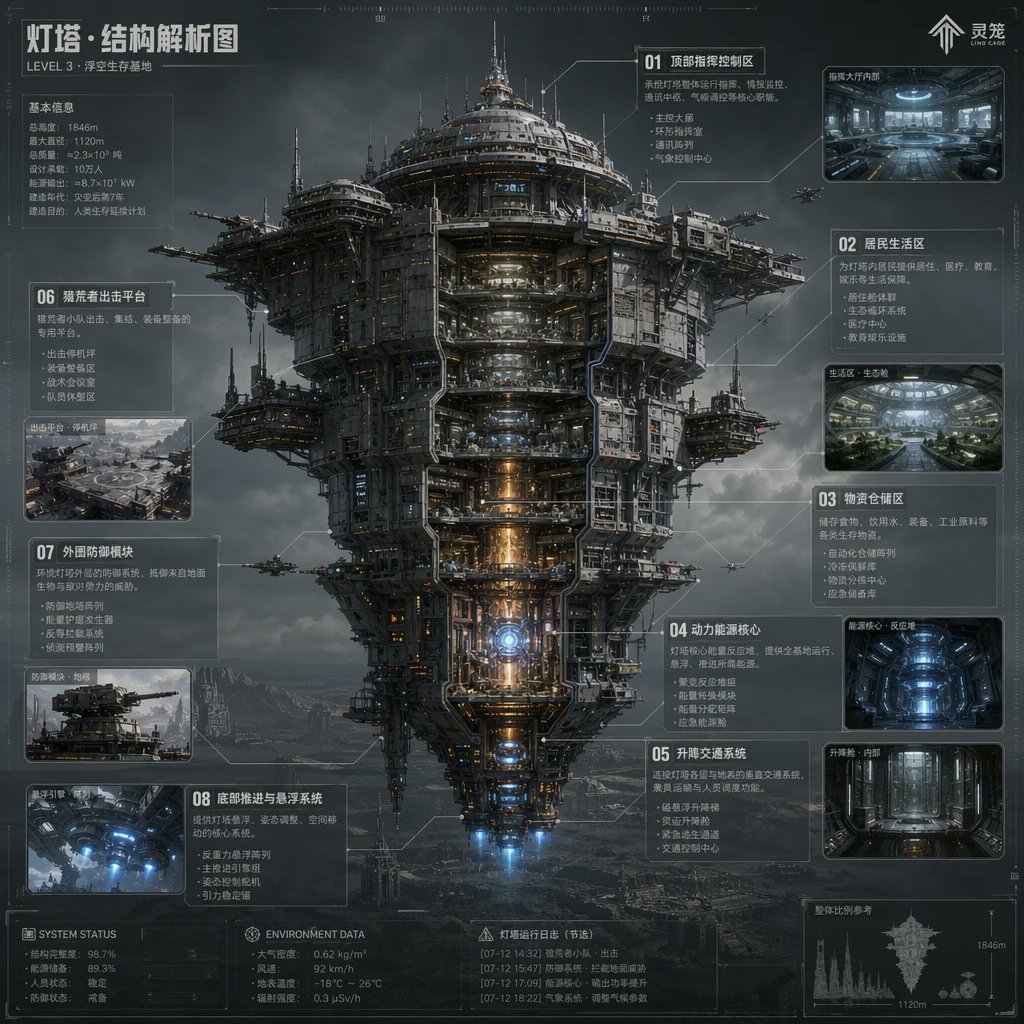
科幻燈塔結構圖
這個提示會產生一張內容豐富的未來主義中國風資訊圖海報,海報上是一座巨大的漂浮堡壘,帶有剖面圖,非常適合用於概念藝術演示和世界構建圖。
這是一個插畫與藝術的GPT Image 2範例。請使用下方可直接使用的提示資訊產生類似的視覺素材,並在重複使用前查看Awesome GPT Image 2 Prompts署名和商業用途授權資訊。
需要完整的提示符號集?請使用 插畫與藝術 主題中心提供更多相關範例,或打開 GPT Image 2 提示庫 有關完整範例索引、可重複使用結構和來源歸屬的資訊。
Free 1K preview
Generate one preview image instantly, no sign-up required.
3094/4000
提示詞
可直接複製的提示
{
  "type": "科幻技術資訊圖海報",
  "subject": "正面剖面圖展示的大型漂浮堡壘巨型結構",
  "style": "超細緻的硬表面科幻概念藝術,電影級工業現實主義,藍圖啟發的HUD疊加層,大氣的體積雲,深色鋼鐵紋理,微妙的橙色和藍色內部照明,高細節的標籤線和示意圖標註",
  "setting": {
    "location": "荒涼多山廢土上方的暴風雨天空",
    "mood": "寒冷、宏偉、未來主義、反烏托邦"
  },
  "main_structure": {
    "name": "燈塔 · 結構分析圖",
    "subtitle": "3級 · 漂浮生存基地",
    "form": "一個巨大的垂直分層空中城市塔樓,具有寬闊的圓形上部王冠,密集的機械上部結構,暴露的平台,天線尖塔,停機臂,懸掛的側艙和錐形下部引擎部分",
    "view": "居中全身立面圖,對稱構圖,部分內部剖面圖,露出堆疊的內部甲板和核心系統",
    "materials": "槍灰色鋼材、風化的鈦金屬、管道、電纜、強化玻璃、發光的機械",
    "lighting": "陰鬱多雲的日光,帶有發光的內部走廊,溫暖的反應堆核心光線,底部藍色推力光線"
  },
  "layout": {
    "composition": "單一的中央巨型結構,周圍環繞著標記的資訊面板和嵌入式圖像",
    "sections": [
      {
        "title": "01 頂部指揮與控制區",
        "position": "右上",
        "count": 1,
        "labels": [
          "頂部指揮與控制區"
        ]
      },
      {
        "title": "02 居住區",
        "position": "右上方中間",
        "count": 1,
        "labels": [
          "居住區"
        ]
      },
      {
        "title": "03 物流儲存區",
        "position": "右中間",
        "count": 1,
        "labels": [
          "物流儲存區"
        ]
      },
      {
        "title": "04 動力核心",
        "position": "右下方中間",
        "count": 1,
        "labels": [
          "動力和能源核心"
        ]
      },
      {
        "title": "05 升降和運輸系統",
        "position": "右下",
        "count": 1,
        "labels": [
          "升降和運輸系統"
        ]
      },
      {
        "title": "06 懸浮外殼衝擊共享平台",
        "position": "左上方中間",
        "count": 1,
        "labels": [
          "懸浮外殼衝擊共享平台"
        ]
      },
      {
        "title": "07 外部防禦模組",
        "position": "左中間偏下",
        "count": 1,
        "labels": [
          "外部防禦模組"
        ]
      },
      {
        "title": "08 底部推進和懸浮系統",
        "position": "左下",
        "count": 1,
        "labels": [
          "底部推進和懸浮系統"
        ]
      }
    ],
    "inset_images_count": 6,
    "inset_images": [
      "右上指揮大廳內部",
      "右上方中間的住宅綠色內部",
      "右中間藍色照明的儲存室或反應堆室",
      "右下垂直電梯走廊",
      "左中間平台外部概覽",
      "左下底部推力器內部"
    ],
    "extra_panels_count": 5,
    "extra_panels": [
      "左上角基本資訊統計塊",
      "左下角系統狀態塊",
      "底部中心環境數據塊",
      "底部中心信標操作日誌(摘錄)塊",
      "底部右側輪廓比例比較,標記有1846米和1120米"
    ]
  },
  "text_elements": {
    "brand_mark": "Soul",
    "top_left_heading": "燈塔 · 結構分析圖",
    "small_subheading": "3級 · 漂浮生存基地",
    "language": "中文",
    "density": "密集的技術註釋,小的示意圖筆記,細的連接線,測量標記,微小的介面字形"
  },
  "secondary_elements": {
    "aircraft_count": 6,
    "aircraft": "環繞結構飛行的少量護衛無人機或攻擊機",
    "background_details": "遠山,霧,分層的暴風雲,隱約的地面結構"
  },
  "rendering": {
    "quality": "高解析度拋光概念圖",
    "aspect_ratio": "1:1",
    "camera": "類似正交透視的遠攝資訊圖呈現,帶有輕微的電影深度",
    "color_palette": "炭灰色,鋼藍色,冷白色,琥珀色高光,電藍色推力器"
  },
  "customization": {
    "headline": "{argument name=\"headline text\" default=\"燈塔 · 結構分析圖\"}",
    "subtitle": "{argument name=\"subtitle text\" default=\"3級 · 漂浮生存基地\"}",
    "structure_name": "{argument name=\"structure name\" default=\"燈塔\"}",
    "primary_style": "{argument name=\"visual style\" default=\"超細緻的硬表面科幻概念藝術\"}",
    "environment": "{argument name=\"environment\" default=\"荒涼多山廢土上方的暴風雨天空\"}"
  }
}
提示變數
提示符號中可編輯的參數佔位符及其預設值。
多變的
headline text
預設
Lighthouse · Structural Analysis Diagram
多變的
subtitle text
預設
LEVEL 3 · Floating Survival Base
多變的
structure name
預設
Lighthouse
多變的
visual style
預設
ultra-detailed hard-surface science fiction concept art
多變的
environment
預設
stormy sky above a barren mountainous wasteland
Best for
- - 插畫與藝術 visual exploration
- - Image generation and reference-image edits
- - Reusable briefs that keep source attribution visible
Change these parts
- - Subject, product, character, or scene
- - Aspect ratio, camera, lighting, and background
- - Brand, text, color, and output constraints
Recommended model and settings
- - Model: gpt-image-2
- - Input mode: 文生圖
- - Aspect ratio: source
- - Commercial status: review original source
How to use this prompt
- 1. Copy the prompt and preserve its structure for the first test.
- 2. Replace the subject, context, and publishing channel.
- 3. Change one camera, lighting, or style variable per iteration.
- 4. Inspect the output, source, text, and rights before reuse.
Limitations, source, and reuse cautions
- - Generated output is an editable draft, not factual, legal, or rights evidence.
- - Review the linked source, people, brands, logos, text, and third-party media before commercial use.
內容來自Awesome GPT Image 2 Prompts 。必須註明出處。商業用途狀態為allowed ;付費使用前請查看來源版權資訊。
此類案例更多
按類別、輸入模式相容性、品質和低風險進行優先排序。






重用和來源註釋
預覽案例後,請謹慎使用此提示。
- 1.複製提示或直接在 Dovoo 中使用生成按鈕開啟提示。
- 2.根據您的實際使用情況調整變數、寬高比和參考影像。
- 3.發布或付費使用前,請確認版權、署名要求以及品牌或肖像權風險。