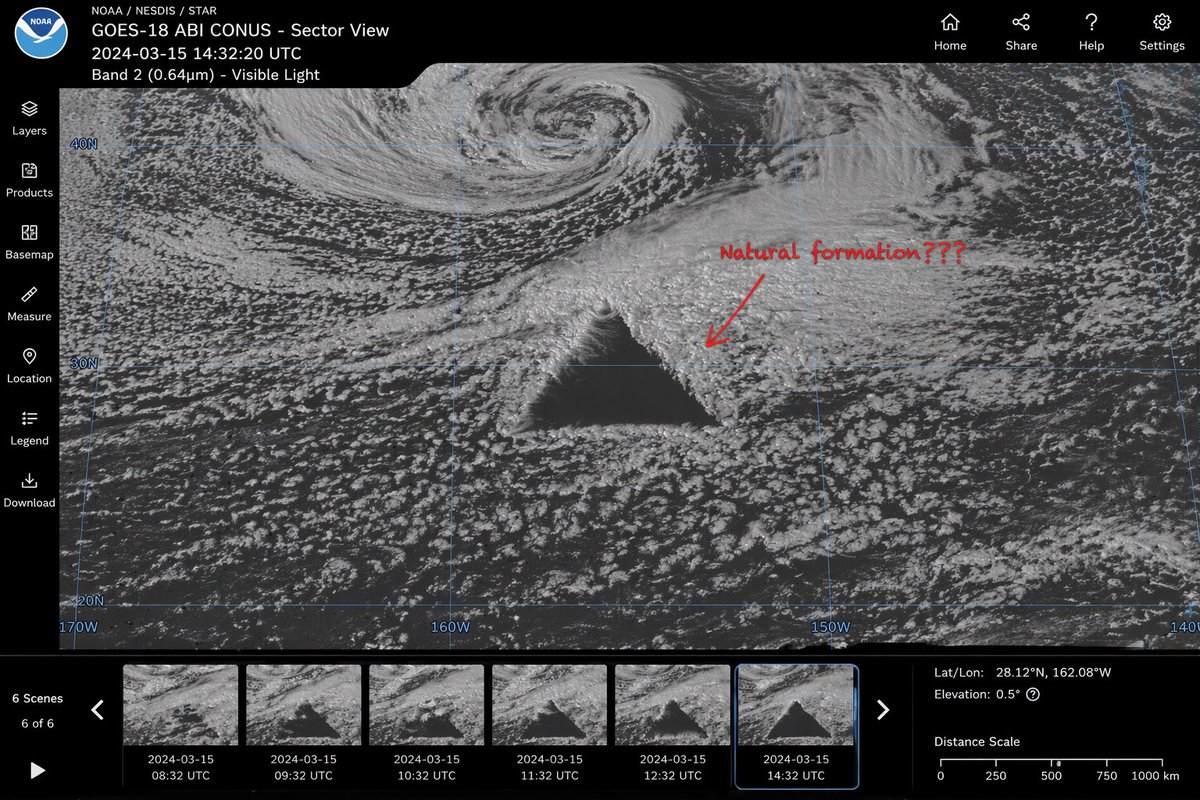
衛星異常介面模型
產生逼真的衛星影像網路介面,其中包含神秘的幾何異常、時間軸縮圖和使用者介面控制。
這是一個平面設計和海報設計的GPT Image 2範例。請使用下方可直接使用的提示資訊產生類似的視覺素材,並在重複使用前查看Awesome GPT Image 2 Prompts署名和商業用途授權資訊。
需要完整的提示符號集?請使用 平面設計和海報設計 主題中心提供更多相關範例,或打開 GPT Image 2 提示庫 有關完整範例索引、可重複使用結構和來源歸屬的資訊。
Free 1K preview
Generate one preview image instantly, no sign-up required.
1645/4000
提示詞
可直接複製的提示
{
  "type": "satellite imagery web interface mockup",
  "main_display": {
    "imagery": "greyscale satellite view of ocean clouds featuring a {argument name=\"anomaly shape\" default=\"massive, perfectly geometric dark triangle\"} in the center",
    "annotation": "red handwritten text '{argument name=\"annotation text\" default=\"Natural formation???\"}' with a red arrow pointing to the anomaly",
    "overlay": "faint blue latitude and longitude grid lines with coordinate labels like 40N, 30N, 160W"
  },
  "ui_layout": {
    "top_header": {
      "left_section": "NOAA logo, text '{argument name=\"satellite name\" default=\"GOES-18 ABI CONUS - Sector View\"}', '{argument name=\"timestamp\" default=\"2024-03-15 14:32:20 UTC\"}', and 'Band 2 (0.64µm) - Visible Light'",
      "right_section": "4 navigation icons with labels: Home, Share, Help, Settings"
    },
    "left_sidebar": {
      "count": 7,
      "items": [
        "Layers",
        "Products",
        "Basemap",
        "Measure",
        "Location",
        "Legend",
        "Download"
      ]
    },
    "bottom_panel": {
      "timeline": {
        "controls": "Play button, left/right arrows, text '6 Scenes', '6 of 6'",
        "thumbnails": {
          "count": 6,
          "description": "sequential satellite images showing the anomaly's progression, with hourly timestamps from 08:32 UTC to 14:32 UTC"
        }
      },
      "data_readout": {
        "coordinates": "{argument name=\"coordinate text\" default=\"Lat/Lon: 28.12°N, 162.08°W\"}",
        "elevation": "Elevation: 0.5°",
        "scale": "Distance Scale bar from 0 to 1000 km"
      }
    }
  }
}
提示變數
提示符號中可編輯的參數佔位符及其預設值。
多變的
anomaly shape
預設
massive, perfectly geometric dark triangle
多變的
annotation text
預設
Natural formation???
多變的
satellite name
預設
GOES-18 ABI CONUS - Sector View
多變的
timestamp
預設
2024-03-15 14:32:20 UTC
多變的
coordinate text
預設
Lat/Lon: 28.12°N, 162.08°W
Best for
- - 平面設計和海報設計 visual exploration
- - Image generation and reference-image edits
- - Reusable briefs that keep source attribution visible
Change these parts
- - Subject, product, character, or scene
- - Aspect ratio, camera, lighting, and background
- - Brand, text, color, and output constraints
Recommended model and settings
- - Model: gpt-image-2
- - Input mode: 文生圖
- - Aspect ratio: source
- - Commercial status: review original source
How to use this prompt
- 1. Copy the prompt and preserve its structure for the first test.
- 2. Replace the subject, context, and publishing channel.
- 3. Change one camera, lighting, or style variable per iteration.
- 4. Inspect the output, source, text, and rights before reuse.
Limitations, source, and reuse cautions
- - Generated output is an editable draft, not factual, legal, or rights evidence.
- - Review the linked source, people, brands, logos, text, and third-party media before commercial use.
內容來自Awesome GPT Image 2 Prompts 。必須註明出處。商業用途狀態為allowed ;付費使用前請查看來源版權資訊。
此類案例更多
按類別、輸入模式相容性、品質和低風險進行優先排序。






重用和來源註釋
預覽案例後,請謹慎使用此提示。
- 1.複製提示或直接在 Dovoo 中使用生成按鈕開啟提示。
- 2.根據您的實際使用情況調整變數、寬高比和參考影像。
- 3.發布或付費使用前,請確認版權、署名要求以及品牌或肖像權風險。