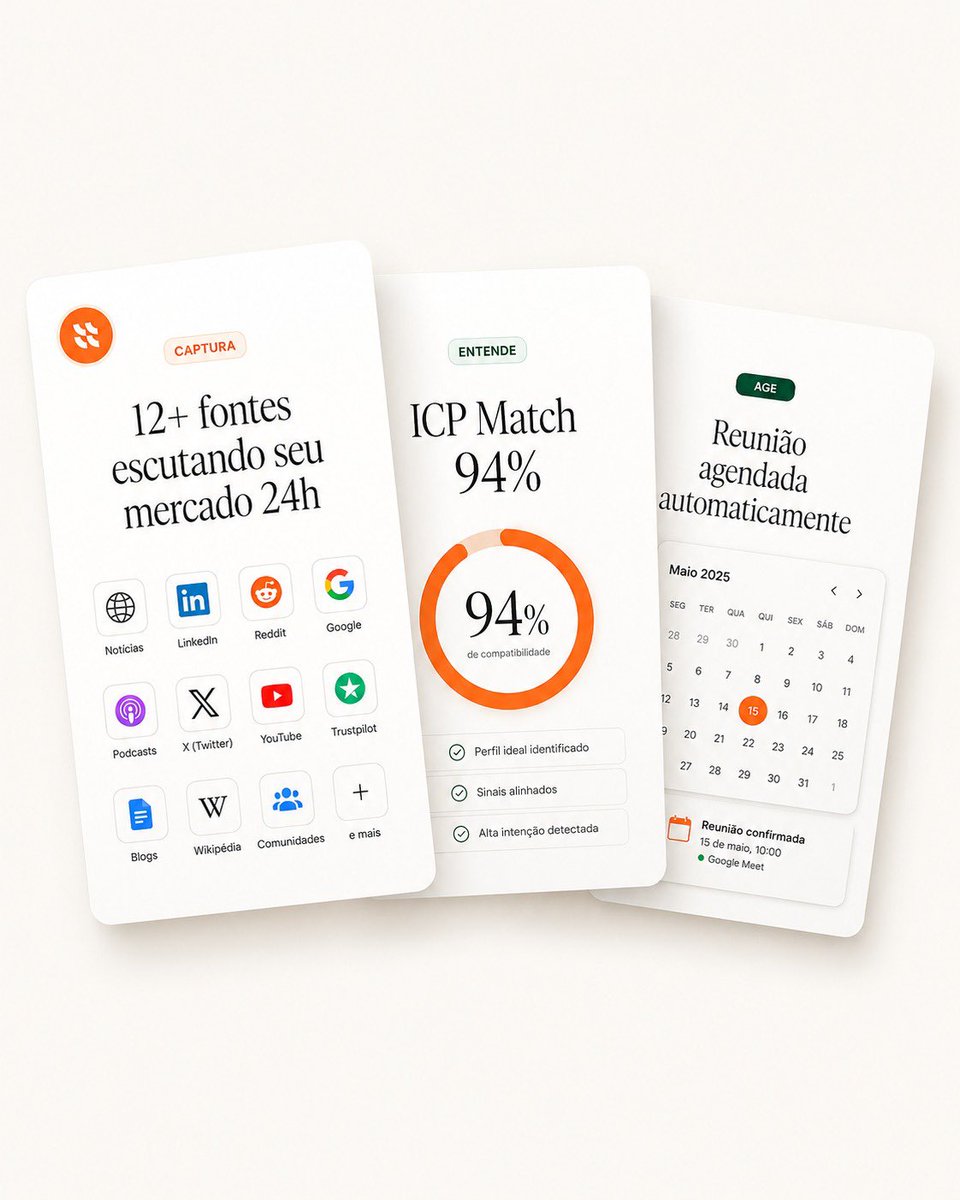
重疊的SaaS功能卡
一個精美的落地頁主圖模型,包含三個重疊的 SaaS 功能卡,分別用於擷取、配對評分和自動排程。
這是一個產品與商業的GPT Image 2範例。請使用下方可直接使用的提示資訊產生類似的視覺素材,並在重複使用前查看Awesome GPT Image 2 Prompts署名和商業用途授權資訊。
需要完整的提示符號集?請使用 產品與商業 主題中心提供更多相關範例,或打開 GPT Image 2 提示庫 有關完整範例索引、可重複使用結構和來源歸屬的資訊。
Free 1K preview
Generate one preview image instantly, no sign-up required.
3357/4000
提示詞
可直接複製的提示
Goal: Create a clean landing-page hero visual showing three overlapping white SaaS feature cards for a sales intelligence / lead monitoring product, in a premium minimal Figma-style mockup.

Canvas: Square 1:1 composition, warm off-white background with very soft beige gradient, subtle vignette, realistic soft shadows under cards. Cards are tall rounded rectangles with slight perspective tilt and depth, floating in the center. Use elegant editorial serif typography for large headings and small sans-serif labels.

Layout: Arrange exactly 3 vertical cards, overlapping horizontally. The left card is in front and tilted slightly counterclockwise, the middle card is centered and nearly upright, the right card sits behind and tilted slightly clockwise. Keep generous whitespace and rounded corners.

Card 1, left card — capture sources: At the top left place a small orange circular logo icon with abstract white marks. Near the top center place a pale peach pill label reading “CAPTURA”. Large headline in Portuguese: “{argument name="left card headline" default="12+ fontes escutando seu mercado 24h"}”. Below it, show exactly 12 small rounded source tiles in a 3-column by 4-row grid, each with an icon and label. The 12 labels are: “Notícias”, “LinkedIn”, “Reddit”, “Google”, “Podcasts”, “X (Twitter)”, “YouTube”, “Trustpilot”, “Blogs”, “Wikipédia”, “Comunidades”, “e mais”. Use recognizable simplified icons: globe, LinkedIn logo, Reddit alien, Google G, podcast glyph, X logo, YouTube play button, green trust star, document/blog icon, W, group/community dots, plus sign.

Card 2, center card — match score: Place a pale green pill label reading “ENTENDE”. Main headline text: “{argument name="match headline" default="ICP Match 94%"}”. Center a thick circular donut progress ring in bright orange, almost complete, with pale peach remainder. Inside the ring, display “{argument name="match percentage" default="94%"}” in large serif type and a tiny subtitle “de compatibilidade”. Below the ring place exactly 3 thin rounded checklist rows with small green check icons and the labels: “Perfil ideal identificado”, “Sinais alinhados”, “Alta intenção detectada”.

Card 3, right card — action scheduling: Place a dark green pill label reading “AGE”. Large headline in Portuguese: “{argument name="right card headline" default="Reunião agendada automaticamente"}”. Below it, include a compact calendar widget headed “Maio 2025” with weekday labels in Portuguese: “SEG”, “TER”, “QUA”, “QUI”, “SEX”, “SÁB”, “DOM”. Show a monthly grid of dates with the 15 highlighted by an orange circle. Add small left and right chevrons near the calendar header. At the bottom, include a confirmation block with an orange calendar icon and the text “Reunião confirmada”, “15 de maio, 10:00”, and a green dot followed by “Google Meet”.

Visual style: High-end SaaS landing page aesthetic, soft 3D paper cards, off-white surfaces, thin pale gray dividers, muted green and orange accent colors, subtle shadows, crisp vector UI icons, refined typography, realistic but clean product mockup.

Constraints: Use exactly 3 cards, exactly 12 source tiles on the left card, exactly 3 checklist rows on the middle card, and one calendar widget on the right card. Keep all text legible, no people, no extra logos beyond the specified source icons, no watermark, no browser chrome.
提示變數
提示符號中可編輯的參數佔位符及其預設值。
多變的
left card headline
預設
12+ fontes escutando seu mercado 24h
多變的
match headline
預設
ICP Match 94%
多變的
match percentage
預設
94%
多變的
right card headline
預設
Reunião agendada automaticamente
Best for
- - 產品與商業 visual exploration
- - Image generation and reference-image edits
- - Reusable briefs that keep source attribution visible
Change these parts
- - Subject, product, character, or scene
- - Aspect ratio, camera, lighting, and background
- - Brand, text, color, and output constraints
Recommended model and settings
- - Model: gpt-image-2
- - Input mode: 文生圖
- - Aspect ratio: source
- - Commercial status: review original source
How to use this prompt
- 1. Copy the prompt and preserve its structure for the first test.
- 2. Replace the subject, context, and publishing channel.
- 3. Change one camera, lighting, or style variable per iteration.
- 4. Inspect the output, source, text, and rights before reuse.
Limitations, source, and reuse cautions
- - Generated output is an editable draft, not factual, legal, or rights evidence.
- - Review the linked source, people, brands, logos, text, and third-party media before commercial use.
內容來自Awesome GPT Image 2 Prompts 。必須註明出處。商業用途狀態為allowed ;付費使用前請查看來源版權資訊。
此類案例更多
按類別、輸入模式相容性、品質和低風險進行優先排序。






重用和來源註釋
預覽案例後,請謹慎使用此提示。
- 1.複製提示或直接在 Dovoo 中使用生成按鈕開啟提示。
- 2.根據您的實際使用情況調整變數、寬高比和參考影像。
- 3.發布或付費使用前,請確認版權、署名要求以及品牌或肖像權風險。