Plush Whale Tokyo Design Studio
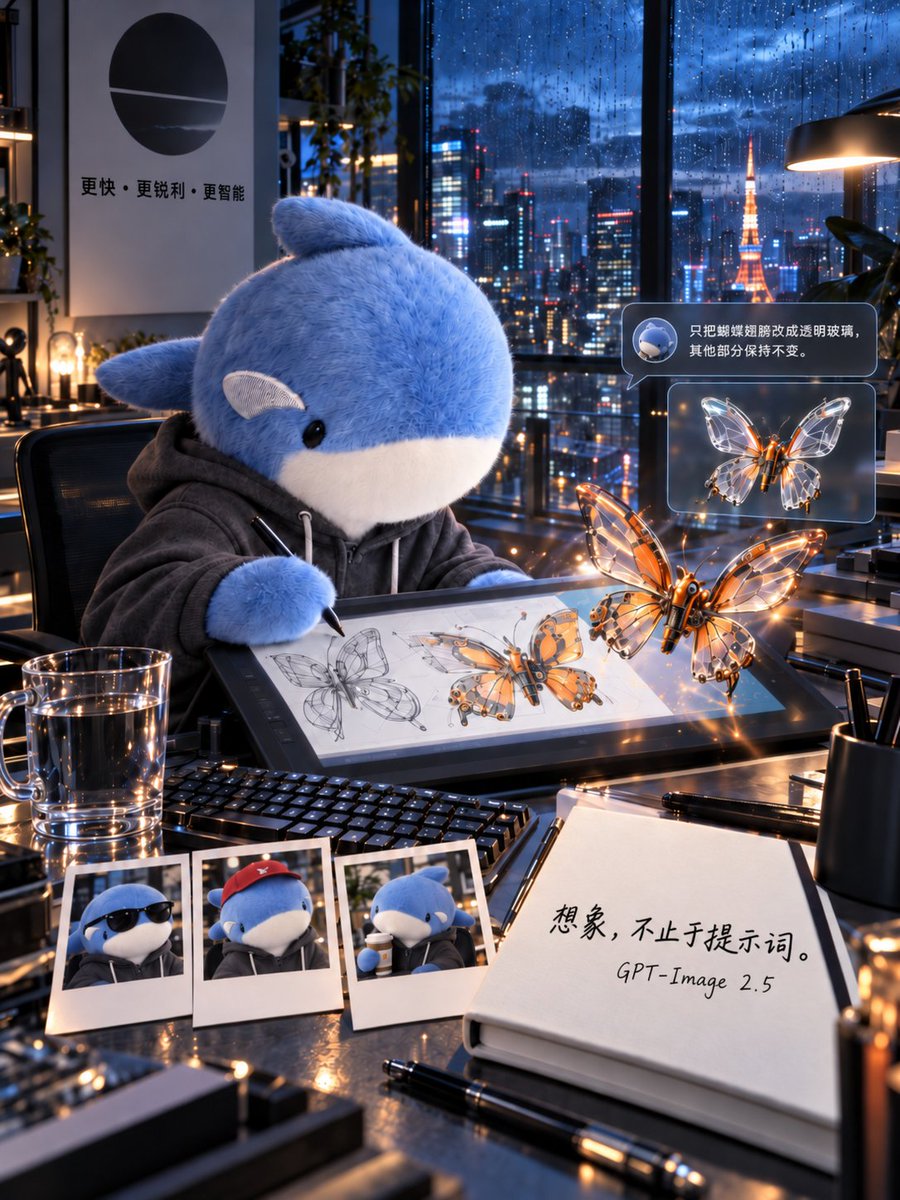
A cinematic vertical poster prompt showing a plush whale in a rainy Tokyo high-rise studio designing glowing glass-wing mechanical butterflies.
這是一個產品與商業的GPT Image 2範例。請使用下方可直接使用的提示資訊產生類似的視覺素材,並在重複使用前查看Awesome GPT Image 2 Prompts署名和商業用途授權資訊。
需要完整的提示符號集?請使用 產品與商業 主題中心提供更多相關範例,或打開 GPT Image 2 提示庫 有關完整範例索引、可重複使用結構和來源歸屬的資訊。
Free 1K preview
Generate one preview image instantly, no sign-up required.
3296/4000
提示詞
可直接複製的提示
Goal: Create a 3:4 vertical cinematic visual poster of a futuristic design studio on the top floor of a Tokyo high-rise during blue hour after heavy rain, featuring a plush whale character designing a mechanical butterfly.

Canvas: Vertical 3:4 composition, ultra-detailed cinematic realism, shallow depth of field, glossy reflections, warm desk lights contrasted with cool rainy blue city light. The camera looks slightly downward across a cluttered designer’s desk toward floor-to-ceiling windows.

Main subject: A large cute plush {argument name="character name" default="blue whale"} mascot sits in a black office chair at the desk, wearing a dark gray hoodie with white drawstrings. It has soft fuzzy blue fur, a white belly and muzzle, small black glossy eyes, side fins, and a small rounded fin on top. The character holds a stylus and draws on a large pen-display tablet.

Scene and environment: Behind the character, huge rain-covered windows show a vivid Tokyo night skyline with wet glass, bokeh neon reflections, skyscrapers, and Tokyo Tower glowing orange in the distance. Realistic raindrops streak down the glass. Add indoor plants, shelves, desk lamps, and metallic studio equipment. On the left wall, place a minimalist poster with a black circular logo and Chinese text reading 「更快・更锐利・更智能」.

Desk contents: Include exactly 9 distinct desk items: 1 large pen-display tablet showing butterfly concept sketches, 1 black keyboard, 1 transparent glass mug of water, 3 Polaroid photos of the whale character, 1 open notebook, 1 black pen lying in front of the notebook, and 1 black cylindrical pen cup. The three Polaroids should show: the whale wearing sunglasses, the whale wearing a red cap, and the whale drinking from a cup.

Butterfly design: Show exactly 2 prominent mechanical butterflies: one larger glowing orange-and-glass butterfly floating in front of the tablet, and one smaller transparent glass-wing butterfly shown in a floating UI card. The larger butterfly should have a metallic orange body, delicate transparent wings with mechanical vein structures, warm LED highlights, and sparkling reflections. The tablet screen should also show multiple drawn stages of the butterfly design, including pencil line sketches and colored mechanical renderings.

Interface overlay: Add exactly 2 floating translucent UI bubbles on the right side. The top bubble contains a small round icon of the whale and Chinese text: 「只把蝴蝶翅膀改成透明玻璃,其他部分保持不变。」 The lower bubble contains the smaller glass-wing butterfly preview. Use rounded rectangles, subtle blue-gray glassmorphism, and soft glow.

Notebook text: On the open notebook in the lower right foreground, write large handwritten Chinese text: 「想象,不止于提示词。」 and below it write “GPT-Image 2.5”.

Visual style: Hyperrealistic 3D cinematic advertising poster, immaculate material rendering, wet glass, polished black tabletop, metal edges, water droplets, soft plush fur, transparent glass wings, orange neon glints, blue ambient city light, volumetric lamp glow, high contrast but clean, almost no noise.

Constraints: Preserve the exact counted items and text placements, keep all text legible, do not add extra characters, avoid cartoon flatness, avoid watermark or logo overlays beyond the described wall poster and notebook text.
提示變數
提示符號中可編輯的參數佔位符及其預設值。
多變的
character name
預設
blue whale
Best for
- - 產品與商業 visual exploration
- - Image generation and reference-image edits
- - Reusable briefs that keep source attribution visible
Change these parts
- - Subject, product, character, or scene
- - Aspect ratio, camera, lighting, and background
- - Brand, text, color, and output constraints
Recommended model and settings
- - Model: gpt-image-2
- - Input mode: 文生圖
- - Aspect ratio: source
- - Commercial status: review original source
How to use this prompt
- 1. Copy the prompt and preserve its structure for the first test.
- 2. Replace the subject, context, and publishing channel.
- 3. Change one camera, lighting, or style variable per iteration.
- 4. Inspect the output, source, text, and rights before reuse.
Limitations, source, and reuse cautions
- - Generated output is an editable draft, not factual, legal, or rights evidence.
- - Review the linked source, people, brands, logos, text, and third-party media before commercial use.
內容來自Awesome GPT Image 2 Prompts 。必須註明出處。商業用途狀態為allowed ;付費使用前請查看來源版權資訊。
此類案例更多
按類別、輸入模式相容性、品質和低風險進行優先排序。






重用和來源註釋
預覽案例後,請謹慎使用此提示。
- 1.複製提示或直接在 Dovoo 中使用生成按鈕開啟提示。
- 2.根據您的實際使用情況調整變數、寬高比和參考影像。
- 3.發布或付費使用前,請確認版權、署名要求以及品牌或肖像權風險。