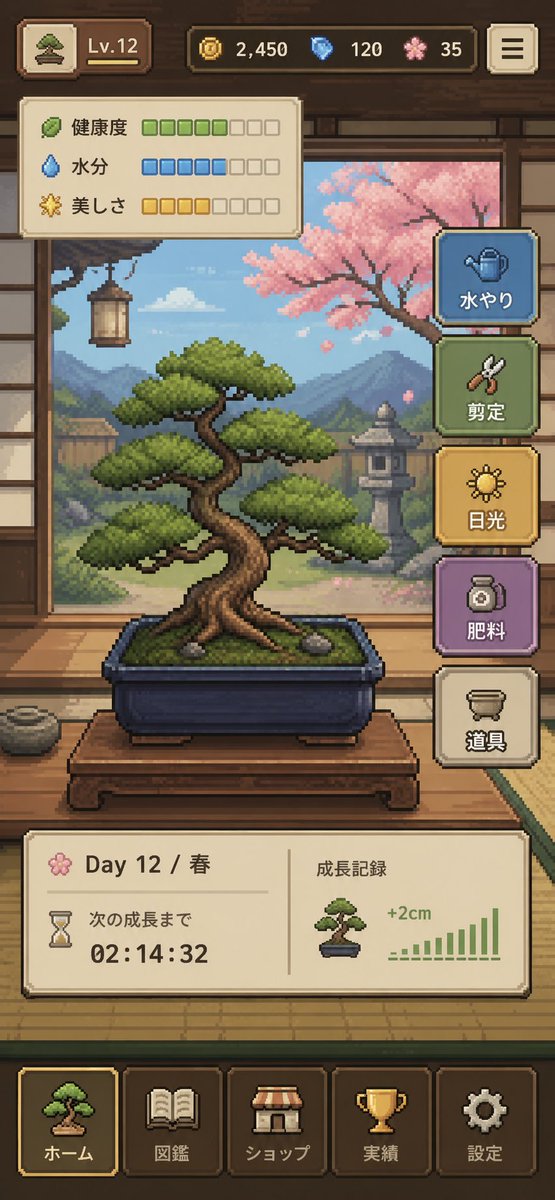
像素藝術盆栽遊戲介面
一個精美的垂直螢幕手機遊戲介面,展示了一個溫馨的像素藝術盆栽養護模擬器,非常適合用於 UI 概念設計、獨立遊戲模型和應用商店展示藝術。
這是一個動漫與遊戲的GPT Image 2範例。請使用下方可直接使用的提示資訊產生類似的視覺素材,並在重複使用前查看Awesome GPT Image 2 Prompts署名和商業用途授權資訊。
需要完整的提示符號集?請使用 動漫與遊戲 主題中心提供更多相關範例,或打開 GPT Image 2 提示庫 有關完整範例索引、可重複使用結構和來源歸屬的資訊。
Free 1K preview
Generate one preview image instantly, no sign-up required.
3125/4000
提示詞
可直接複製的提示
{
  "type": "像素藝術手機遊戲 UI 模型",
  "theme": "舒適的日本盆景栽培模擬器",
  "style": {
    "rendering": "細緻的 2D 像素藝術,精緻的復古遊戲美學,清晰的精靈圖,溫暖的燈光,柔和的大氣背景",
    "aspect_ratio": "9:16 縱向",
    "camera": "正對傳統日式房間內部的視角,將盆景置於中心"
  },
  "subject": {
    "main_object": "盆栽樹,放置在長方形深藍色陶瓷盆中",
    "bonsai": {
      "species_look": "具有分層圓形樹葉的松樹狀盆景",
      "trunk": "粗壯扭曲的棕色樹幹,露出根部",
      "placement": "放置在矮木展示桌上",
      "soil": "佈滿青苔的綠色表面,可見 2 顆小石頭"
    }
  },
  "environment": {
    "setting": "傳統日式榻榻米房間,可透過開放的障子窗俯瞰花園",
    "background_elements": [
      "木樑和牆壁裝飾",
      "左側懸掛的燈籠",
      "遠處的山脈",
      "花園裡的石燈籠",
      "右側的粉紅色櫻花樹",
      "帶有雲朵的柔和藍天"
    ],
    "mood": "平靜、手工製作、冥想"
  },
  "ui": {
    "top_bar": {
      "count": 5,
      "elements": [
        "位於左上角的迷你盆景圖示按鈕",
        "等級徽章顯示 \"Lv.12\"",
        "硬幣計數器顯示 \"2,450\"",
        "藍色寶石計數器顯示 \"120\"",
        "粉紅色花瓣貨幣計數器顯示 \"35\""
      ],
      "top_right": "帶有 3 條水平線的選單按鈕"
    },
    "status_panel": {
      "position": "位於頂欄下方左上角",
      "count": 3,
      "rows": [
        {
          "label": "健康",
          "icon": "葉子",
          "filled": 5,
          "total": 8,
          "color": "綠色"
        },
        {
          "label": "濕度",
          "icon": "水滴",
          "filled": 5,
          "total": 8,
          "color": "藍色"
        },
        {
          "label": "美しさ",
          "icon": "閃耀花朵",
          "filled": 4,
          "total": 8,
          "color": "金色"
        }
      ]
    },
    "action_buttons": {
      "position": "右側垂直堆疊",
      "count": 5,
      "buttons": [
        {
          "label": "澆水",
          "icon": "澆水壺",
          "color": "藍色"
        },
        {
          "label": "修剪",
          "icon": "剪刀",
          "color": "綠色"
        },
        {
          "label": "光照",
          "icon": "太陽",
          "color": "金色"
        },
        {
          "label": "施肥",
          "icon": "肥料罐",
          "color": "紫色"
        },
        {
          "label": "工具",
          "icon": "花盆或工具容器",
          "color": "奶油色"
        }
      ]
    },
    "info_panel": {
      "position": "導航上方中間位置",
      "count": 2,
      "sections": [
        {
          "label": "第 12 天 / 春季",
          "subitems": [
            "花朵圖示",
            "沙漏圖示",
            "文字 \"下次生長\"",
            "倒計時 \"02:14:32\""
          ]
        },
        {
          "label": "生長記錄",
          "subitems": [
            "小型盆景縮圖",
            "文字 \"+2 公分\"",
            "帶有 10 條上升柱的綠色柱狀圖"
          ]
        }
      ]
    },
    "bottom_navigation": {
      "position": "底部",
      "count": 5,
      "tabs": [
        "首頁",
        "圖鑑",
        "商店",
        "成就",
        "設定"
      ],
      "icons": [
        "盆景",
        "書",
        "商店遮陽棚",
        "獎盃",
        "齒輪"
      ],
      "active_tab": "首頁"
    }
  },
  "composition": "中央盆景主角物件,UI 面板構成了場景,但沒有遮蓋樹木,遊戲準備好的模型,看起來像是已完成的手機應用程式截圖",
  "color_palette": {
    "dominant": [
      "溫暖的木棕色",
      "榻榻米米色",
      "青苔綠",
      "天空藍",
      "櫻花粉",
      "柔和的金色"
    ],
    "accent_buttons": [
      "灰藍色",
      "鼠尾草綠",
      "芥末金",
      "柔和的紫色",
      "奶油色"
    ]
  },
  "quality": "乾淨、易讀的介面,專業的獨立遊戲原型,迷人且高度凝聚"
}]}
Best for
- - 動漫與遊戲 visual exploration
- - Image generation and reference-image edits
- - Reusable briefs that keep source attribution visible
Change these parts
- - Subject, product, character, or scene
- - Aspect ratio, camera, lighting, and background
- - Brand, text, color, and output constraints
Recommended model and settings
- - Model: gpt-image-2
- - Input mode: 文生圖
- - Aspect ratio: source
- - Commercial status: review original source
How to use this prompt
- 1. Copy the prompt and preserve its structure for the first test.
- 2. Replace the subject, context, and publishing channel.
- 3. Change one camera, lighting, or style variable per iteration.
- 4. Inspect the output, source, text, and rights before reuse.
Limitations, source, and reuse cautions
- - Generated output is an editable draft, not factual, legal, or rights evidence.
- - Review the linked source, people, brands, logos, text, and third-party media before commercial use.
內容來自Awesome GPT Image 2 Prompts 。必須註明出處。商業用途狀態為allowed ;付費使用前請查看來源版權資訊。
此類案例更多
按類別、輸入模式相容性、品質和低風險進行優先排序。






重用和來源註釋
預覽案例後,請謹慎使用此提示。
- 1.複製提示或直接在 Dovoo 中使用生成按鈕開啟提示。
- 2.根據您的實際使用情況調整變數、寬高比和參考影像。
- 3.發布或付費使用前,請確認版權、署名要求以及品牌或肖像權風險。