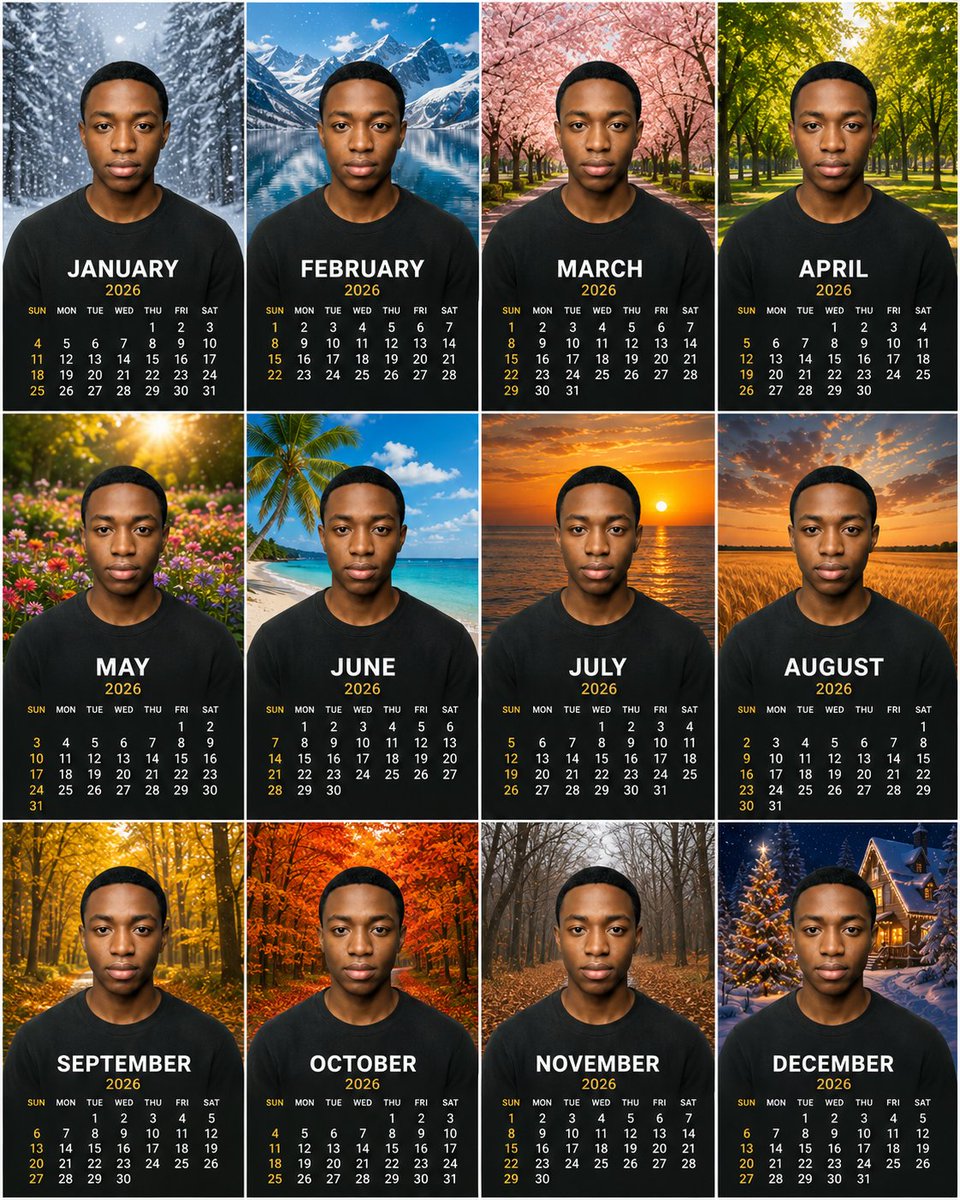
Personalized 2026 Portrait Calendar
Generates a premium 12-month photorealistic portrait calendar poster with seasonal backgrounds and consistent subject identity.
這是一個產品與商業的GPT Image 2範例。請使用下方可直接使用的提示資訊產生類似的視覺素材,並在重複使用前查看Awesome GPT Image 2 Prompts署名和商業用途授權資訊。
需要完整的提示符號集?請使用 產品與商業 主題中心提供更多相關範例,或打開 GPT Image 2 提示庫 有關完整範例索引、可重複使用結構和來源歸屬的資訊。
Free 1K preview
Generate one preview image instantly, no sign-up required.
3180/4000
提示詞
可直接複製的提示
Objective: To create a high-end, photorealistic 12-month calendar poster for {argument name="year" default="2026"}, using the same centered portrait subject in each month panel.

Canvas: A square 4:3 ratio poster layout arranged in a clean 3x4 grid, with thin white lines separating the panels. Each panel is a vertical calendar card with the subject centered in the foreground, showing from the chest up.

Subject Details: A young Black man with a short, dark haircut and smooth medium-brown skin tone, with a neutral and serious expression, looking directly at the camera. He is wearing a plain black crew-neck t-shirt in each panel. Maintain consistent facial features, pose, proportions, facial lighting, and clothing across all 12 panels, as if the same portrait is composited into different seasonal scenes. Use {argument name="subject description" default="black"}.

Layout and Text: Each of the 12 panels contains a large, bold, white, uppercase month name below the chest area, followed by smaller gold-colored year text, and then a compact calendar grid below that. Weekday labels are small white text: SUN MON TUE WED THU FRI SAT, with Sundays and key dates highlighted in warm gold. Use a clean, high-end sans-serif font, high contrast, centered alignment, and ensure accurate month layouts for the current year.

Create 12 calendar panels, in the following order and seasonal backgrounds:
1. JANUARY — A snowy evergreen forest path, falling snowflakes, a cold blue-toned winter atmosphere.
2. FEBRUARY — A bright alpine lake, snow-covered mountains, and a clear blue sky.
3. MARCH — A pink cherry blossom avenue, trees arching over the walkway.
4. APRIL — A lush green park or forest, sunlight filtering through fresh spring leaves.
5. MAY — A colorful garden, warm golden sunlight, and blooming flowers.
6. JUNE — A tropical beach, palm trees, turquoise water, white sand, and a blue sky.
7. JULY — An orange sunset over the ocean, the sun near the horizon with golden reflections.
8. AUGUST — A golden wheat field at sunset, with dramatic warm-colored clouds.
9. SEPTEMBER — A yellow autumn forest, shimmering leaves, and a forest path.
10. OCTOBER — A vibrant red-orange autumn forest, dense autumn foliage.
11. NOVEMBER — A late autumn bare forest path, brown fallen leaves, and a soft gray atmosphere.
12. DECEMBER — A snowy Christmas village scene, decorated lit trees, and warm cabin lights at night.

Visual Style: Hyperrealistic, high-end print design, sharp high-resolution photography, cinematic seasonal backgrounds, consistent portrait proportions, balanced exposure, realistic depth of field, refined commercial calendar aesthetics. Use {argument name="calendar style" default="2026"} and {argument name="shirt color" default="Black"}.

Constraints: Do not include extra months, do not repeat panels, do not include logos, do not include watermarks, and do not include decorative borders other than the thin white grid lines. Maintain completely identical facial features and centered pose across all 12 panels. All month names should remain in English uppercase, and ensure the final composition presents clearly as a complete 12-month calendar poster.
提示變數
提示符號中可編輯的參數佔位符及其預設值。
多變的
year
預設
2026
多變的
subject description
預設
black
多變的
calendar style
預設
2026
多變的
shirt color
預設
Black
Best for
- - 產品與商業 visual exploration
- - Image generation and reference-image edits
- - Reusable briefs that keep source attribution visible
Change these parts
- - Subject, product, character, or scene
- - Aspect ratio, camera, lighting, and background
- - Brand, text, color, and output constraints
Recommended model and settings
- - Model: gpt-image-2
- - Input mode: 文生圖
- - Aspect ratio: source
- - Commercial status: review original source
How to use this prompt
- 1. Copy the prompt and preserve its structure for the first test.
- 2. Replace the subject, context, and publishing channel.
- 3. Change one camera, lighting, or style variable per iteration.
- 4. Inspect the output, source, text, and rights before reuse.
Limitations, source, and reuse cautions
- - Generated output is an editable draft, not factual, legal, or rights evidence.
- - Review the linked source, people, brands, logos, text, and third-party media before commercial use.
內容來自Awesome GPT Image 2 Prompts 。必須註明出處。商業用途狀態為allowed ;付費使用前請查看來源版權資訊。
此類案例更多
按類別、輸入模式相容性、品質和低風險進行優先排序。






重用和來源註釋
預覽案例後,請謹慎使用此提示。
- 1.複製提示或直接在 Dovoo 中使用生成按鈕開啟提示。
- 2.根據您的實際使用情況調整變數、寬高比和參考影像。
- 3.發布或付費使用前,請確認版權、署名要求以及品牌或肖像權風險。