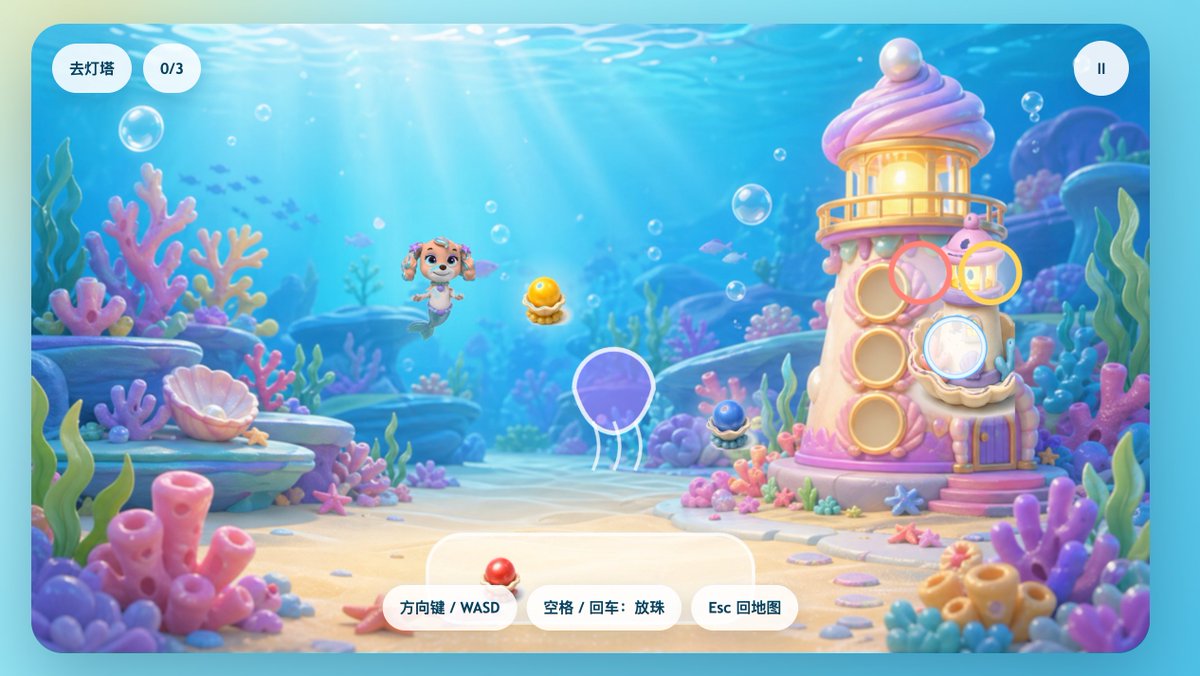
粉彩水下美人魚小狗遊戲介面
一個充滿奇思妙想的水下遊戲畫面,包含美人魚幼崽、珊瑚燈塔和趣味十足的中國風用戶介面元素,適合用作兒童休閒遊戲的啟動畫面或關卡場景。
這是一個動漫與遊戲的GPT Image 2範例。請使用下方可直接使用的提示資訊產生類似的視覺素材,並在重複使用前查看Awesome GPT Image 2 Prompts署名和商業用途授權資訊。
需要完整的提示符號集?請使用 動漫與遊戲 主題中心提供更多相關範例,或打開 GPT Image 2 提示庫 有關完整範例索引、可重複使用結構和來源歸屬的資訊。
Free 1K preview
Generate one preview image instantly, no sign-up required.
2287/4000
提示詞
可直接複製的提示
A charming side-view underwater casual game start screen, rendered in a soft 3D cartoon style, designed like a refined children's web game interface. The scene depicts a bright seabed, with sunlight streaming through clear blue water, accompanied by floating bubbles, distant silhouettes of small fish, and a dreamy coral reef environment filled with rounded pink, purple, blue, and mint green corals, seagrass, shells, rocks, and sand. In the center-left of the image, a mermaid puppy character inspired by rescue dog cartoons floats happily underwater, with a dog face, sparkling large eyes, drooping ears, a small crown-shaped ornament on her head, and a fish tail instead of hind legs, facing forward with a cheerful expression. To the right stands a quirky candy-colored coral lighthouse, shaped like a pink and white shell tower, with a glowing lantern room on top, a pearl embedded in the roof, round shell windows, a small balcony, a purple door, and coral details at the base. Game UI elements are directly overlaid on the scene: two rounded white capsule buttons in the upper left corner, the first reading “Go to Lighthouse,” the second displaying “0/3”; and a circular white pause button with a pause icon in the upper right corner. Near the lighthouse, display 4 floating semi-transparent colored target rings around interaction points: a pink ring near the upper-middle window, a yellow ring near the upper-right lantern area, a light blue ring covering the lower-right shell window, and a ring with a white outline around a purple jellyfish in the lower-left center. 3 collectible shell pearl items are visible in the scene: a glowing golden pearl in an open shell in the center, a dark blue small pearl shell at the base of the lighthouse, and a red pearl shell placed on the UI panel at the bottom center. At the bottom center, place 3 rounded white operation prompt buttons, with the text: “Arrow Keys / WASD,” “Space / Enter: Drop Pearls,” and “Esc to Map.” Add a large semi-transparent rounded white panel behind the bottom operation buttons. The overall image should evoke a happy, safe, colorful, and magical feeling, with a high degree of refinement, soft depth of field, soft lighting, glossy toy texture, and a mobile or web game aesthetic suitable for children.
Best for
- - 動漫與遊戲 visual exploration
- - Image generation and reference-image edits
- - Reusable briefs that keep source attribution visible
Change these parts
- - Subject, product, character, or scene
- - Aspect ratio, camera, lighting, and background
- - Brand, text, color, and output constraints
Recommended model and settings
- - Model: gpt-image-2
- - Input mode: 文生圖
- - Aspect ratio: source
- - Commercial status: review original source
How to use this prompt
- 1. Copy the prompt and preserve its structure for the first test.
- 2. Replace the subject, context, and publishing channel.
- 3. Change one camera, lighting, or style variable per iteration.
- 4. Inspect the output, source, text, and rights before reuse.
Limitations, source, and reuse cautions
- - Generated output is an editable draft, not factual, legal, or rights evidence.
- - Review the linked source, people, brands, logos, text, and third-party media before commercial use.
內容來自Awesome GPT Image 2 Prompts 。必須註明出處。商業用途狀態為allowed ;付費使用前請查看來源版權資訊。
此類案例更多
按類別、輸入模式相容性、品質和低風險進行優先排序。






重用和來源註釋
預覽案例後,請謹慎使用此提示。
- 1.複製提示或直接在 Dovoo 中使用生成按鈕開啟提示。
- 2.根據您的實際使用情況調整變數、寬高比和參考影像。
- 3.發布或付費使用前,請確認版權、署名要求以及品牌或肖像權風險。