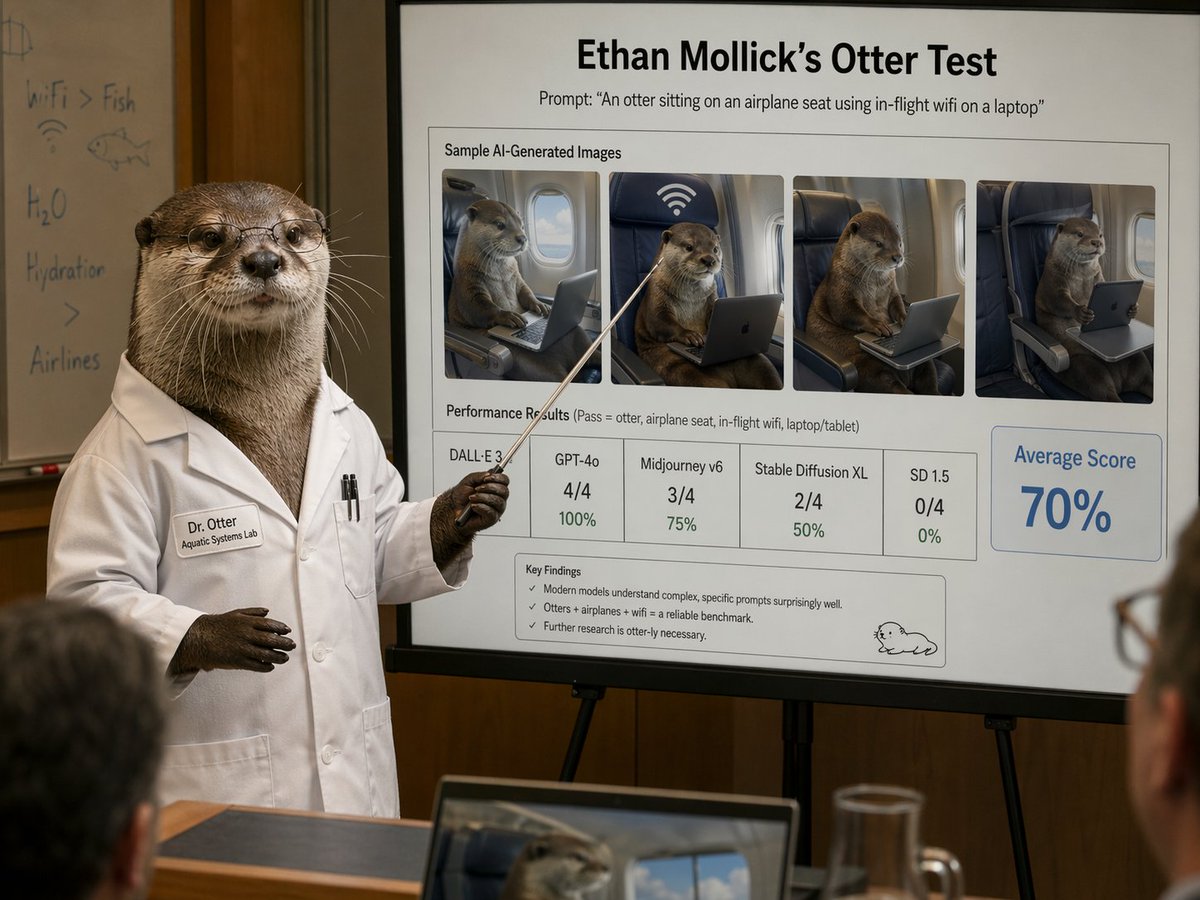
水獺科學家示範幻燈片
一幅逼真的喜劇會議場景,一隻穿著實驗服的水獺展示了一張精美的基準幻燈片,內容是關於人工智慧生成的水獺圖像,非常適合用於諷刺、社交媒體貼文或編輯風格的人工智慧簡報。
這是一個平面設計和海報設計的GPT Image 2範例。請使用下方可直接使用的提示資訊產生類似的視覺素材,並在重複使用前查看Awesome GPT Image 2 Prompts署名和商業用途授權資訊。
需要完整的提示符號集?請使用 平面設計和海報設計 主題中心提供更多相關範例,或打開 GPT Image 2 提示庫 有關完整範例索引、可重複使用結構和來源歸屬的資訊。
Free 1K preview
Generate one preview image instantly, no sign-up required.
2639/4000
提示詞
可直接複製的提示
A photorealistic humorous academic presentation in a conference room: an anthropomorphic otter scientist stands at the left side of the frame wearing a crisp white lab coat and holding a thin pointing stick toward a large presentation board on an easel. The otter is upright like a human, with realistic brown fur, dark paws, and a professional posture. The lab coat has a stitched name tag reading "Dr. Otter" and a smaller line reading "Aquatic Systems Lab," plus two pens in the chest pocket. Show every face clearly with natural, detailed facial features. Behind the otter is a whiteboard with faint handwritten notes and doodles, including "WiFi > Fish," "H2O," "Hydration," a fish sketch, and a wifi symbol. The main focus is a large clean presentation slide with sharp readable text and polished corporate-academic layout. At the top, a bold title reads "{argument name="headline text" default="Ethan Mollick’s Otter Test"}" and beneath it a subtitle reads "Prompt: \"{argument name="prompt text" default="An otter sitting on an airplane seat using in-flight wifi on a laptop"}\"". Below that is a boxed section titled "Sample AI-Generated Images" containing exactly 4 side-by-side sample images of a realistic otter seated in an airplane seat using a laptop or tablet, each framed like model outputs, with one showing a large wifi symbol above the seat. Beneath the images is a section labeled "Performance Results (Pass = otter, airplane seat, in-flight wifi, laptop/tablet)" with exactly 5 score boxes: "DALL·E 3" with no visible numeric score, "GPT-4o" with "4/4" and "100%", "Midjourney v6" with "3/4" and "75%", "Stable Diffusion XL" with "2/4" and "50%", and "SD 1.5" with "0/4" and "0%". On the right side is a large highlighted box reading "Average Score" and "{argument name="average score" default="70%"}" in large blue type. At the bottom of the slide is a "Key Findings" box with exactly 3 bullet points: "Modern models understand complex, specific prompts surprisingly well.", "Otters + airplanes + wifi = a reliable benchmark.", and "Further research is otter-ly necessary." A small simple cartoon otter doodle appears in the lower-right corner of the slide. The room is warmly lit with wood-paneled walls, shallow depth of field, and a few blurred audience members in the foreground, including a laptop at the bottom edge showing an otter image on its screen and a glass pitcher on a table. Style: ultra-realistic editorial photography, deadpan scientific satire, believable conference presentation, high detail, natural indoor lighting, professional lens compression, readable slide typography, polished yet absurd.提示變數
提示符號中可編輯的參數佔位符及其預設值。
多變的
headline text
預設
Ethan Mollick’s Otter Test
多變的
prompt text
預設
An otter sitting on an airplane seat using in-flight wifi on a laptop
多變的
average score
預設
70%
Best for
- - 平面設計和海報設計 visual exploration
- - Image generation and reference-image edits
- - Reusable briefs that keep source attribution visible
Change these parts
- - Subject, product, character, or scene
- - Aspect ratio, camera, lighting, and background
- - Brand, text, color, and output constraints
Recommended model and settings
- - Model: gpt-image-2
- - Input mode: 文生圖
- - Aspect ratio: source
- - Commercial status: review original source
How to use this prompt
- 1. Copy the prompt and preserve its structure for the first test.
- 2. Replace the subject, context, and publishing channel.
- 3. Change one camera, lighting, or style variable per iteration.
- 4. Inspect the output, source, text, and rights before reuse.
Limitations, source, and reuse cautions
- - Generated output is an editable draft, not factual, legal, or rights evidence.
- - Review the linked source, people, brands, logos, text, and third-party media before commercial use.
內容來自Awesome GPT Image 2 Prompts 。必須註明出處。商業用途狀態為allowed ;付費使用前請查看來源版權資訊。
此類案例更多
按類別、輸入模式相容性、品質和低風險進行優先排序。






重用和來源註釋
預覽案例後,請謹慎使用此提示。
- 1.複製提示或直接在 Dovoo 中使用生成按鈕開啟提示。
- 2.根據您的實際使用情況調整變數、寬高比和參考影像。
- 3.發布或付費使用前,請確認版權、署名要求以及品牌或肖像權風險。