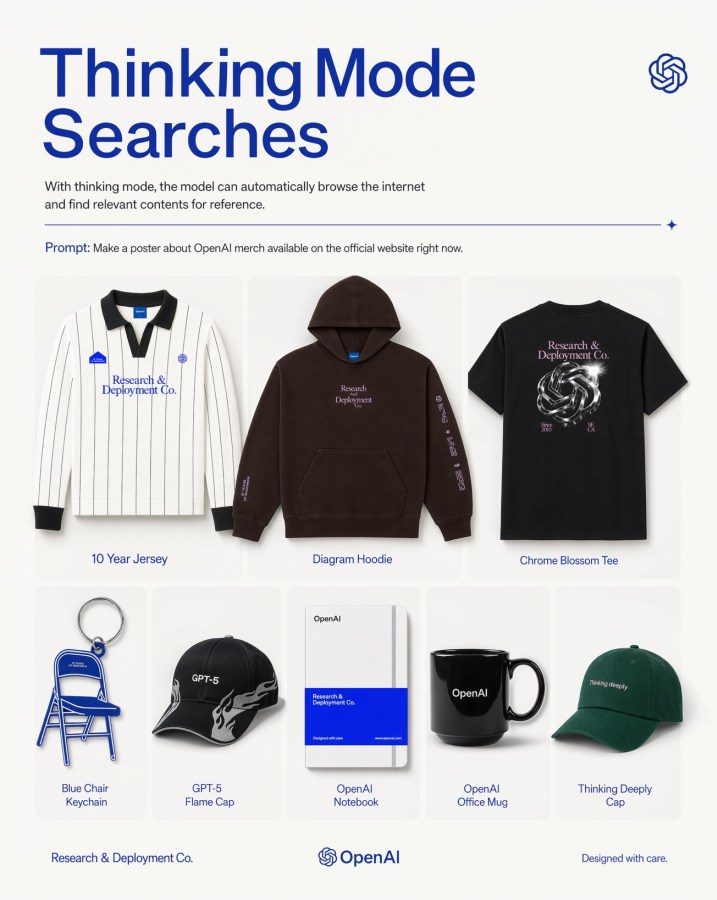
OpenAI 商品海報網格
一張現代風格的編輯海報,以簡潔的產品網格形式展示了八款 OpenAI 主題商品,適合科技品牌推廣或社群媒體行銷視覺素材。
這是一個產品與商業的GPT Image 2範例。請使用下方可直接使用的提示資訊產生類似的視覺素材,並在重複使用前查看Awesome GPT Image 2 Prompts署名和商業用途授權資訊。
需要完整的提示符號集?請使用 產品與商業 主題中心提供更多相關範例,或打開 GPT Image 2 提示庫 有關完整範例索引、可重複使用結構和來源歸屬的資訊。
Free 1K preview
Generate one preview image instantly, no sign-up required.
2414/4000
提示詞
可直接複製的提示
A clean, minimalist promotional poster on an off-white background in a modern tech-brand style. At the top left, a very large bold sans-serif headline in deep cobalt blue reads {argument name="headline text" default="Thinking Mode Searches"} split across two lines. Beneath it, a smaller gray explanatory sentence says that with thinking mode, the model can automatically browse the internet and find relevant contents for reference. At the top right, place a small blue OpenAI knot logo. Below the intro text, add a thin horizontal blue divider line ending with a tiny sparkle icon on the right. Under that, include a prompt line in small text with the word “Prompt:” in blue followed by the sentence {argument name="prompt text" default="Make a poster about OpenAI merch available on the official website right now."}. The main body is a centered 3-by-2 product grid with 8 total merchandise items shown as clean catalog cutouts with soft shadows inside rounded pale cards. Top row has 3 larger products: 1) a white long-sleeve striped rugby-style jersey with black collar and cuffs, small blue patches, and blue chest text “Research & Deployment Co.”, labeled “10 Year Jersey”; 2) a dark brown pullover hoodie with front pocket, small centered chest text “Research Deployment Co.” and sleeve print, labeled “Diagram Hoodie”; 3) a black T-shirt viewed from the back with a metallic knot graphic and pale pink text “Research & Deployment Co.”, labeled “Chrome Blossom Tee”. Bottom row has 5 smaller products: 4) a blue folding chair keychain shaped like a chair, labeled “Blue Chair Keychain”; 5) a black baseball cap with white flame graphics and “GPT-5” on the front, labeled “GPT-5 Flame Cap”; 6) a white notebook with a bold blue lower band and minimal OpenAI branding, labeled “OpenAI Notebook”; 7) a glossy black mug with “OpenAI” in white, labeled “OpenAI Office Mug”; 8) a dark green baseball cap with small white text “Thinking deeply”, labeled “Thinking Deeply Cap”. Keep all item labels centered below each product in small blue sans-serif text. Along the bottom footer, place “Research & Deployment Co.” on the left, the OpenAI knot logo plus wordmark centered, and “Designed with care.” on the right. Use a balanced editorial layout, lots of whitespace, premium product-ad poster aesthetics, subtle shadows, crisp studio lighting, and a restrained palette of off-white, blue, black, brown, and green.提示變數
提示符號中可編輯的參數佔位符及其預設值。
多變的
headline text
預設
Thinking Mode Searches
多變的
prompt text
預設
Make a poster about OpenAI merch available on the official website right now.
Best for
- - 產品與商業 visual exploration
- - Image generation and reference-image edits
- - Reusable briefs that keep source attribution visible
Change these parts
- - Subject, product, character, or scene
- - Aspect ratio, camera, lighting, and background
- - Brand, text, color, and output constraints
Recommended model and settings
- - Model: gpt-image-2
- - Input mode: 文生圖
- - Aspect ratio: source
- - Commercial status: review original source
How to use this prompt
- 1. Copy the prompt and preserve its structure for the first test.
- 2. Replace the subject, context, and publishing channel.
- 3. Change one camera, lighting, or style variable per iteration.
- 4. Inspect the output, source, text, and rights before reuse.
Limitations, source, and reuse cautions
- - Generated output is an editable draft, not factual, legal, or rights evidence.
- - Review the linked source, people, brands, logos, text, and third-party media before commercial use.
內容來自Awesome GPT Image 2 Prompts 。必須註明出處。商業用途狀態為allowed ;付費使用前請查看來源版權資訊。
此類案例更多
按類別、輸入模式相容性、品質和低風險進行優先排序。






重用和來源註釋
預覽案例後,請謹慎使用此提示。
- 1.複製提示或直接在 Dovoo 中使用生成按鈕開啟提示。
- 2.根據您的實際使用情況調整變數、寬高比和參考影像。
- 3.發布或付費使用前,請確認版權、署名要求以及品牌或肖像權風險。