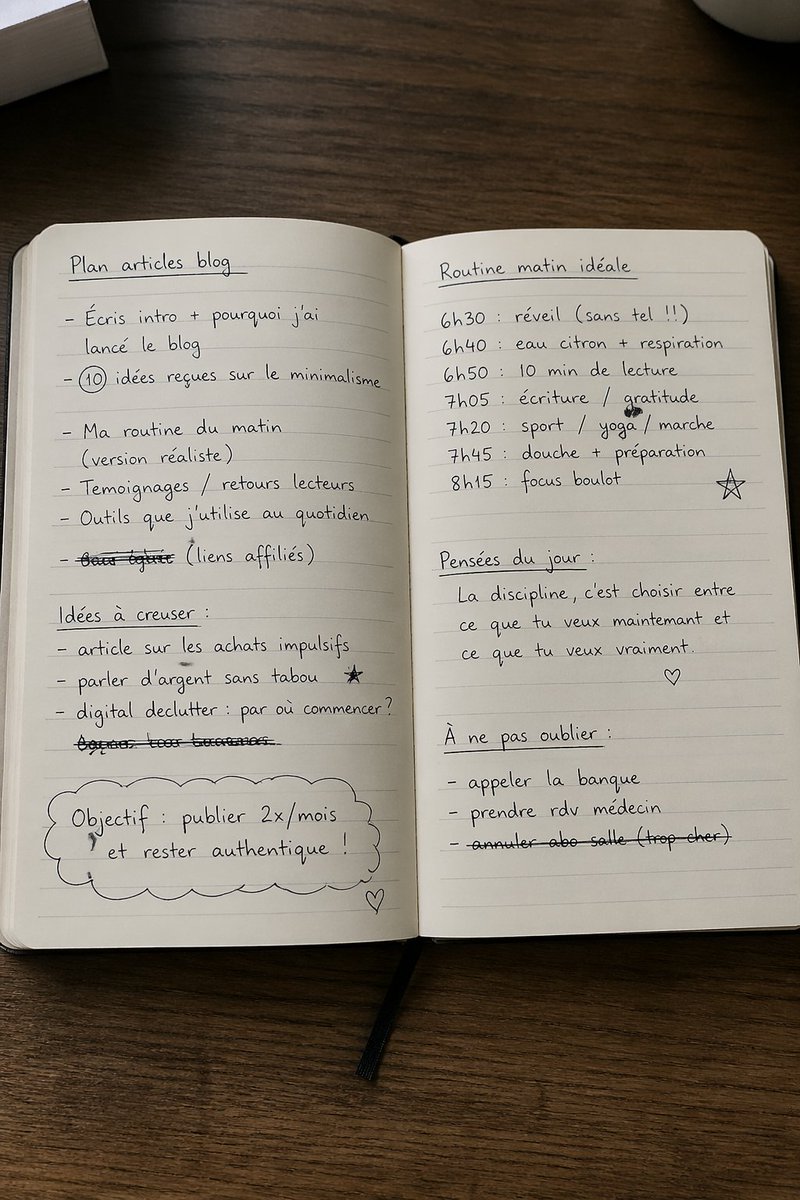
打開的筆記本,裡面有法文手寫計劃
這個提示會產生一張逼真的俯視桌面照片,照片中開啟的筆記本裡寫滿了法語手寫計畫筆記,非常適合用於提高效率、生活方式或部落格主題的視覺素材。
這是一個其他靈感的GPT Image 2範例。請使用下方可直接使用的提示資訊產生類似的視覺素材,並在重複使用前查看Awesome GPT Image 2 Prompts署名和商業用途授權資訊。
需要完整的提示符號集?請使用 其他靈感 主題中心提供更多相關範例,或打開 GPT Image 2 提示庫 有關完整範例索引、可重複使用結構和來源歸屬的資訊。
Free 1K preview
Generate one preview image instantly, no sign-up required.
1378/4000
提示詞
可直接複製的提示
一張逼真的俯視生活照,展示一本打開的橫線筆記本,置於深色木桌上,在柔和的自然室內光線和溫暖的中性色調下拍攝。筆記本幾乎填滿了整個畫面,並在垂直方向上居中,打開到兩頁,上面寫著整潔的黑色手寫法文筆記、隨意的圓體字跡、輕微的瑕疵、一些塗鴉,以及一些劃掉的線條。展示一條黑色緞帶書籤從筆記本的底部中央垂下。在左上角包含一疊淺色書籍或紙張的局部,以及從右上角進入的局部白色杯子。頁面應該看起來是奶油色的,帶有淡淡的水平劃線和微妙的中心摺痕。在左頁上,在頂部附近寫下底線標題“Plan articles blog”,然後緊跟著 6 個項目符號: “Écris intro + pourquoi j’ai lancé le blog”、“10 idées reçues sur le minimalisme”(數字 10 被圈起來)、“Ma routine du matin (version réaliste)”、“Témoignages / retours lecteurs”、“Outils que j’utilise au quotidien”,以及一條劃掉的線條,寫著“bons plans (liens affiliés)”。在左頁下方,添加底線副標題“Idées à creuser :”,然後緊跟著 3 個項目符號:“article sur les achats impulsifs”、“parler d’argent sans tabou”(附近有一個小星星塗鴉),以及“digital declutter : par où commencer ?” ,此外在它們下方添加一條完全劃掉的手寫線條。在左下角,畫一個大型雲朵形狀的輪廓,其中包含文字“Objectif : publier 2x/mois et rester authentique !” ,並在左頁的右下角添加一個小愛心塗鴉。在右頁上,在頂部寫下底線標題“Routine matin idéale”,然後是 6 行時間表:“6h30 : réveil (sans tel !!)”、“6h40 : eau citron + respiration”、“6h50 : 10 min de lecture”、“7h05 : écriture / gratitude”、“7h20 : sport / yoga / marche”、“7h45 : douche + préparation”,以及下方“8h15 : focus boulot”,右邊畫一個手繪星星塗鴉。在下方,添加底線副標題“Pensées du jour :”,並跨越 3 行引用:“La discipline, c’est choisir entre”、“ce que tu veux maintenant et”、“ce que tu veux vraiment.”,下方有一個小愛心塗鴉。在右下角,添加底線副標題“À ne pas oublier :”,然後是 3 個項目符號:“appeler la banque”、“prendre rdv médecin”,以及劃掉的“annuler abo salle (trop cher)”。保持構圖乾淨、簡約且可信,就像一本真實的效率手冊或部落格規劃筆記本,從上方隨意拍攝。
Best for
- - 其他靈感 visual exploration
- - Image generation and reference-image edits
- - Reusable briefs that keep source attribution visible
Change these parts
- - Subject, product, character, or scene
- - Aspect ratio, camera, lighting, and background
- - Brand, text, color, and output constraints
Recommended model and settings
- - Model: gpt-image-2
- - Input mode: 文生圖
- - Aspect ratio: source
- - Commercial status: review original source
How to use this prompt
- 1. Copy the prompt and preserve its structure for the first test.
- 2. Replace the subject, context, and publishing channel.
- 3. Change one camera, lighting, or style variable per iteration.
- 4. Inspect the output, source, text, and rights before reuse.
Limitations, source, and reuse cautions
- - Generated output is an editable draft, not factual, legal, or rights evidence.
- - Review the linked source, people, brands, logos, text, and third-party media before commercial use.
內容來自Awesome GPT Image 2 Prompts 。必須註明出處。商業用途狀態為allowed ;付費使用前請查看來源版權資訊。
此類案例更多
按類別、輸入模式相容性、品質和低風險進行優先排序。






重用和來源註釋
預覽案例後,請謹慎使用此提示。
- 1.複製提示或直接在 Dovoo 中使用生成按鈕開啟提示。
- 2.根據您的實際使用情況調整變數、寬高比和參考影像。
- 3.發布或付費使用前,請確認版權、署名要求以及品牌或肖像權風險。