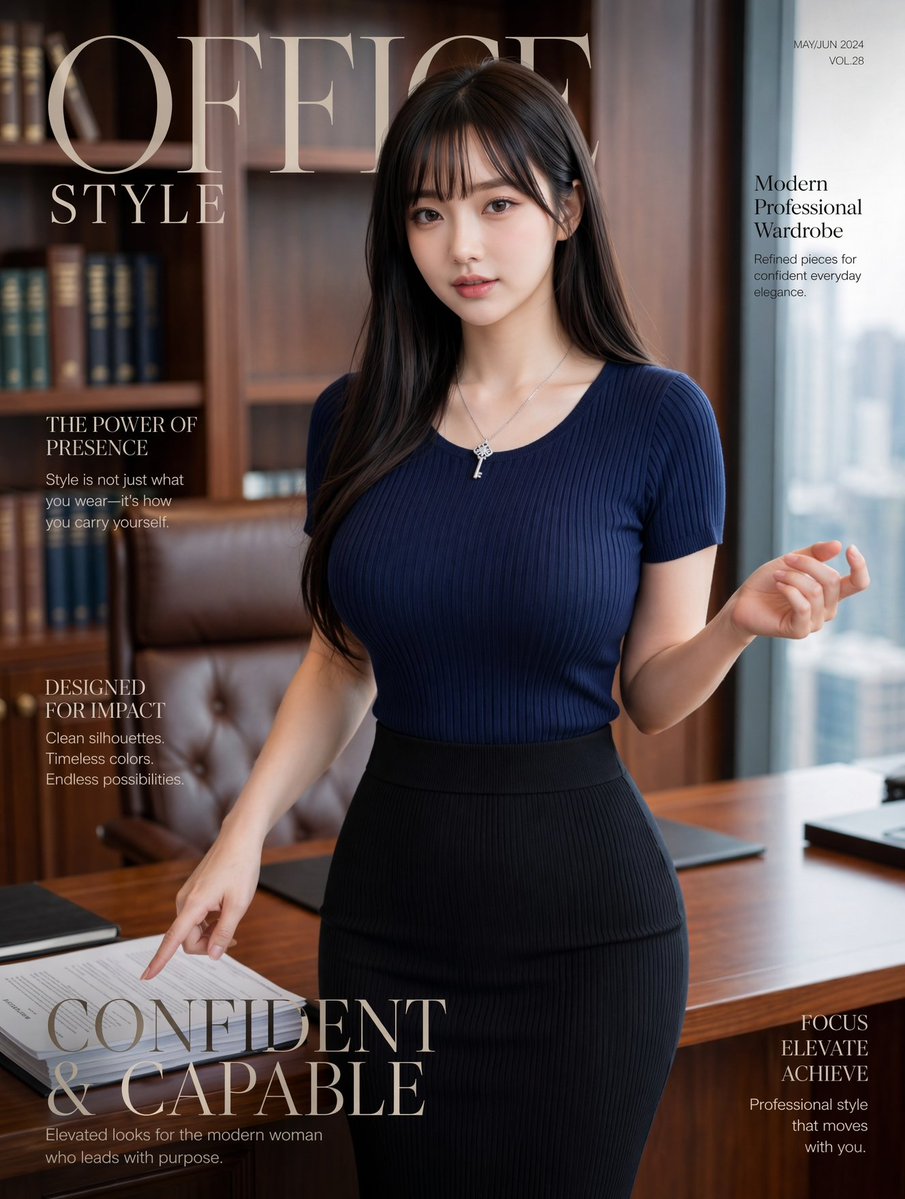
辦公室時尚雜誌封面
這個提示可以產生一張精美的雜誌風格封面,封面是一位自信的職業女性在豪華的辦公環境中,非常適合用於時尚品牌推廣、模擬封面和企業風格宣傳活動。
這是一個時尚與美妝的GPT Image 2範例。請使用下方可直接使用的提示資訊產生類似的視覺素材,並在重複使用前查看Awesome GPT Image 2 Prompts署名和商業用途授權資訊。
需要完整的提示符號集?請使用 時尚與美妝 主題中心提供更多相關範例,或打開 GPT Image 2 提示庫 有關完整範例索引、可重複使用結構和來源歸屬的資訊。
Free 1K preview
Generate one preview image instantly, no sign-up required.
2317/4000
提示詞
可直接複製的提示
A luxury fashion magazine cover photographed in a modern executive office, featuring a stylish young East Asian businesswoman standing beside a wooden desk in a confident editorial pose. She has long, smooth, dark brown to black hair parted slightly off center, falling over both shoulders, and wears a fitted ribbed knit short-sleeve top in {argument name="top color" default="deep navy"}, tucked into a high-waisted ribbed pencil skirt in {argument name="skirt color" default="black"}. Add a delicate silver necklace with a small key pendant. Her body is angled slightly toward camera, with one hand lifted loosely near shoulder height and the other hand pointing down toward papers on the desk, conveying poised authority and effortless elegance. The setting is a refined corner office with warm wood bookshelves filled with books, a tufted brown leather executive chair, a polished wooden desk with neatly arranged documents and dark desk pads, and a tall window on the right revealing a soft blurred city skyline. Use soft natural daylight from the window mixed with warm interior tones, shallow depth of field, premium magazine photography, polished skin, realistic fabric texture, tasteful retouching, and a sophisticated editorial mood. Overlay elegant serif magazine typography: a very large masthead at the top left reading {argument name="magazine title" default="OFFICE STYLE"}, small issue text at the top right reading {argument name="issue text" default="MAY/JUN 2024 VOL.28"}, and 5 cover lines total: on the upper right, "Modern Professional Wardrobe" with the smaller subtext "Refined pieces for confident everyday elegance."; on the upper left, "THE POWER OF PRESENCE" with the smaller subtext "Style is not just what you wear—it's how you carry yourself."; on the left middle, "DESIGNED FOR IMPACT" with the smaller subtext "Clean silhouettes. Timeless colors. Endless possibilities."; across the lower left in very large serif type, {argument name="main cover line" default="CONFIDENT & CAPABLE"}; and on the lower right, "FOCUS ELEVATE ACHIEVE" with the smaller subtext "Professional style that moves with you.". Vertical portrait layout, high-end fashion magazine cover composition, clean spacing, muted luxury palette, realistic office styling, chic corporate femininity, confidence in motion.提示變數
提示符號中可編輯的參數佔位符及其預設值。
多變的
top color
預設
deep navy
多變的
skirt color
預設
black
多變的
magazine title
預設
OFFICE STYLE
多變的
issue text
預設
MAY/JUN 2024 VOL.28
多變的
main cover line
預設
CONFIDENT & CAPABLE
Best for
- - 時尚與美妝 visual exploration
- - Image generation and reference-image edits
- - Reusable briefs that keep source attribution visible
Change these parts
- - Subject, product, character, or scene
- - Aspect ratio, camera, lighting, and background
- - Brand, text, color, and output constraints
Recommended model and settings
- - Model: gpt-image-2
- - Input mode: 文生圖
- - Aspect ratio: source
- - Commercial status: review original source
How to use this prompt
- 1. Copy the prompt and preserve its structure for the first test.
- 2. Replace the subject, context, and publishing channel.
- 3. Change one camera, lighting, or style variable per iteration.
- 4. Inspect the output, source, text, and rights before reuse.
Limitations, source, and reuse cautions
- - Generated output is an editable draft, not factual, legal, or rights evidence.
- - Review the linked source, people, brands, logos, text, and third-party media before commercial use.
內容來自Awesome GPT Image 2 Prompts 。必須註明出處。商業用途狀態為allowed ;付費使用前請查看來源版權資訊。
此類案例更多
按類別、輸入模式相容性、品質和低風險進行優先排序。






重用和來源註釋
預覽案例後,請謹慎使用此提示。
- 1.複製提示或直接在 Dovoo 中使用生成按鈕開啟提示。
- 2.根據您的實際使用情況調整變數、寬高比和參考影像。
- 3.發布或付費使用前,請確認版權、署名要求以及品牌或肖像權風險。