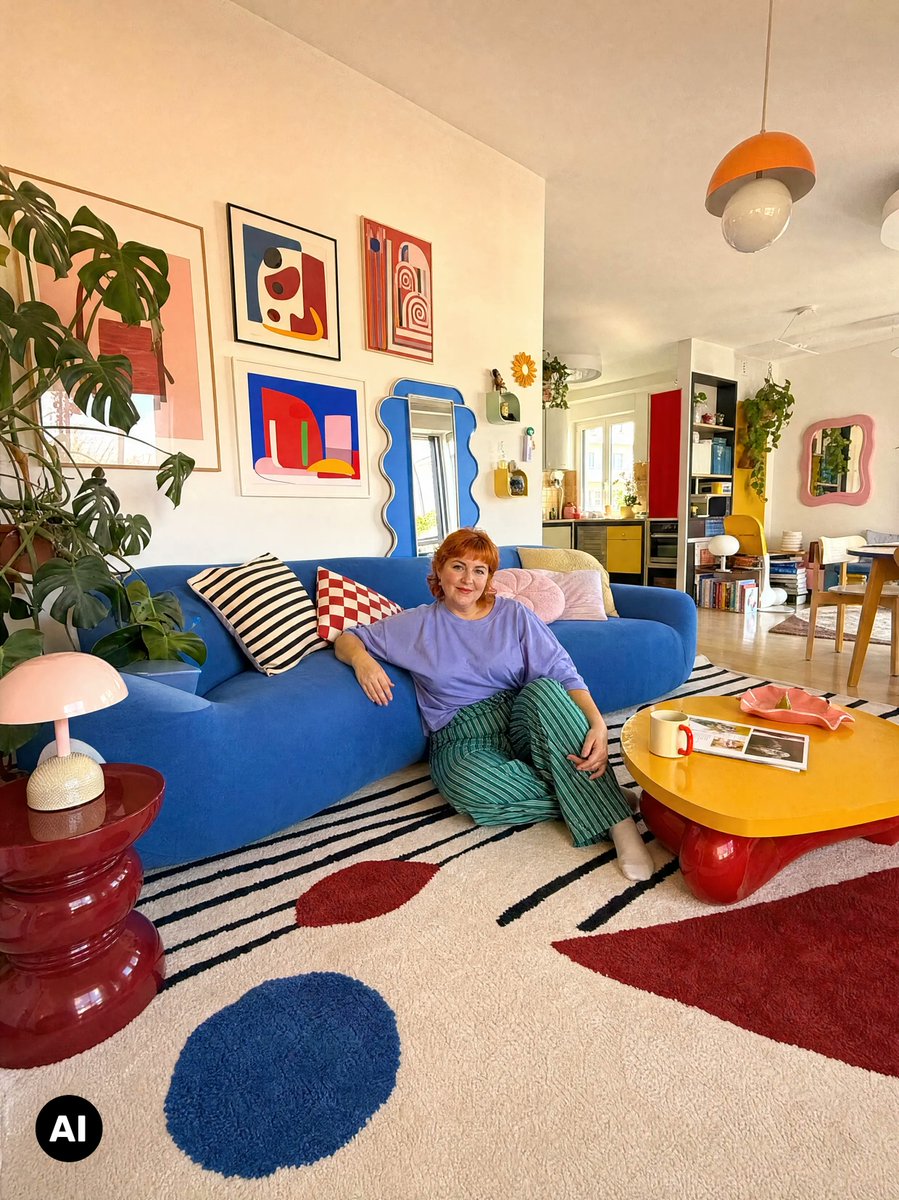
Moodboard to Clean Interior Photo
Transforms a collage-style interior moodboard into a clean photorealistic room photograph while preserving the original decor and layout.
這是一個室內設計與建築的GPT Image 2範例。請使用下方可直接使用的提示資訊產生類似的視覺素材,並在重複使用前查看Awesome GPT Image 2 Prompts署名和商業用途授權資訊。
需要完整的提示符號集?請使用 室內設計與建築 主題中心提供更多相關範例,或打開 GPT Image 2 提示庫 有關完整範例索引、可重複使用結構和來源歸屬的資訊。
Free 1K preview
Generate one preview image instantly, no sign-up required.
Free text preview doesn’t preserve reference-image consistency.
1058/4000
提示詞
可直接複製的提示
Using the provided reference image, turn the interior moodboard collage into a clean, realistic full-room photograph. Use the central living-room photo as the source scene and expand/reconstruct it so it fills the entire vertical {argument name="aspect ratio" default="4:5"} frame. Remove every scrapbook and moodboard overlay around the room: 5 handwritten note scraps labeled “COLOR STUDY,” “SOFT + BOLD,” “LOVE THIS,” “LIVING ROOM,” and “TEXTURE”; 7 vertical paint swatches; 5 extra photo cutouts; 2 sketch papers; and the surrounding fabric/rug samples, tape pieces, torn paper edges, stickers, and beige board background. Preserve the actual room design, furniture placement, person on the floor, plants, wall art, mirrors, lamps, rug, coffee table, sofa, colors, and cozy eclectic style from the source photo. Recreate any areas previously covered by collage elements naturally and photorealistically, with consistent lighting, perspective, shadows, and lens feel. Keep it looking like a candid wide-angle interior photo, not a collage or illustration.提示變數
提示符號中可編輯的參數佔位符及其預設值。
多變的
aspect ratio
預設
4:5
Best for
- - 室內設計與建築 visual exploration
- - Image generation and reference-image edits
- - Reusable briefs that keep source attribution visible
Change these parts
- - Subject, product, character, or scene
- - Aspect ratio, camera, lighting, and background
- - Brand, text, color, and output constraints
Recommended model and settings
- - Model: gpt-image-2
- - Input mode: 圖生圖
- - Aspect ratio: source
- - Commercial status: review original source
How to use this prompt
- 1. Copy the prompt and preserve its structure for the first test.
- 2. Replace the subject, context, and publishing channel.
- 3. Change one camera, lighting, or style variable per iteration.
- 4. Inspect the output, source, text, and rights before reuse.
Limitations, source, and reuse cautions
- - Generated output is an editable draft, not factual, legal, or rights evidence.
- - Review the linked source, people, brands, logos, text, and third-party media before commercial use.
內容來自Awesome GPT Image 2 Prompts 。必須註明出處。商業用途狀態為allowed ;付費使用前請查看來源版權資訊。
此類案例更多
按類別、輸入模式相容性、品質和低風險進行優先排序。
重用和來源註釋
預覽案例後,請謹慎使用此提示。
- 1.複製提示或直接在 Dovoo 中使用生成按鈕開啟提示。
- 2.根據您的實際使用情況調整變數、寬高比和參考影像。
- 3.發布或付費使用前,請確認版權、署名要求以及品牌或肖像權風險。