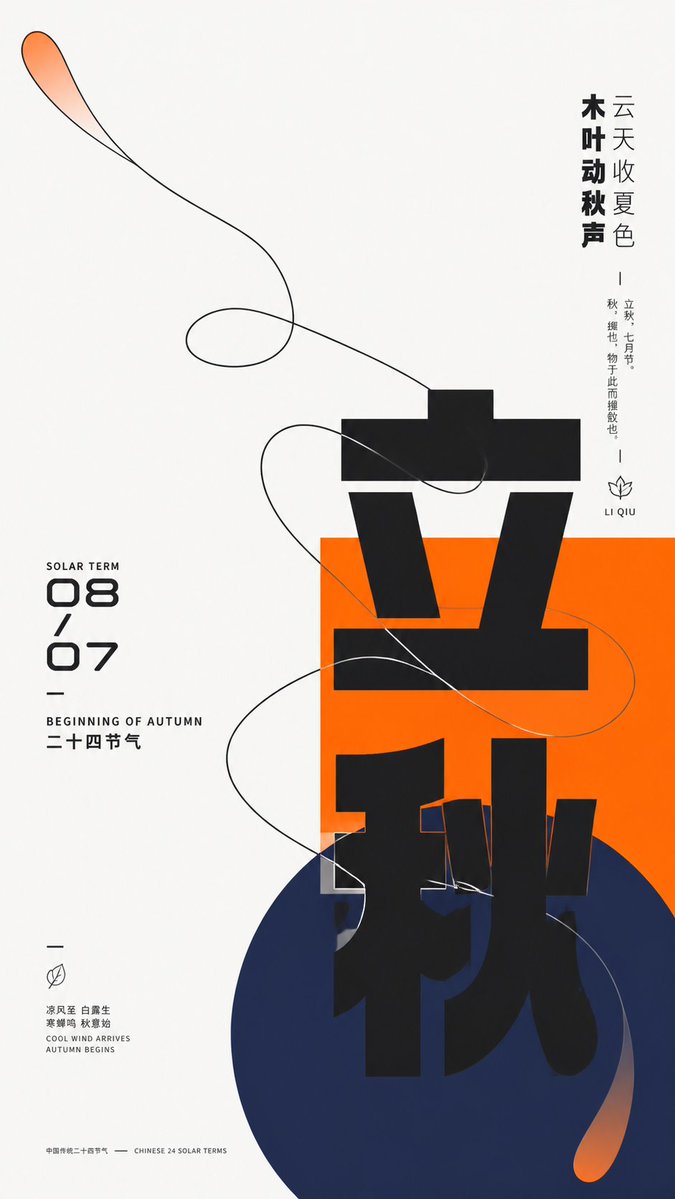
Modern Chinese Graphic Design Layout
A sophisticated prompt for creating modern Chinese graphic design featuring geometric shapes, organic outlines, and bold typography with balanced negative space.
這是一個平面設計和海報設計的GPT Image 2範例。請使用下方可直接使用的提示資訊產生類似的視覺素材,並在重複使用前查看Awesome GPT Image 2 Prompts署名和商業用途授權資訊。
需要完整的提示符號集?請使用 平面設計和海報設計 主題中心提供更多相關範例,或打開 GPT Image 2 提示庫 有關完整範例索引、可重複使用結構和來源歸屬的資訊。
Free 1K preview
Generate one preview image instantly, no sign-up required.
Free text preview doesn’t preserve reference-image consistency.
3149/4000
提示詞
可直接複製的提示
Construct a modern graphic visual around {argument name="subject" default="any theme object"} by intersecting giant Chinese thematic characters, geometric color blocks, and single-line organic outlines. Maintain high brightness and a pure background overall, leaving more than two-thirds of the space white, with an off-center cluster bearing the main weight: a saturated {argument name="main color" default="main theme color"} rectangle establishes a stable plane, a deeper low-brightness cool-toned circle overlaps from below and extends beyond the boundary, and the core Chinese theme character advances vertically with oversized heavy black geometric strokes across the white base, rectangle, and circle, forming strong scale jumps through incomplete occlusion and cropping; the left side features a compact digital column of dates and bilingual sub-headers, while the right side balances the weight with two levels of vertical short sentences, and small micro-descriptions, short dashes, and linear symbols are scattered at the edges, creating a three-level reading rhythm from the main character to side notes and then to details. Abstract the dynamic relationship derived from the theme into a continuous organic outline, using clear near-black single lines to outline a broad swirling form that enters the color blocks from large areas of white space and crosses the edges, with curves intersecting multiple times but maintaining a discernible single path; the interior of the outline mostly retains the base color, with only local transparent thematic main color fades added at the tips and extensions, creating tension between the light lines and the heavy giant characters. Colors are adaptively selected by theme: the largest area is borne by a clean high-brightness neutral base, the main theme color remains bright and highly saturated for rectangles and local transparent gradients, the circle uses a deep cold supporting color pulled away from the main color's hue, blending into the main color at the end to form soft diffusion, and text and outlines use near-black, with a very small amount of light-colored text pressed against the main color block; fix unequal areas, light/dark levels, and saturation differences, without fixing specific color names. All elements present a flat surface like matte digital printing, with sharp outline edges, gradients only slowly feathered in two parts, and no three-dimensional shadows, paper grain, or global lighting effects. The font maintains a low-contrast, thick, near-geometric sans-serif skeleton, with main characters allowed to have components elongated, displaced, cut, or changing background across color blocks; numbers use a rounded futuristic structure, and small text is enclosed by narrow bodies and loose letter-spacing; brand names, advertising copy, and specific dates are all replaced by new theme information. Finally, preserve extreme white space, geometric gathering below center, vertical and horizontal text pulling against each other, and the moment organic lines cross rigid graphics, avoiding filling parts evenly or simplifying outlines into isolated decorations.提示變數
提示符號中可編輯的參數佔位符及其預設值。
多變的
subject
預設
any theme object
多變的
main color
預設
main theme color
Best for
- - 平面設計和海報設計 visual exploration
- - Image generation and reference-image edits
- - Reusable briefs that keep source attribution visible
Change these parts
- - Subject, product, character, or scene
- - Aspect ratio, camera, lighting, and background
- - Brand, text, color, and output constraints
Recommended model and settings
- - Model: gpt-image-2
- - Input mode: 圖生圖
- - Aspect ratio: source
- - Commercial status: review original source
How to use this prompt
- 1. Copy the prompt and preserve its structure for the first test.
- 2. Replace the subject, context, and publishing channel.
- 3. Change one camera, lighting, or style variable per iteration.
- 4. Inspect the output, source, text, and rights before reuse.
Limitations, source, and reuse cautions
- - Generated output is an editable draft, not factual, legal, or rights evidence.
- - Review the linked source, people, brands, logos, text, and third-party media before commercial use.
內容來自Awesome GPT Image 2 Prompts 。必須註明出處。商業用途狀態為allowed ;付費使用前請查看來源版權資訊。
此類案例更多
按類別、輸入模式相容性、品質和低風險進行優先排序。




重用和來源註釋
預覽案例後,請謹慎使用此提示。
- 1.複製提示或直接在 Dovoo 中使用生成按鈕開啟提示。
- 2.根據您的實際使用情況調整變數、寬高比和參考影像。
- 3.發布或付費使用前,請確認版權、署名要求以及品牌或肖像權風險。