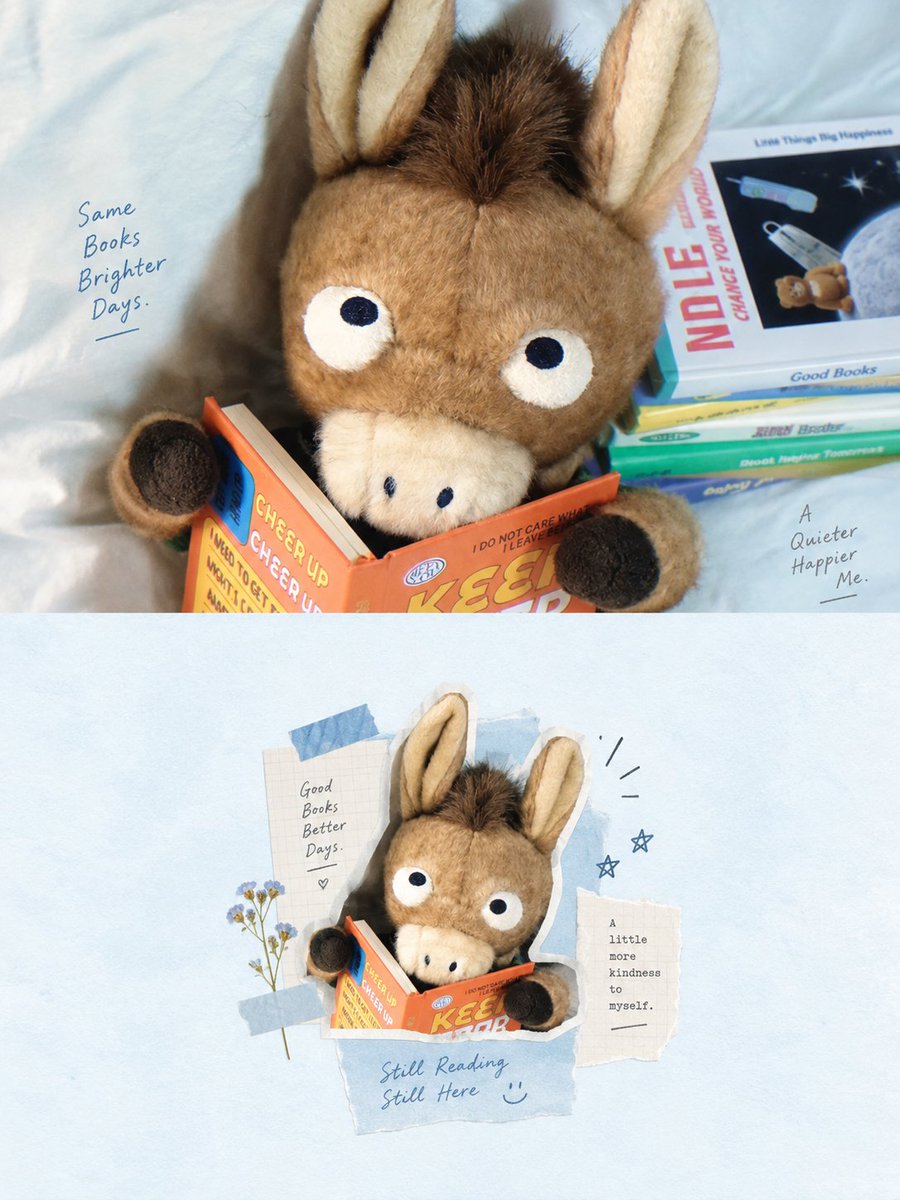
Airy Mixed-Media Collage Poster
A detailed design prompt for high-end mixed-media collage posters with an airy, minimalist aesthetic, splitting the composition between a realistic photo and a digital collage.
這是一個平面設計和海報設計的GPT Image 2範例。請使用下方可直接使用的提示資訊產生類似的視覺素材,並在重複使用前查看Awesome GPT Image 2 Prompts署名和商業用途授權資訊。
需要完整的提示符號集?請使用 平面設計和海報設計 主題中心提供更多相關範例,或打開 GPT Image 2 提示庫 有關完整範例索引、可重複使用結構和來源歸屬的資訊。
Free 1K preview
Generate one preview image instantly, no sign-up required.
Free text preview doesn’t preserve reference-image consistency.
4000/4000
提示詞
可直接複製的提示
Please create a high-end design poster for each photo I upload, without combining multiple images into one; each should be output separately. Use a 3:4 vertical composition, with the top and bottom areas strictly divided in a 1:1 ratio, each occupying 50% of the image.

The upper half should retain the original photo, maintaining the subject's identity, structure, pose, realistic texture, natural lighting, and original color atmosphere. Only apply slight professional color adjustments to give it the feel of an art magazine, independent publication, or exhibition image. To adapt to the aspect ratio, the background environment can extend naturally, but the subject must not be stretched, deformed, or altered.

The lower half should first understand the core theme, subject relationship, structural trend, emotional atmosphere, and visual memory points of the original image, and then reconstruct it into a whitespace-style digital mixed-media collage insert. Do not copy objects from the photo one by one, nor fill the entire frame; instead, remove irrelevant details, retaining only the structures, trends, and visual cues that best represent the original image. Re-summarize it through photo fragments, delicate line art, handwritten annotations, paper textures, and a few collage shapes, making the correspondence with the upper photo immediately recognizable.

The composition should follow the logic of a “small central frame with large whitespace.” The true visual subject is controlled within a small area in the center of the lower half, like a magazine insert, scrapbook page, or collage card, placed against a clean, expansive background. The subject does not need to be fully unfolded; it can be moderately cropped, compressed, or combined, surrounded only by minimalist line art, paper scraps, arrows, symbols, or a few short text annotations, creating a relaxed and restrained editing relationship. Whitespace is not just an empty background; it is a key part of creating a sense of breathing room, spaciousness, and rhythm with the subject.

The visual language should employ digital mixed-media collage: you can combine small portions of photos, simple black thin-line doodles, handwriting, paper collage traces, thin tape, or sticky note elements, but the overall style must be restrained, light, and quiet—avoiding heavy manual stacking or complex decoration. The subject should remain clear, and auxiliary elements should only be used to emphasize the theme, supplement memory, and optimize the layout, without forming a new visual center.

The color scheme is based on light, breathable tones, defaulting to {argument name="color tone" default="Low-saturation light blue with white"}, and adjusted according to the photo above. Overall, use light blue, hazy blue, powder blue, white, or off-white as large-area backgrounds, supplemented by black thin lines to outline the structure, a small amount of dark blue to regulate the rhythm, and a touch of light yellow, pale gold, or minimalist warm colors as highlights. The colors should be stable, light, healing, and clean, like the relationship between soft skies and paper, avoiding high saturation, messy colors, dirty tones, or excessive vintage feel.

Text intervention should be minimal, with no language restrictions. Feel free to extract a few words, phrases, or notes based on the theme, location, action, emotion, or memory. Use small, restrained, and relaxed font styles with a handwritten or edited feel, naturally distributed around the subject or the edges of the whitespace, like light annotations in a magazine insert, rather than commercial headlines.

The overall presentation should be small subject, large artistic whitespace, blue and white theme, combination of photos and line art, paper texture collage, and a light, relaxed editing insert feel, referencing minimalist mixed-media collage / whitespace scrapbook layout / centralized editing collage / light magazine-style layout. Avoid full-page collage, complex backgrounds, messy decoration, commercial template feel, cheap scrapbook style, and redrawing objects one by one.
提示變數
提示符號中可編輯的參數佔位符及其預設值。
多變的
color tone
預設
Low-saturation light blue with white
Best for
- - 平面設計和海報設計 visual exploration
- - Image generation and reference-image edits
- - Reusable briefs that keep source attribution visible
Change these parts
- - Subject, product, character, or scene
- - Aspect ratio, camera, lighting, and background
- - Brand, text, color, and output constraints
Recommended model and settings
- - Model: gpt-image-2
- - Input mode: 圖生圖
- - Aspect ratio: source
- - Commercial status: review original source
How to use this prompt
- 1. Copy the prompt and preserve its structure for the first test.
- 2. Replace the subject, context, and publishing channel.
- 3. Change one camera, lighting, or style variable per iteration.
- 4. Inspect the output, source, text, and rights before reuse.
Limitations, source, and reuse cautions
- - Generated output is an editable draft, not factual, legal, or rights evidence.
- - Review the linked source, people, brands, logos, text, and third-party media before commercial use.
內容來自Awesome GPT Image 2 Prompts 。必須註明出處。商業用途狀態為allowed ;付費使用前請查看來源版權資訊。
此類案例更多
按類別、輸入模式相容性、品質和低風險進行優先排序。






重用和來源註釋
預覽案例後,請謹慎使用此提示。
- 1.複製提示或直接在 Dovoo 中使用生成按鈕開啟提示。
- 2.根據您的實際使用情況調整變數、寬高比和參考影像。
- 3.發布或付費使用前,請確認版權、署名要求以及品牌或肖像權風險。