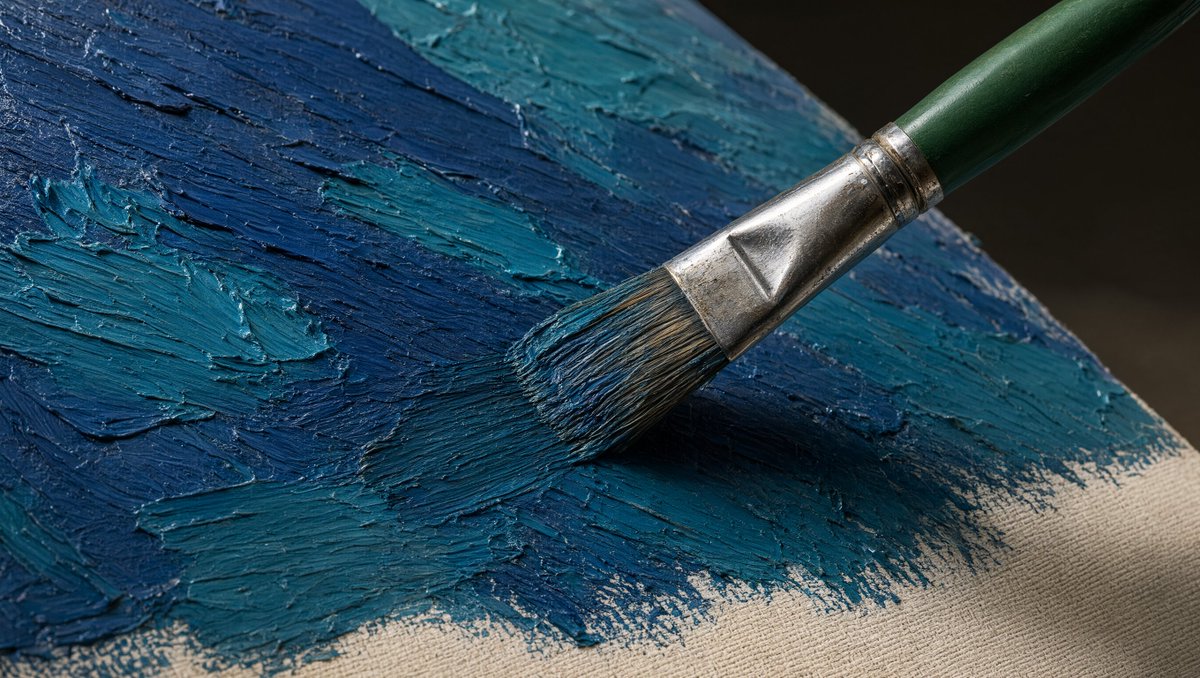
画布上的巨观油画笔
用于生成具有纹理的油画场景的逼真特写提示,其中一支画笔在画布上涂抹着蓝色的厚涂颜料。
這是一個其他靈感的GPT Image 2範例。請使用下方可直接使用的提示資訊產生類似的視覺素材,並在重複使用前查看Awesome GPT Image 2 Prompts署名和商業用途授權資訊。
需要完整的提示符號集?請使用 其他靈感 主題中心提供更多相關範例,或打開 GPT Image 2 提示庫 有關完整範例索引、可重複使用結構和來源歸屬的資訊。
Free 1K preview
Generate one preview image instantly, no sign-up required.
473/4000
提示詞
可直接複製的提示
创建一张超逼真的巨观照片,描绘着一支单只的艺术家画笔将浓厚的油画颜料涂抹在拉伸的画布上。画笔从右上角以对角线方式进入中心,具有 {argument name="brush handle color" default="深绿色"} 木制笔柄、磨损的闪亮银色金属箍和装载着 {argument name="paint color palette" default="深海军蓝和青蓝色"} 颜料的天然鬃毛。展示确切的一支画笔和一张画布表面。画布以透视角度倾斜,充满整个画面,右下角可见米色原始织物,其余表面覆盖着厚重的厚涂颜料。强调凸起的脊纹、类似调色刀的纹理、鬃毛凹槽、湿润有光泽的高光以及颜料中的小刮痕。使用从左上方投下的戏剧性的逼真光线,在画笔下方营造出黑暗柔和的阴影,并在金属箍和湿润的颜料上形成清晰的镜面反射。背景应为黑暗且失焦,具有浅景深、高细节纹理、自然色彩分级以及电影般的特写构图,采用 {argument name="aspect ratio" default="16:9 横向"} 画面。没有文字,没有手,没有额外的工具,没有水印。提示變數
提示符號中可編輯的參數佔位符及其預設值。
多變的
brush handle color
預設
dark green
多變的
paint color palette
預設
deep navy blue and teal blue
多變的
aspect ratio
預設
16:9 horizontal
Best for
- - 其他靈感 visual exploration
- - Image generation and reference-image edits
- - Reusable briefs that keep source attribution visible
Change these parts
- - Subject, product, character, or scene
- - Aspect ratio, camera, lighting, and background
- - Brand, text, color, and output constraints
Recommended model and settings
- - Model: gpt-image-2
- - Input mode: 文生圖
- - Aspect ratio: source
- - Commercial status: review original source
How to use this prompt
- 1. Copy the prompt and preserve its structure for the first test.
- 2. Replace the subject, context, and publishing channel.
- 3. Change one camera, lighting, or style variable per iteration.
- 4. Inspect the output, source, text, and rights before reuse.
Limitations, source, and reuse cautions
- - Generated output is an editable draft, not factual, legal, or rights evidence.
- - Review the linked source, people, brands, logos, text, and third-party media before commercial use.
內容來自Awesome GPT Image 2 Prompts 。必須註明出處。商業用途狀態為allowed ;付費使用前請查看來源版權資訊。
此類案例更多
按類別、輸入模式相容性、品質和低風險進行優先排序。






重用和來源註釋
預覽案例後,請謹慎使用此提示。
- 1.複製提示或直接在 Dovoo 中使用生成按鈕開啟提示。
- 2.根據您的實際使用情況調整變數、寬高比和參考影像。
- 3.發布或付費使用前,請確認版權、署名要求以及品牌或肖像權風險。