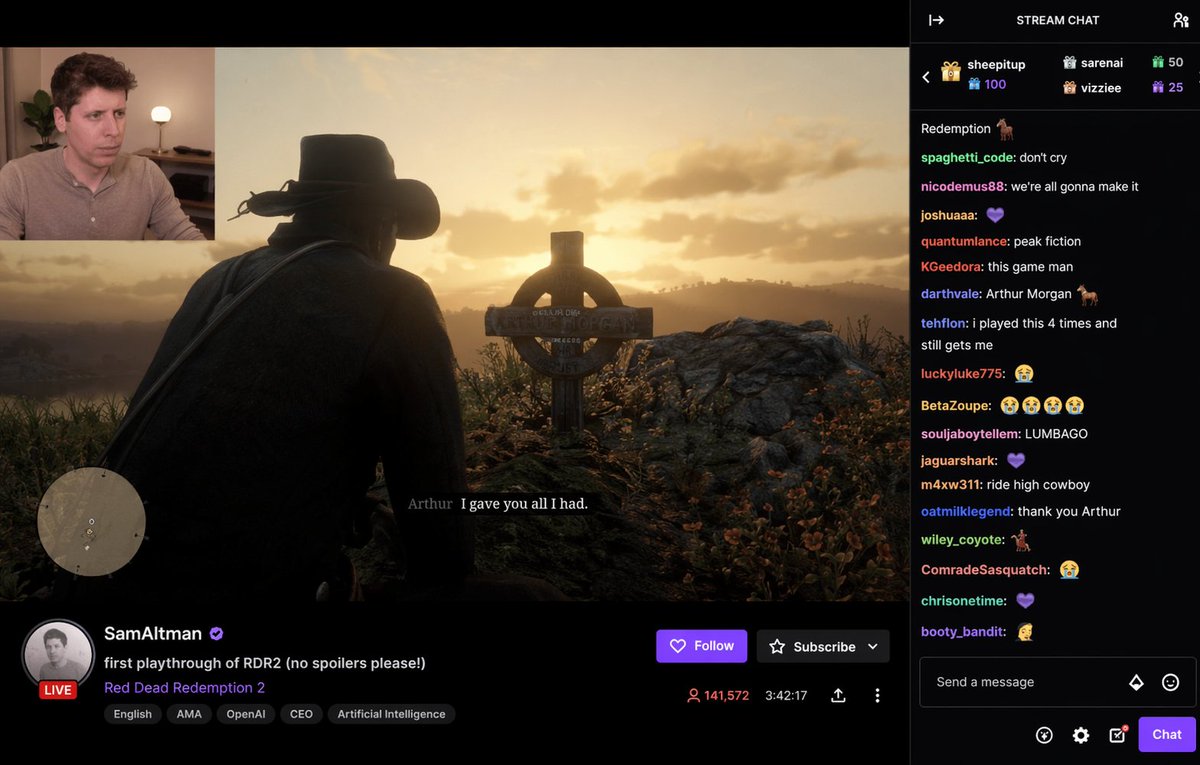
直播介面模型
產生逼真的直播平台介面,包括遊戲畫面、網路攝影機疊加、直播詳情和活躍的聊天側邊欄。
這是一個平面設計和海報設計的GPT Image 2範例。請使用下方可直接使用的提示資訊產生類似的視覺素材,並在重複使用前查看Awesome GPT Image 2 Prompts署名和商業用途授權資訊。
需要完整的提示符號集?請使用 平面設計和海報設計 主題中心提供更多相關範例,或打開 GPT Image 2 提示庫 有關完整範例索引、可重複使用結構和來源歸屬的資訊。
Free 1K preview
Generate one preview image instantly, no sign-up required.
1787/4000
提示詞
可直接複製的提示
{
  "type": "live stream interface mockup",
  "layout": {
    "main_feed": {
      "content": "video game scene, cowboy silhouette looking at a grave with a celtic cross at sunset",
      "subtitle": "{argument name=\"game subtitle\" default=\"Arthur I gave you all I had.\"}",
      "ui_elements": [
        "circular minimap in bottom left"
      ]
    },
    "webcam": {
      "position": "top left",
      "subject": "{argument name=\"webcam subject\" default=\"Sam Altman\"} looking intently and slightly sad",
      "background": "room with a plant and a glowing lamp"
    },
    "stream_info": {
      "position": "bottom",
      "profile": {
        "name": "{argument name=\"streamer name\" default=\"SamAltman\"}",
        "verified": true,
        "avatar": "grayscale portrait of the streamer",
        "live_badge": "LIVE"
      },
      "details": {
        "title": "{argument name=\"stream title\" default=\"first playthrough of RDR2 (no spoilers please!)\"}",
        "category": "{argument name=\"game title\" default=\"Red Dead Redemption 2\"}",
        "tags": [
          "English",
          "AMA",
          "OpenAI",
          "CEO",
          "Artificial Intelligence"
        ]
      },
      "stats": {
        "viewers": "141,572",
        "uptime": "3:42:17"
      },
      "buttons": [
        "Follow",
        "Subscribe"
      ]
    },
    "chat_sidebar": {
      "position": "right",
      "header": "STREAM CHAT",
      "messages_count": 17,
      "message_examples": [
        "spaghetti_code: don't cry",
        "nicodemus88: we're all gonna make it",
        "quantumlance: peak fiction",
        "souljaboytellem: LUMBAGO",
        "m4xw311: ride high cowboy"
      ],
      "input_area": "Send a message box with a purple Chat button"
    }
  }
}
提示變數
提示符號中可編輯的參數佔位符及其預設值。
多變的
game subtitle
預設
Arthur I gave you all I had.
多變的
webcam subject
預設
Sam Altman
多變的
streamer name
預設
SamAltman
多變的
stream title
預設
first playthrough of RDR2 (no spoilers please!)
多變的
game title
預設
Red Dead Redemption 2
Best for
- - 平面設計和海報設計 visual exploration
- - Image generation and reference-image edits
- - Reusable briefs that keep source attribution visible
Change these parts
- - Subject, product, character, or scene
- - Aspect ratio, camera, lighting, and background
- - Brand, text, color, and output constraints
Recommended model and settings
- - Model: gpt-image-2
- - Input mode: 文生圖
- - Aspect ratio: source
- - Commercial status: review original source
How to use this prompt
- 1. Copy the prompt and preserve its structure for the first test.
- 2. Replace the subject, context, and publishing channel.
- 3. Change one camera, lighting, or style variable per iteration.
- 4. Inspect the output, source, text, and rights before reuse.
Limitations, source, and reuse cautions
- - Generated output is an editable draft, not factual, legal, or rights evidence.
- - Review the linked source, people, brands, logos, text, and third-party media before commercial use.
內容來自Awesome GPT Image 2 Prompts 。必須註明出處。商業用途狀態為allowed ;付費使用前請查看來源版權資訊。
此類案例更多
按類別、輸入模式相容性、品質和低風險進行優先排序。






重用和來源註釋
預覽案例後,請謹慎使用此提示。
- 1.複製提示或直接在 Dovoo 中使用生成按鈕開啟提示。
- 2.根據您的實際使用情況調整變數、寬高比和參考影像。
- 3.發布或付費使用前,請確認版權、署名要求以及品牌或肖像權風險。