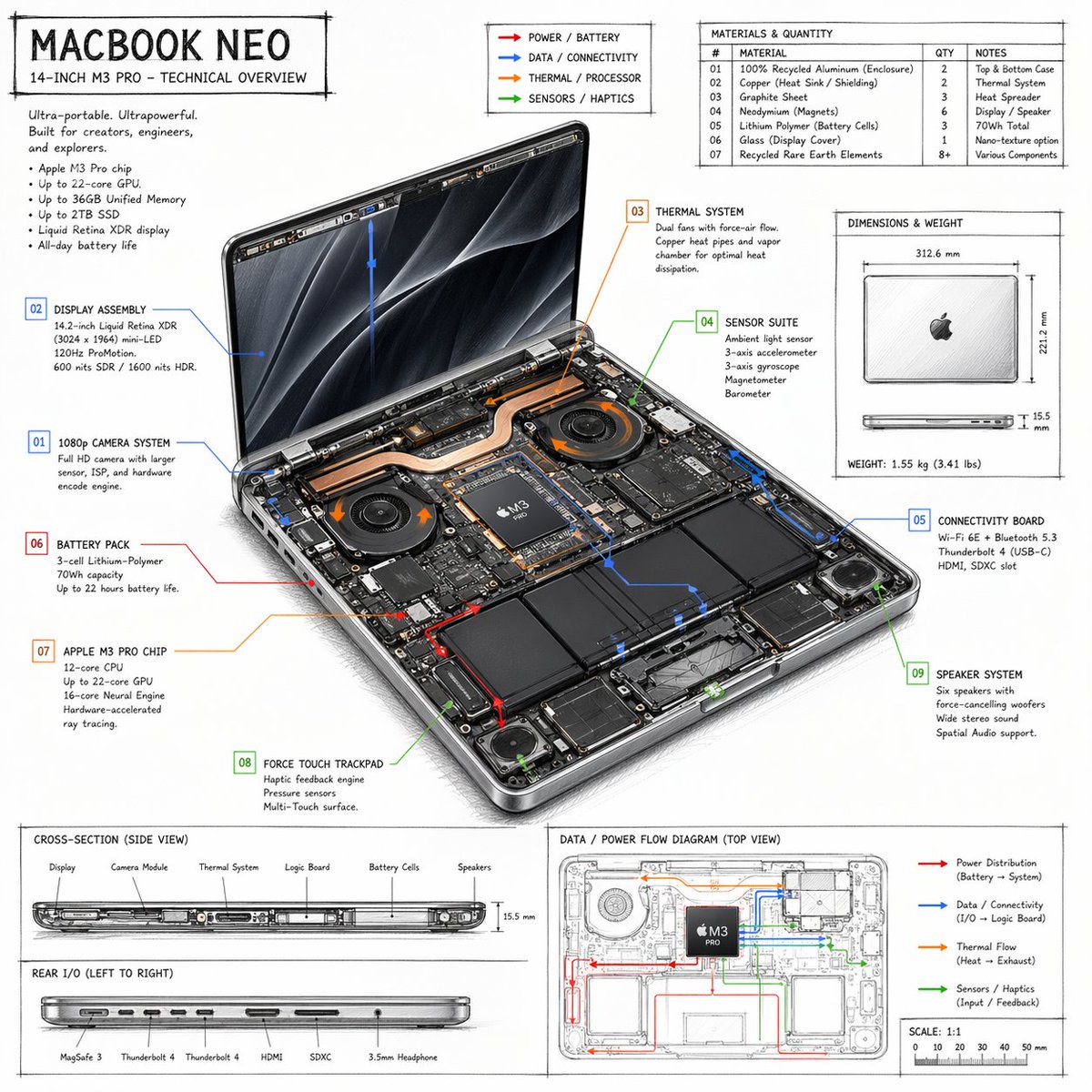
筆記型電腦技術概覽資訊圖
詳細的、手繪風格的筆記型電腦技術規格表,包含內部組件標註、材料表和流程圖。
這是一個平面設計和海報設計的GPT Image 2範例。請使用下方可直接使用的提示資訊產生類似的視覺素材,並在重複使用前查看Awesome GPT Image 2 Prompts署名和商業用途授權資訊。
需要完整的提示符號集?請使用 平面設計和海報設計 主題中心提供更多相關範例,或打開 GPT Image 2 提示庫 有關完整範例索引、可重複使用結構和來源歸屬的資訊。
Free 1K preview
Generate one preview image instantly, no sign-up required.
1682/4000
提示詞
可直接複製的提示
{
  "type": "技術概覽資訊圖表",
  "style": "{argument name=\"visual style\" default=\"手繪技術草圖搭配簡潔排版\"}",
  "product": {
    "name": "{argument name=\"product name\" default=\"MACBOOK NEO\"}",
    "subtitle": "14 吋 {argument name=\"processor model\" default=\"M3 PRO\"} - 技術概覽"
  },
  "layout": {
    "centerpiece": {
      "description": "打開筆記型電腦的等距視圖,顯示內部硬體組件,如雙風扇、銅製散熱管、電池和邏輯板",
      "callouts_count": 9,
      "callout_labels": [
        "01 1080p 攝影機系統",
        "02 顯示器組件",
        "03 散熱系統",
        "04 感測器套件",
        "05 連接板",
        "06 電池組",
        "07 {argument name=\"main component\" default=\"APPLE M3 PRO 晶片\"}",
        "08 力感觸控板",
        "09 揚聲器系統"
      ]
    },
    "sections": [
      {
        "title": "標題文字",
        "position": "左上角",
        "content": "行銷文案和 5 個要點規格清單"
      },
      {
        "title": "圖例",
        "position": "頂部中央",
        "content": "4 個顏色編碼的箭頭,指示 {argument name=\"accent colors\" default=\"紅色、藍色、橘色、綠色\"} 的電力、資料、散熱和感測器流程線"
      },
      {
        "title": "材料與數量",
        "position": "右上角",
        "type": "表格",
        "rows_count": 7,
        "columns": [
          "#",
          "材料",
          "數量",
          "備註"
        ]
      },
      {
        "title": "尺寸與重量",
        "position": "中間右側",
        "content": "關閉筆記型電腦的頂部和側面視圖,附帶測量值"
      },
      {
        "title": "剖面圖(側面視圖)",
        "position": "底部左側(上半部分)",
        "content": "側面剖面圖,顯示內部組件佈局,附帶 6 個標籤"
      },
      {
        "title": "後部 I/O(從左到右)",
        "position": "底部左側(下半部分)",
        "content": "側面剖面圖,顯示 6 個端口"
      },
      {
        "title": "資料/電力流程圖(頂部視圖)",
        "position": "底部右側",
        "content": "線框頂部視圖,帶有彩色流程線、圖例和比例尺"
      }
    ]
  }
}
提示變數
提示符號中可編輯的參數佔位符及其預設值。
多變的
visual style
預設
hand-drawn technical sketch with clean typography
多變的
product name
預設
MACBOOK NEO
多變的
processor model
預設
M3 PRO
多變的
main component
預設
APPLE M3 PRO CHIP
多變的
accent colors
預設
red, blue, orange, green
Best for
- - 平面設計和海報設計 visual exploration
- - Image generation and reference-image edits
- - Reusable briefs that keep source attribution visible
Change these parts
- - Subject, product, character, or scene
- - Aspect ratio, camera, lighting, and background
- - Brand, text, color, and output constraints
Recommended model and settings
- - Model: gpt-image-2
- - Input mode: 文生圖
- - Aspect ratio: source
- - Commercial status: review original source
How to use this prompt
- 1. Copy the prompt and preserve its structure for the first test.
- 2. Replace the subject, context, and publishing channel.
- 3. Change one camera, lighting, or style variable per iteration.
- 4. Inspect the output, source, text, and rights before reuse.
Limitations, source, and reuse cautions
- - Generated output is an editable draft, not factual, legal, or rights evidence.
- - Review the linked source, people, brands, logos, text, and third-party media before commercial use.
內容來自Awesome GPT Image 2 Prompts 。必須註明出處。商業用途狀態為allowed ;付費使用前請查看來源版權資訊。
此類案例更多
按類別、輸入模式相容性、品質和低風險進行優先排序。






重用和來源註釋
預覽案例後,請謹慎使用此提示。
- 1.複製提示或直接在 Dovoo 中使用生成按鈕開啟提示。
- 2.根據您的實際使用情況調整變數、寬高比和參考影像。
- 3.發布或付費使用前,請確認版權、署名要求以及品牌或肖像權風險。