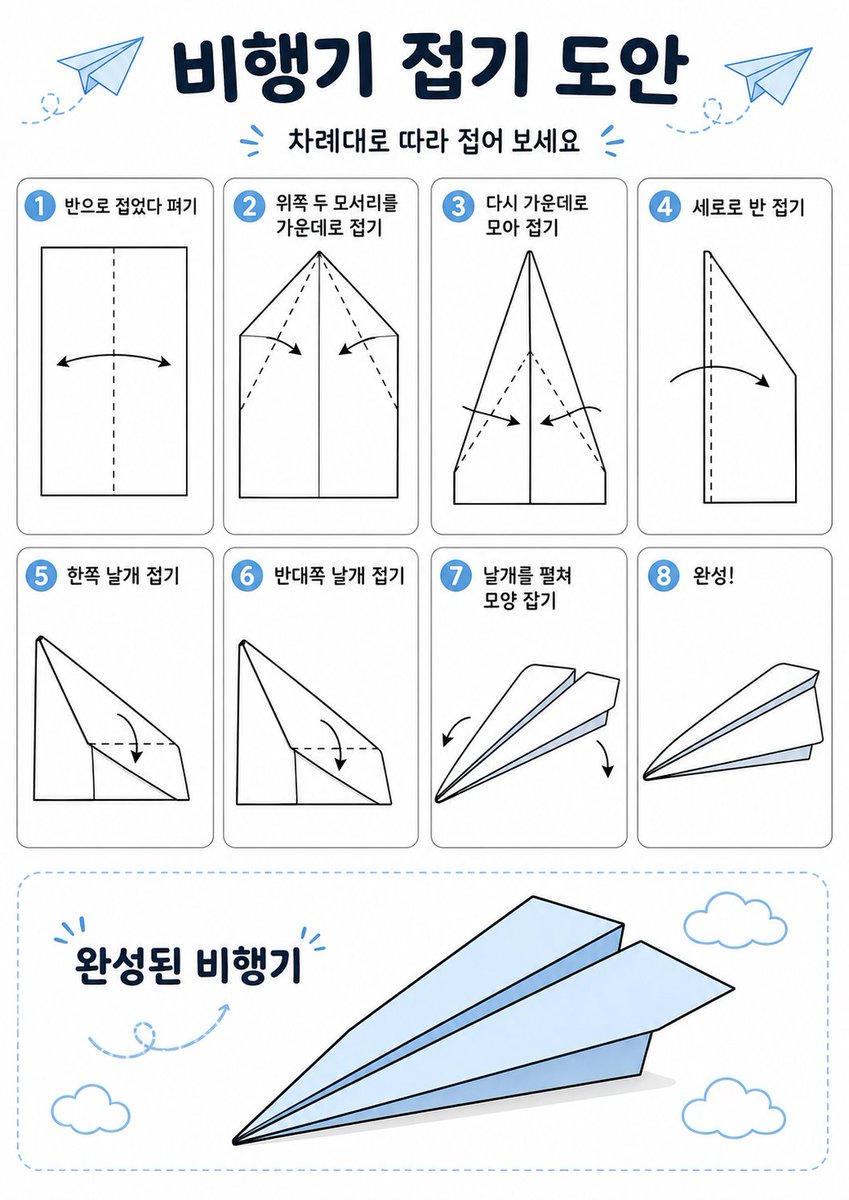
韓國紙飛機摺法海報
此提示會產生一個清晰的韓語摺紙教學資訊圖,教你如何用 8 個標籤的步驟來折疊紙飛機。
這是一個平面設計和海報設計的GPT Image 2範例。請使用下方可直接使用的提示資訊產生類似的視覺素材,並在重複使用前查看Awesome GPT Image 2 Prompts署名和商業用途授權資訊。
需要完整的提示符號集?請使用 平面設計和海報設計 主題中心提供更多相關範例,或打開 GPT Image 2 提示庫 有關完整範例索引、可重複使用結構和來源歸屬的資訊。
Free 1K preview
Generate one preview image instantly, no sign-up required.
3948/4000
提示詞
可直接複製的提示
{
  "type": "origami instruction poster",
  "topic": "paper airplane folding guide",
  "language": "Korean",
  "style": {
    "overall": "clean educational infographic, simple vector line art, friendly classroom worksheet aesthetic",
    "palette": {
      "background": "white",
      "primary": "dark navy",
      "accent": "light sky blue",
      "line": "black",
      "shadow": "soft light gray"
    },
    "rendering": "flat 2D layout with crisp outlines and minimal shading"
  },
  "canvas": {
    "orientation": "portrait",
    "margin": "generous white margins"
  },
  "header": {
    "title": "{argument name=\"headline text\" default=\"비행기 접기 도안\"}",
    "subtitle": "{argument name=\"subtitle text\" default=\"차례대로 따라 접어 보세요\"}",
    "decorations": {
      "paper_airplanes": 2,
      "dashed_flight_paths": 2,
      "blue_accent_marks": 2
    }
  },
  "layout": {
    "grid": {
      "columns": 4,
      "rows": 2,
      "step_cards": 8
    },
    "sections": [
      {
        "title": "steps row 1",
        "position": "upper middle",
        "count": 4,
        "labels": [
          "1 반으로 접었다 펴기",
          "2 위쪽 두 모서리를 가운데로 접기",
          "3 다시 가운데로 모아 접기",
          "4 세로로 반 접기"
        ]
      },
      {
        "title": "steps row 2",
        "position": "middle",
        "count": 4,
        "labels": [
          "5 한쪽 날개 접기",
          "6 반대쪽 날개 접기",
          "7 날개를 펼쳐 모양 잡기",
          "8 완성!"
        ]
      },
      {
        "title": "finished airplane display",
        "position": "bottom",
        "count": 1,
        "labels": [
          "완성된 비행기"
        ]
      }
    ]
  },
  "step_cards": [
    {
      "step": 1,
      "badge": "1",
      "text": "반으로 접었다 펴기",
      "diagram": "vertical rectangle sheet with a centered vertical dashed fold line and a curved double-headed arrow indicating folding inward and reopening"
    },
    {
      "step": 2,
      "badge": "2",
      "text": "위쪽 두 모서리를 가운데로 접기",
      "diagram": "paper with pointed top, both upper corners folded to the center line, dashed diagonal guide lines, two inward arrows"
    },
    {
      "step": 3,
      "badge": "3",
      "text": "다시 가운데로 모아 접기",
      "diagram": "narrower pointed shape, side edges folded again toward the center line, dashed diagonal guides, two inward arrows near the lower middle"
    },
    {
      "step": 4,
      "badge": "4",
      "text": "세로로 반 접기",
      "diagram": "side-view folded shape with a vertical dashed center line and one large curved arrow showing the model folded in half lengthwise"
    },
    {
      "step": 5,
      "badge": "5",
      "text": "한쪽 날개 접기",
      "diagram": "triangular side-view airplane body with one wing folded downward, dashed horizontal guide near the top edge and a curved arrow"
    },
    {
      "step": 6,
      "badge": "6",
      "text": "반대쪽 날개 접기",
      "diagram": "same side-view as step 5, folding the opposite wing downward with matching dashed guide and curved arrow"
    },
    {
      "step": 7,
      "badge": "7",
      "text": "날개를 펼쳐 모양 잡기",
      "diagram": "3D paper airplane opening into shape, two curved arrows pointing downward and outward on each side"
    },
    {
      "step": 8,
      "badge": "8",
      "text": "완성!",
      "diagram": "completed paper airplane in simple perspective, light blue top faces, black outline, no arrows"
    }
  ],
  "bottom_panel": {
    "container": "large rounded rectangle with light blue dashed border",
    "label": "완성된 비행기",
    "main_object": "large completed paper airplane angled from lower left to upper right, pale blue surfaces with black outline and subtle gray shadow beneath",
    "decorations": {
      "clouds": 3,
      "swirl_arrow": 1
    }
  },
  "text_style": {
    "title": "bold rounded Korean display font in dark navy",
    "subtitle": "smaller bold Korean text",
    "step_labels": "bold black Korean text",
    "number_badges": "white numbers inside blue circles"
  }
}
提示變數
提示符號中可編輯的參數佔位符及其預設值。
多變的
headline text
預設
비행기 접기 도안
多變的
subtitle text
預設
차례대로 따라 접어 보세요
Best for
- - 平面設計和海報設計 visual exploration
- - Image generation and reference-image edits
- - Reusable briefs that keep source attribution visible
Change these parts
- - Subject, product, character, or scene
- - Aspect ratio, camera, lighting, and background
- - Brand, text, color, and output constraints
Recommended model and settings
- - Model: gpt-image-2
- - Input mode: 文生圖
- - Aspect ratio: source
- - Commercial status: review original source
How to use this prompt
- 1. Copy the prompt and preserve its structure for the first test.
- 2. Replace the subject, context, and publishing channel.
- 3. Change one camera, lighting, or style variable per iteration.
- 4. Inspect the output, source, text, and rights before reuse.
Limitations, source, and reuse cautions
- - Generated output is an editable draft, not factual, legal, or rights evidence.
- - Review the linked source, people, brands, logos, text, and third-party media before commercial use.
內容來自Awesome GPT Image 2 Prompts 。必須註明出處。商業用途狀態為allowed ;付費使用前請查看來源版權資訊。
此類案例更多
按類別、輸入模式相容性、品質和低風險進行優先排序。






重用和來源註釋
預覽案例後,請謹慎使用此提示。
- 1.複製提示或直接在 Dovoo 中使用生成按鈕開啟提示。
- 2.根據您的實際使用情況調整變數、寬高比和參考影像。
- 3.發布或付費使用前,請確認版權、署名要求以及品牌或肖像權風險。