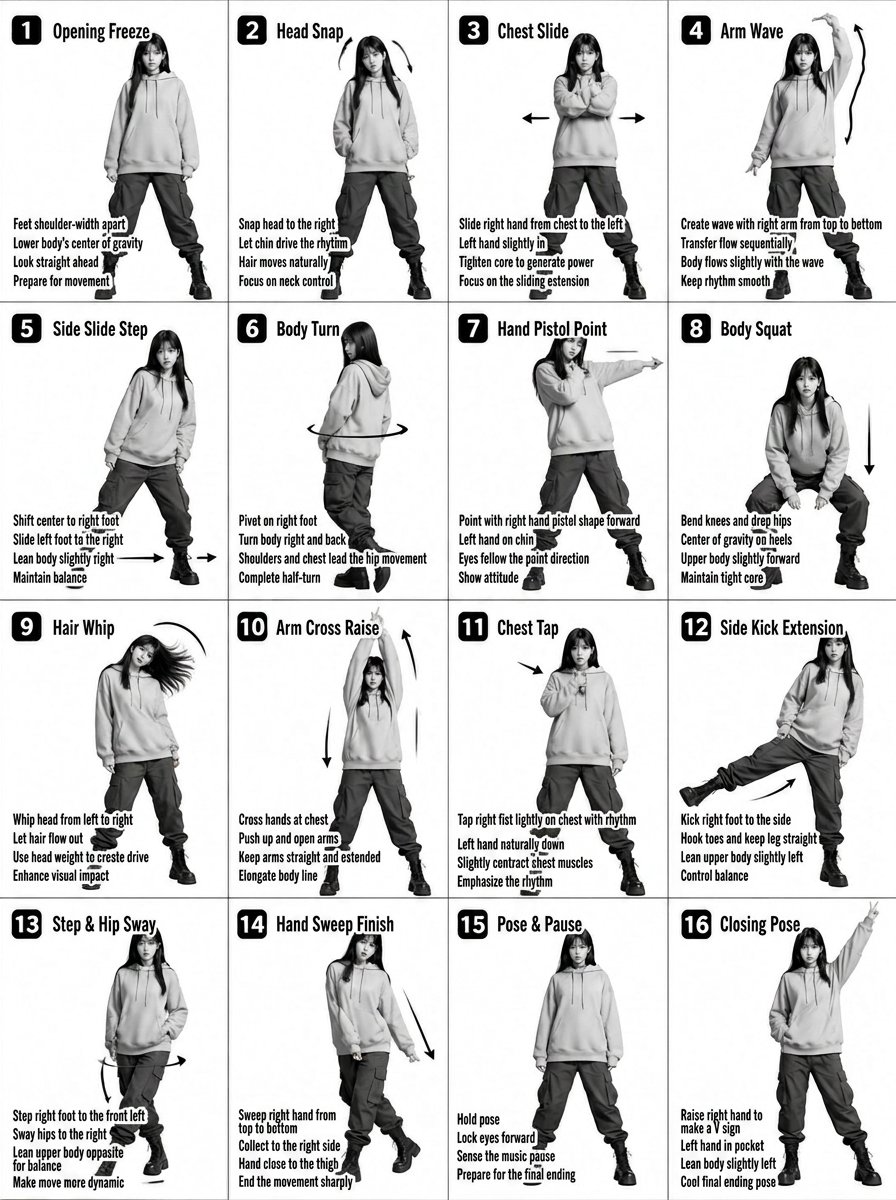
K-pop舞蹈教學海報產生器
將一張 4x4 的動作圖變成一張時尚的 K-pop 偶像教學海報,帶有霓虹裝飾和現代圖形。
這是一個平面設計和海報設計的GPT Image 2範例。請使用下方可直接使用的提示資訊產生類似的視覺素材,並在重複使用前查看Awesome GPT Image 2 Prompts署名和商業用途授權資訊。
需要完整的提示符號集?請使用 平面設計和海報設計 主題中心提供更多相關範例,或打開 GPT Image 2 提示庫 有關完整範例索引、可重複使用結構和來源歸屬的資訊。
Free 1K preview
Generate one preview image instantly, no sign-up required.
Free text preview doesn’t preserve reference-image consistency.
2452/4000
提示詞
可直接複製的提示
Transform the input image into a stylized {argument name="style" default="K-pop dance tutorial poster"} with a fashion-forward streetwear aesthetic, keeping the exact 4x4 grid layout (16 panels) and choreography structure.
Core Composition
Maintain a 16-panel grid (4 columns × 4 rows) with clean spacing

Each panel shows the same female dancer performing sequential choreography

Preserve panel numbering (1–16) in bold, modern UI-style labels

Keep step titles and instructional captions, but redesign typography to feel like K-pop album graphics / dance practice overlays

Subject Styling (K-pop Idol Inspired)

Young female dancer with soft glam K-pop makeup (dewy skin, subtle shimmer, defined eyes)

Hair: long, sleek, slightly dynamic (motion-friendly, flowing during moves)

Expression: confident, charismatic stage presence

Outfit (streetwear-inspired):

{argument name="clothing" default="Cropped hoodie or oversized zip-up jacket with cargo pants"}

Chunky sneakers or platform boots

Optional accessories: chain necklace, ear cuffs, fingerless gloves

Visual Style

Switch from plain grayscale → high-contrast + soft neon accents

Base palette: {argument name="colors" default="black, white, gray"}

Accent colors: neon pink, electric blue, or violet glow (subtle, not overpowering)

Lighting:

Studio lighting with a soft glow + rim light effect

Slight stage-light vibe, like a K-pop dance practice video

Graphics & Effects

Add dynamic motion trails and glow accents on arms, legs, and hair movement

Replace basic arrows with stylized motion graphics (neon strokes, swooshes)

Subtle light streaks or particle effects for energy

Optional faint floor reflection or glossy surface

Typography

Titles: bold, modern, slightly condensed sans-serif (K-pop album style)

Add subtle glow or gradient to titles

Instruction text: clean, minimal, slightly futuristic UI style

Panel numbers: inside rounded squares or pill shapes with neon outline

Camera & Framing

Full-body framing in each panel (consistent scale)

Straight-on angle, but with slight dynamic tilt or perspective energy

Maintain clarity of movement for instructional purpose

Mood & Energy

Feels like a K-pop dance practice meets fashion editorial

Clean but energetic

Stylish, rhythmic, performance-driven

Important Constraints

Keep choreography readable and sequential

Do NOT merge panels or change layout

Maintain consistency of dancer identity across all panels
提示變數
提示符號中可編輯的參數佔位符及其預設值。
多變的
style
預設
K-pop dance tutorial poster
多變的
clothing
預設
Cropped hoodie or oversized zip-up jacket with cargo pants
多變的
colors
預設
black, white, gray
Best for
- - 平面設計和海報設計 visual exploration
- - Image generation and reference-image edits
- - Reusable briefs that keep source attribution visible
Change these parts
- - Subject, product, character, or scene
- - Aspect ratio, camera, lighting, and background
- - Brand, text, color, and output constraints
Recommended model and settings
- - Model: gpt-image-2
- - Input mode: 圖生圖
- - Aspect ratio: source
- - Commercial status: review original source
How to use this prompt
- 1. Copy the prompt and preserve its structure for the first test.
- 2. Replace the subject, context, and publishing channel.
- 3. Change one camera, lighting, or style variable per iteration.
- 4. Inspect the output, source, text, and rights before reuse.
Limitations, source, and reuse cautions
- - Generated output is an editable draft, not factual, legal, or rights evidence.
- - Review the linked source, people, brands, logos, text, and third-party media before commercial use.
內容來自Awesome GPT Image 2 Prompts 。必須註明出處。商業用途狀態為allowed ;付費使用前請查看來源版權資訊。
此類案例更多
按類別、輸入模式相容性、品質和低風險進行優先排序。






重用和來源註釋
預覽案例後,請謹慎使用此提示。
- 1.複製提示或直接在 Dovoo 中使用生成按鈕開啟提示。
- 2.根據您的實際使用情況調整變數、寬高比和參考影像。
- 3.發布或付費使用前,請確認版權、署名要求以及品牌或肖像權風險。