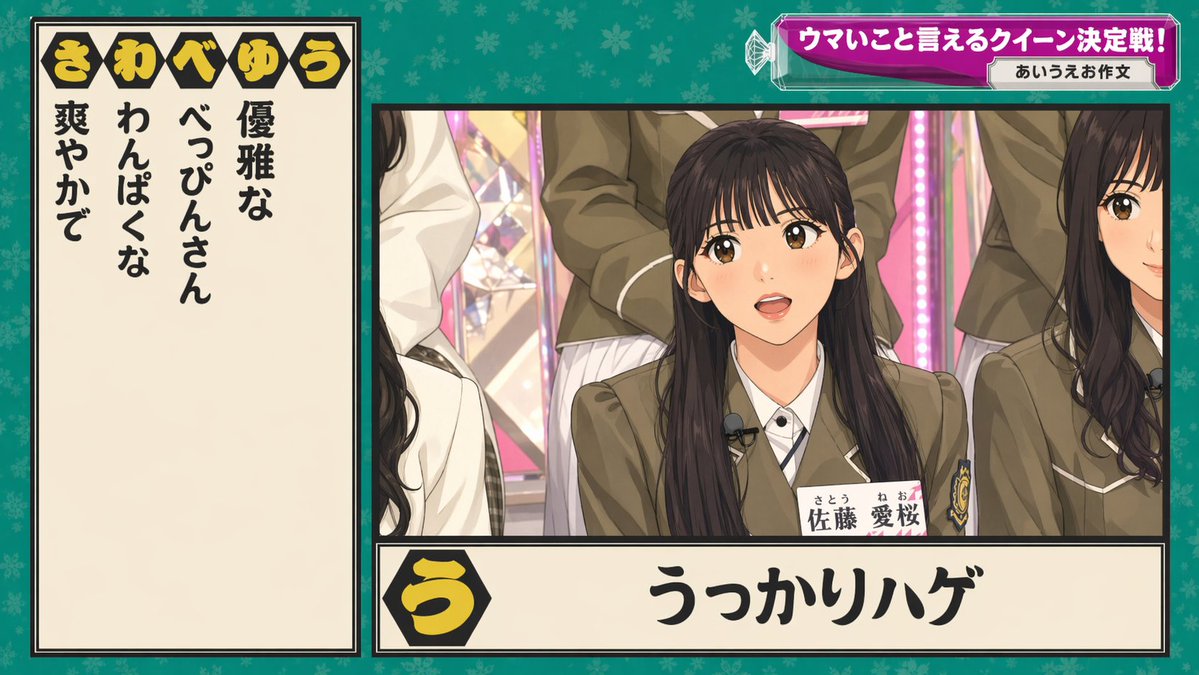
日本綜藝節目問答螢幕
一張日式電視問答節目截圖,包含參賽者面板、提示文字、標題橫幅和醒目的答案,適合用於重現廣播圖形或遊戲節目模型。
這是一個平面設計和海報設計的GPT Image 2範例。請使用下方可直接使用的提示資訊產生類似的視覺素材,並在重複使用前查看Awesome GPT Image 2 Prompts署名和商業用途授權資訊。
需要完整的提示符號集?請使用 平面設計和海報設計 主題中心提供更多相關範例,或打開 GPT Image 2 提示庫 有關完整範例索引、可重複使用結構和來源歸屬的資訊。
Free 1K preview
Generate one preview image instantly, no sign-up required.
3382/4000
提示詞
可直接複製的提示
{
  "type": "Japanese TV variety show quiz graphic",
  "style": "modern Japanese broadcast screenshot, crisp studio lighting, high text legibility, colorful game-show overlay, semi-realistic live-action composite",
  "scene": {
    "setting": "idol variety show studio with pink illuminated stage elements and multiple seated female participants in school-uniform-inspired outfits",
    "background": "teal-green patterned full-frame backdrop with subtle floral motifs behind the graphic layout"
  },
  "layout": {
    "format": "single broadcast frame with left answer panel, main video panel on right, top-right headline banner, and bottom answer strip",
    "sections": [
      {
        "title": "き わ べ ゆ う",
        "position": "top-left inside the left panel header",
        "count": 5,
        "labels": [
          "き",
          "わ",
          "べ",
          "ゆ",
          "う"
        ]
      },
      {
        "title": "left clue list",
        "position": "left vertical cream panel",
        "count": 4,
        "labels": [
          "優雅な",
          "わんぱくな",
          "べっぴんさん",
          "爽やかで"
        ]
      },
      {
        "title": "top-right banner",
        "position": "upper-right",
        "count": 2,
        "labels": [
          "ウマいこと言えるクイーン決定戦!",
          "あいうえお作文"
        ]
      },
      {
        "title": "bottom answer strip",
        "position": "bottom center-right",
        "count": 2,
        "labels": [
          "う",
          "うっかりハゲ"
        ]
      }
    ],
    "centerpiece": "main camera shot of a seated young Japanese woman centered in the right panel, surrounded by other similarly dressed women cropped at the sides and back"
  },
  "subjects": {
    "count": 5,
    "primary subject": {
      "gender": "female",
      "age": "late teens to early twenties",
      "ethnicity": "Japanese",
      "hair": "long straight dark hair, center part",
      "outfit": "Olive brown school uniform blazer, white shirt, striped tie, a badge on the chest pocket, wearing a clip-on lapel microphone, a name tag visible with “Satō Aizakura” written on it and furigana."
    },
    "secondary subjects": [
      "partial woman on left edge with long dark wavy hair and white jacket",
      "partial woman on right edge with long dark wavy hair and matching blazer",
      "standing woman behind center in matching blazer and pleated skirt",
      "additional cropped participant in back-left"
    ]
  },
  "graphics": {
    "left panel": {
      "background": "warm cream",
      "border": "thick black border with thin inner line",
      "text": "large bold vertical black Japanese characters"
    },
    "top banner": {
      "shape": "faceted magenta-purple gradient capsule with glossy highlights and white outline, small crystal-like decorative elements at left",
      "sublabel": "small white rounded rectangle on the right"
    },
    "bottom strip": {
      "background": "cream rectangular panel with black border",
      "icon": "black hexagon at left containing large yellow hiragana う",
      "answer_text": "very large bold black calligraphic Japanese text"
    }
  },
  "camera": {
    "framing": "medium shot within the right panel",
    "angle": "straight-on broadcast camera angle"
  },
  "quality": "clean high-resolution TV screenshot aesthetic with precise Japanese typography and authentic variety-show composition"
}
Best for
- - 平面設計和海報設計 visual exploration
- - Image generation and reference-image edits
- - Reusable briefs that keep source attribution visible
Change these parts
- - Subject, product, character, or scene
- - Aspect ratio, camera, lighting, and background
- - Brand, text, color, and output constraints
Recommended model and settings
- - Model: gpt-image-2
- - Input mode: 文生圖
- - Aspect ratio: source
- - Commercial status: review original source
How to use this prompt
- 1. Copy the prompt and preserve its structure for the first test.
- 2. Replace the subject, context, and publishing channel.
- 3. Change one camera, lighting, or style variable per iteration.
- 4. Inspect the output, source, text, and rights before reuse.
Limitations, source, and reuse cautions
- - Generated output is an editable draft, not factual, legal, or rights evidence.
- - Review the linked source, people, brands, logos, text, and third-party media before commercial use.
內容來自Awesome GPT Image 2 Prompts 。必須註明出處。商業用途狀態為allowed ;付費使用前請查看來源版權資訊。
此類案例更多
按類別、輸入模式相容性、品質和低風險進行優先排序。






重用和來源註釋
預覽案例後,請謹慎使用此提示。
- 1.複製提示或直接在 Dovoo 中使用生成按鈕開啟提示。
- 2.根據您的實際使用情況調整變數、寬高比和參考影像。
- 3.發布或付費使用前,請確認版權、署名要求以及品牌或肖像權風險。