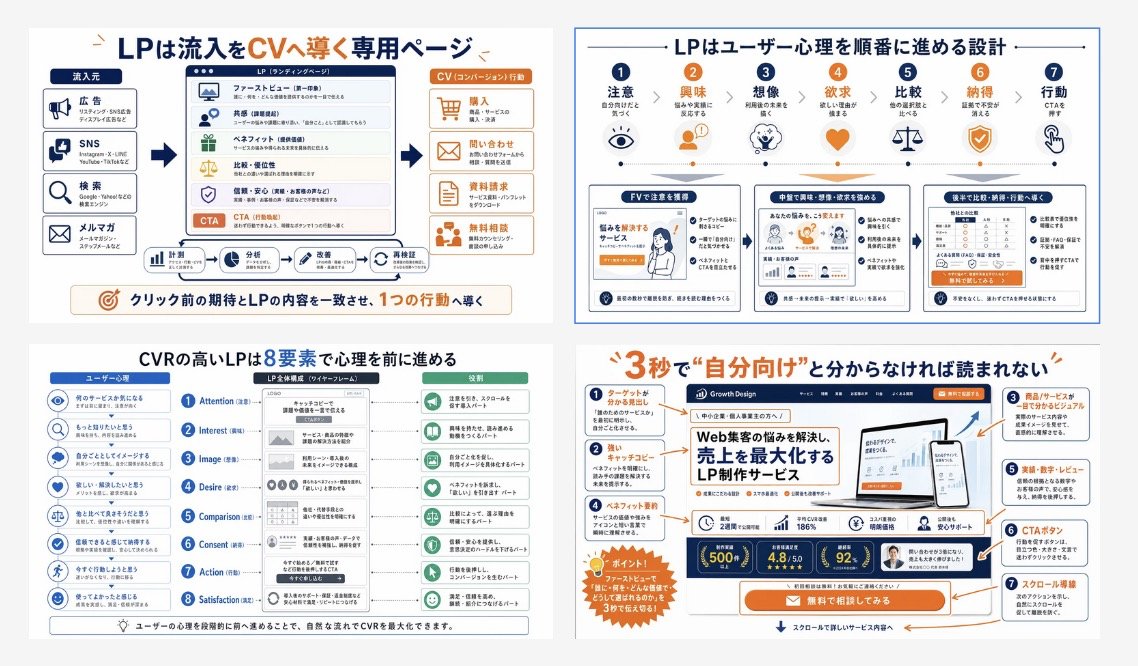
日本LP轉換資訊圖表
這是一份四格日式教育資訊圖,解釋了著陸頁結構、使用者心理和轉換設計,適用於培訓材料或行銷簡報。
這是一個平面設計和海報設計的GPT Image 2範例。請使用下方可直接使用的提示資訊產生類似的視覺素材,並在重複使用前查看Awesome GPT Image 2 Prompts署名和商業用途授權資訊。
需要完整的提示符號集?請使用 平面設計和海報設計 主題中心提供更多相關範例,或打開 GPT Image 2 提示庫 有關完整範例索引、可重複使用結構和來源歸屬的資訊。
Free 1K preview
Generate one preview image instantly, no sign-up required.
4000/4000
提示詞
可直接複製的提示
{
  "type": "Japanese landing page education infographic collage",
  "style": "clean corporate training slide, flat vector infographic mixed with UI mockup thumbnails, white background, navy blue and orange accent palette, thin gray dividers, rounded boxes, clear iconography, presentation-ready",
  "language": "Japanese",
  "canvas": {
    "aspect_ratio": "16:9",
    "background": "light gray outer margin with four white infographic panels in a 2x2 grid"
  },
  "layout": {
    "grid": {
      "rows": 2,
      "columns": 2,
      "count": 4
    },
    "sections": [
      {
        "title": "LPは流入をCVへ導く専用ページ",
        "position": "top-left",
        "count": 4,
        "labels": [
          "Traffic source",
          "LP(ランディングページ)",
          "CV(コンバージョン)行動",
          "クリック前の期待とLPの内容を一致させ、1つの行動へ導く"
        ]
      },
      {
        "title": "LPはユーザー心理を順番に進める設計",
        "position": "top-right",
        "count": 7,
        "labels": [
          "Attention",
          "Interest",
          "Imagination",
          "Desire",
          "Comparison",
          "Agreement",
          "Action"
        ]
      },
      {
        "title": "CVRの高いLPは8要素で心理を前に進める",
        "position": "bottom-left",
        "count": 8,
        "labels": [
          "Attention",
          "Interest",
          "Image",
          "Desire",
          "Comparison",
          "Consent",
          "Action",
          "Satisfaction"
        ]
      },
      {
        "title": "3秒で\\\"自分向け\\\"と分からなければ読まれない",
        "position": "bottom-right",
        "count": 7,
        "labels": [
          "ターゲットがわかる見出し",
          "キャッチコピー",
          "商品/サービスが誰でも分かるビジュアル",
          "ベネフィット・実績",
          "実績・数字・レビュー",
          "CTAボタン",
          "スクロール導線"
        ]
      }
    ]
  },
  "panel_details": {
    "top_left": {
      "diagram_type": "conversion funnel explainer",
      "source_count": 4,
      "sources": [
        "Advertisement",
        "SNS",
        "Search",
        "メルマガ"
      ],
      "lp_module_count": 6,
      "lp_modules": [
        "ファーストビュー",
        "Resonance",
        "ベネフィット",
        "比較・優位性",
        "信頼・安心",
        "CTA"
      ],
      "conversion_count": 4,
      "conversions": [
        "Purchase",
        "問い合わせ",
        "Information Request",
        "無料で相談してみる"
      ],
      "footer_flow_count": 5,
      "footer_flows": [
        "Monitoring",
        "Analysis",
        "Improvement Plan",
        "Implementation request",
        "Re-validate"
      ]
    },
    "top_right": {
      "diagram_type": "user psychology progression with icons and three sample LP thumbnails",
      "step_count": 7,
      "steps": [
        {
          "label": "Attention",
          "icon": "eye"
        },
        {
          "label": "Interest",
          "icon": "person"
        },
        {
          "label": "Imagination",
          "icon": "head with spark"
        },
        {
          "label": "Desire",
          "icon": "heart"
        },
        {
          "label": "Comparison",
          "icon": "scales"
        },
        {
          "label": "Agreement",
          "icon": "shield check"
        },
        {
          "label": "Action",
          "icon": "hand clicking"
        }
      ],
      "sample_card_count": 3,
      "sample_cards": [
        "FVで注意を獲得",
        "中盤で興味・想像・欲求を深める",
        "後半で比較・納得・行動へ導線"
      ]
    },
    "bottom_left": {
      "diagram_type": "8-step CVR framework",
      "left_column_count": 8,
      "left_column": "user psychology prompts with blue circular icons",
      "center_column_count": 8,
      "center_column": "LP structure blocks aligned to each stage inside a smartphone-like wireframe",
      "right_column_count": 8,
      "right_column": "green action or reading-state outcomes for each stage",
      "header_labels_count": 3,
      "header_labels": [
        "ユーザー心理",
        "LP全体構成(ワイヤーフレーム)",
        "Role"
      ]
    },
    "bottom_right": {
      "diagram_type": "annotated LP hero critique",
      "headline": "{argument name=\"headline text\" default=\"3秒で\\"自分向け\\"と分からなければ読まれない\"}",
      "annotation_count": 7,
      "annotations": [
        "ターゲットがわかる見出し",
        "キャッチコピー",
        "商品/サービスが誰でも分かるビジュアル",
        "ベネフィット・実績",
        "実績・数字・レビュー",
        "CTAボタン",
        "スクロール導線"
      ],
      "mockup_brand": "{argument name=\"brand name\" default=\"Growth Design\"}",
      "mockup_headline": "{argument name=\"mockup headline\" default=\"Web集客の悩みを解決し、売上を最大化するLP制作サービス\"}",
      "device_count": 2,
      "devices": [
        "desktop monitor",
        "smartphone"
      ],
      "metric_badge_count": 3,
      "metric_badges": [
        "500+",
        "4.8/5.0",
        "92%"
      ],
      "cta_text": "{argument name=\"CTA text\" default=\"無料で相談してみる\"}"
    }
  },
  "visual_notes": {
    "icon_style": "simple line and flat icons in navy, orange, and muted green",
    "typography": "bold Japanese sans-serif headlines, smaller readable body text, emphasis in orange for key words and numbers",
    "composition": "dense but orderly educational poster, each panel framed separately with consistent spacing",
    "quality": "sharp, high-resolution slide suitable for social media post or training manual cover",
    "avoid": "photorealism, messy hand-drawn look, dark background, 3D rendering"
  }
}
提示變數
提示符號中可編輯的參數佔位符及其預設值。
多變的
headline text
預設
3秒で\"自分向け\"と分からなければ読まれない
多變的
brand name
預設
Growth Design
多變的
mockup headline
預設
Web集客の悩みを解決し、売上を最大化するLP制作サービス
多變的
CTA text
預設
無料で相談してみる
Best for
- - 平面設計和海報設計 visual exploration
- - Image generation and reference-image edits
- - Reusable briefs that keep source attribution visible
Change these parts
- - Subject, product, character, or scene
- - Aspect ratio, camera, lighting, and background
- - Brand, text, color, and output constraints
Recommended model and settings
- - Model: gpt-image-2
- - Input mode: 文生圖
- - Aspect ratio: source
- - Commercial status: review original source
How to use this prompt
- 1. Copy the prompt and preserve its structure for the first test.
- 2. Replace the subject, context, and publishing channel.
- 3. Change one camera, lighting, or style variable per iteration.
- 4. Inspect the output, source, text, and rights before reuse.
Limitations, source, and reuse cautions
- - Generated output is an editable draft, not factual, legal, or rights evidence.
- - Review the linked source, people, brands, logos, text, and third-party media before commercial use.
內容來自Awesome GPT Image 2 Prompts 。必須註明出處。商業用途狀態為allowed ;付費使用前請查看來源版權資訊。
此類案例更多
按類別、輸入模式相容性、品質和低風險進行優先排序。






重用和來源註釋
預覽案例後,請謹慎使用此提示。
- 1.複製提示或直接在 Dovoo 中使用生成按鈕開啟提示。
- 2.根據您的實際使用情況調整變數、寬高比和參考影像。
- 3.發布或付費使用前,請確認版權、署名要求以及品牌或肖像權風險。