日本庫存應用程式促銷模型
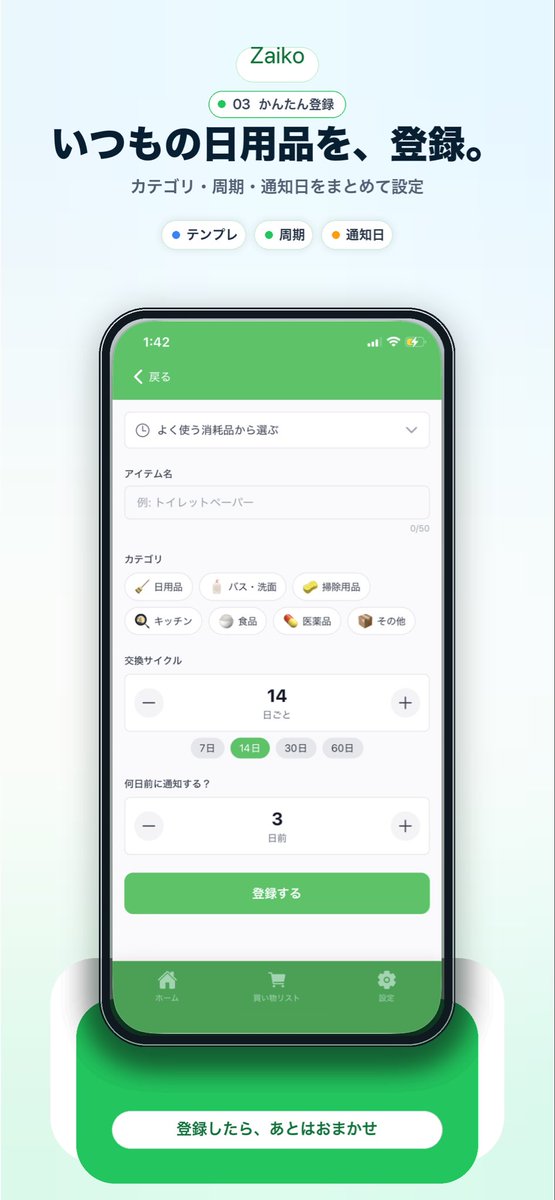
為一款日本家庭物品清單應用程式生成精美的垂直行銷視覺效果圖,該視覺效果圖採用居中的智慧型手機使用者介面、標題文案和強有力的底部行動號召。
這是一個平面設計和海報設計的GPT Image 2範例。請使用下方可直接使用的提示資訊產生類似的視覺素材,並在重複使用前查看Awesome GPT Image 2 Prompts署名和商業用途授權資訊。
需要完整的提示符號集?請使用 平面設計和海報設計 主題中心提供更多相關範例,或打開 GPT Image 2 提示庫 有關完整範例索引、可重複使用結構和來源歸屬的資訊。
Free 1K preview
Generate one preview image instantly, no sign-up required.
3762/4000
提示詞
可直接複製的提示
{
  "type": "mobile app promotional screenshot poster",
  "app": {
    "name": "{argument name=\"app name\" default=\"Zaiko\"}",
    "platform": "iPhone-style inventory and household supplies management app",
    "theme": {
      "primary": "fresh green",
      "background": "very light mint gray gradient",
      "accent": "soft white",
      "text": "dark navy"
    }
  },
  "layout": {
    "orientation": "vertical",
    "composition": "single centered smartphone mockup with marketing copy above and CTA card below",
    "sections": [
      {
        "title": "brand header",
        "position": "top center",
        "count": 2,
        "labels": [
          "Zaiko",
          "03 かんたん登録"
        ]
      },
      {
        "title": "hero text",
        "position": "upper center",
        "count": 2,
        "labels": [
          "いつもの日用品を、登録。",
          "カテゴリ・周期・通知日をまとめて設定"
        ]
      },
      {
        "title": "feature chips",
        "position": "below hero text",
        "count": 3,
        "labels": [
          "テンプレ",
          "Cycle",
          "Reminder date"
        ]
      },
      {
        "title": "app screen form",
        "position": "inside phone center",
        "count": 10,
        "labels": [
          "戻る",
          "よく使う消耗品から選ぶ",
          "アイテム名",
          "カテゴリ",
          "交換サイクル",
          "何日前に通知する?",
          "登録する",
          "ホーム",
          "買い物リスト",
          "Settings"
        ]
      },
      {
        "title": "category chips",
        "position": "mid screen inside phone",
        "count": 7,
        "labels": [
          "Daily necessities",
          "バス・洗面",
          "Cleaning supplies",
          "キッチン",
          "Food",
          "Medicine",
          "その他"
        ]
      },
      {
        "title": "cycle options",
        "position": "lower-mid screen inside phone",
        "count": 4,
        "labels": [
          "7 days",
          "14 days",
          "30 days",
          "60 days"
        ]
      },
      {
        "title": "bottom callout",
        "position": "bottom center",
        "count": 1,
        "labels": [
          "登録したら、あとはおまかせ"
        ]
      }
    ]
  },
  "visuals": {
    "style": "clean modern Japanese startup landing page screenshot, polished UI mockup, soft shadows, rounded cards, minimal interface, App Store marketing aesthetic",
    "background": "pale mint vertical canvas with subtle glow behind the device",
    "top_badge": "small rounded white pill with green outline and green text",
    "phone": {
      "color": "black bezel",
      "angle": "front view",
      "size": "large and centered",
      "screen": {
        "header": "green app bar",
        "status_time": "1:42",
        "form_fields": [
          "dropdown selector",
          "text input with placeholder 例: トイレットペーパー",
          "category chip grid",
          "stepper for replacement cycle showing 14",
          "stepper for notification days showing 3",
          "green submit button"
        ],
        "selected_states": [
          "14 days highlighted in green",
          "green primary button",
          "green bottom tab bar"
        ]
      },
      "shadow": "soft diffuse shadow under phone"
    },
    "bottom_card": {
      "shape": "large rounded green rectangle behind a white pill button",
      "text": "{argument name=\"cta text\" default=\"登録したら、あとはおまかせ\"}",
      "effect": "soft glow and layered rounded white side panels"
    }
  },
  "text_customization": {
    "headline": "{argument name=\"headline text\" default=\"いつもの日用品を、登録。\"}",
    "subheadline": "{argument name=\"subheadline text\" default=\"カテゴリ・周期・通知日をまとめて設定\"}"
  },
  "color_customization": {
    "primary": "{argument name=\"primary color\" default=\"fresh green\"}"
  }
}
提示變數
提示符號中可編輯的參數佔位符及其預設值。
多變的
app name
預設
Zaiko
多變的
cta text
預設
登録したら、あとはおまかせ
多變的
headline text
預設
いつもの日用品を、登録。
多變的
subheadline text
預設
カテゴリ・周期・通知日をまとめて設定
多變的
primary color
預設
fresh green
Best for
- - 平面設計和海報設計 visual exploration
- - Image generation and reference-image edits
- - Reusable briefs that keep source attribution visible
Change these parts
- - Subject, product, character, or scene
- - Aspect ratio, camera, lighting, and background
- - Brand, text, color, and output constraints
Recommended model and settings
- - Model: gpt-image-2
- - Input mode: 文生圖
- - Aspect ratio: source
- - Commercial status: review original source
How to use this prompt
- 1. Copy the prompt and preserve its structure for the first test.
- 2. Replace the subject, context, and publishing channel.
- 3. Change one camera, lighting, or style variable per iteration.
- 4. Inspect the output, source, text, and rights before reuse.
Limitations, source, and reuse cautions
- - Generated output is an editable draft, not factual, legal, or rights evidence.
- - Review the linked source, people, brands, logos, text, and third-party media before commercial use.
內容來自Awesome GPT Image 2 Prompts 。必須註明出處。商業用途狀態為allowed ;付費使用前請查看來源版權資訊。
此類案例更多
按類別、輸入模式相容性、品質和低風險進行優先排序。






重用和來源註釋
預覽案例後,請謹慎使用此提示。
- 1.複製提示或直接在 Dovoo 中使用生成按鈕開啟提示。
- 2.根據您的實際使用情況調整變數、寬高比和參考影像。
- 3.發布或付費使用前,請確認版權、署名要求以及品牌或肖像權風險。