日本EC便攜式風扇功能頁面
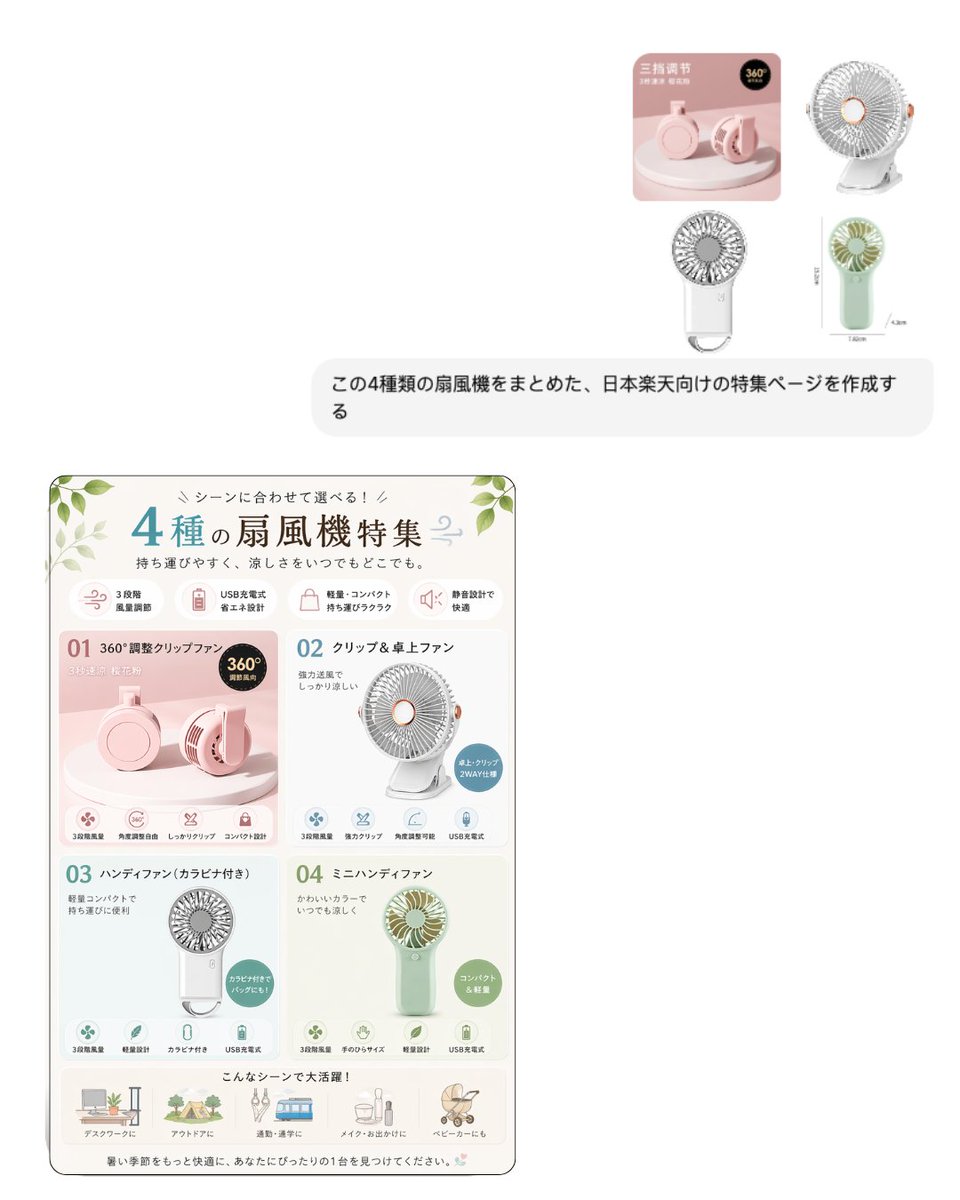
一張豎版日本電商促銷海報,比較了四款便攜式風扇產品,適用於電商平台商品列表、活動頁面和產品特色橫幅。
這是一個平面設計和海報設計的GPT Image 2範例。請使用下方可直接使用的提示資訊產生類似的視覺素材,並在重複使用前查看Awesome GPT Image 2 Prompts署名和商業用途授權資訊。
需要完整的提示符號集?請使用 平面設計和海報設計 主題中心提供更多相關範例,或打開 GPT Image 2 提示庫 有關完整範例索引、可重複使用結構和來源歸屬的資訊。
Free 1K preview
Generate one preview image instantly, no sign-up required.
3221/4000
提示詞
可直接複製的提示
{"type":"Japanese e-commerce feature page poster","subject":"comparison landing-page graphic for 4 portable fans","style":{"overall":"clean Rakuten-style EC promotional sheet, soft pastel lifestyle product infographic, feminine and airy","language":"Japanese","orientation":"vertical","background":"warm off-white with subtle paper texture","border":"thin rounded rectangular border in muted olive gray","decorative elements":"small green leaves in top corners and a tiny breeze swirl icon near the title"},"layout":{"sections":[{"title":"header","position":"top","count":1,"labels":["4種の扇風機特集"]},{"title":"feature icons row","position":"below header","count":4,"labels":["3段階風量調節","USB充電式 省エネ設計","軽量・コンパクト 持ち運びラクラク","静音設計で快適"]},{"title":"product grid","position":"center","count":4,"labels":["01 360°調整クリップファン","02 クリップ&卓上ファン","03 ハンディファン(カラビナ付き)","04 ミニハンディファン"]},{"title":"usage scenes row","position":"bottom","count":5,"labels":["デスクワークに","アウトドアに","通勤・通学に","メイク・お出かけに","ベビーカーにも"]}]} ,"header":{"headline":"{argument name="headline text" default="4種の扇風機特集"}","subheading":"持ち運びやすく、涼しさをいつでもどこでも。","accent_colors":["teal","sage green","soft pink","warm beige"],"title_style":"large mixed-size Japanese typography with oversized teal numeral 4 and dark olive main text"},"products":[{"index":"01","name":"360°調整クリップファン","panel_position":"top-left","panel_background":"blush pink","product_color":"{argument name="product color 1" default="pastel pink"}","main_visual":"foldable round clip fan shown as two product renders on a pedestal, one front-facing and one angled side view","badge_count":1,"badges":["360°調整可能"],"features_count":4,"features":["3段階風量","角度調整自在","しっかりクリップ","コンパクト設計"]},{"index":"02","name":"クリップ&卓上ファン","panel_position":"top-right","panel_background":"white","product_color":"white with peach center ring","main_visual":"small desktop fan with circular grill on a stand, front three-quarter view","badge_count":1,"badges":["卓上・クリップ 2WAY仕様"],"features_count":4,"features":["3段階風量","強力クリップ","角度調整可能","USB充電式"]},{"index":"03","name":"ハンディファン(カラビナ付き)","panel_position":"bottom-left","panel_background":"very pale mint gray","product_color":"white","main_visual":"compact handheld fan with circular grill and rectangular handle including a carabiner loop","badge_count":1,"badges":["カラビナ付きで持ちやすい"],"features_count":4,"features":["3段階風量","軽量設計","カラビナ付き","USB充電式"]},{"index":"04","name":"ミニハンディファン","panel_position":"bottom-right","panel_background":"light beige green","product_color":"{argument name="product color 2" default="mint green"}","main_visual":"cute mini handheld fan with pale green handle and cream blades, centered front view","badge_count":1,"badges":["コンパクト&軽量"],"features_count":4,"features":["3段階風量","手のひらサイズ","軽量設計","USB充電式"]}],"footer":{"headline":"こんなシーンで大活躍!","closing_text":"暑い季節をもっと快適に、あなたにぴったりの1台を見つけてください。"},"visual_rules":{"composition":"single-page EC comparison sheet with a 2x2 product panel grid","icon_style":"small rounded line icons in muted pastel circles","text_density":"moderate, clearly segmented like an online marketplace feature image","shadows":"soft minimal product shadows","rendering":"photo-real product renders embedded in graphic layout","no_people":true}}提示變數
提示符號中可編輯的參數佔位符及其預設值。
多變的
headline text
預設
4種の扇風機特集
多變的
product color 1
預設
pastel pink
多變的
product color 2
預設
mint green
Best for
- - 平面設計和海報設計 visual exploration
- - Image generation and reference-image edits
- - Reusable briefs that keep source attribution visible
Change these parts
- - Subject, product, character, or scene
- - Aspect ratio, camera, lighting, and background
- - Brand, text, color, and output constraints
Recommended model and settings
- - Model: gpt-image-2
- - Input mode: 文生圖
- - Aspect ratio: source
- - Commercial status: review original source
How to use this prompt
- 1. Copy the prompt and preserve its structure for the first test.
- 2. Replace the subject, context, and publishing channel.
- 3. Change one camera, lighting, or style variable per iteration.
- 4. Inspect the output, source, text, and rights before reuse.
Limitations, source, and reuse cautions
- - Generated output is an editable draft, not factual, legal, or rights evidence.
- - Review the linked source, people, brands, logos, text, and third-party media before commercial use.
內容來自Awesome GPT Image 2 Prompts 。必須註明出處。商業用途狀態為allowed ;付費使用前請查看來源版權資訊。
此類案例更多
按類別、輸入模式相容性、品質和低風險進行優先排序。






重用和來源註釋
預覽案例後,請謹慎使用此提示。
- 1.複製提示或直接在 Dovoo 中使用生成按鈕開啟提示。
- 2.根據您的實際使用情況調整變數、寬高比和參考影像。
- 3.發布或付費使用前,請確認版權、署名要求以及品牌或肖像權風險。