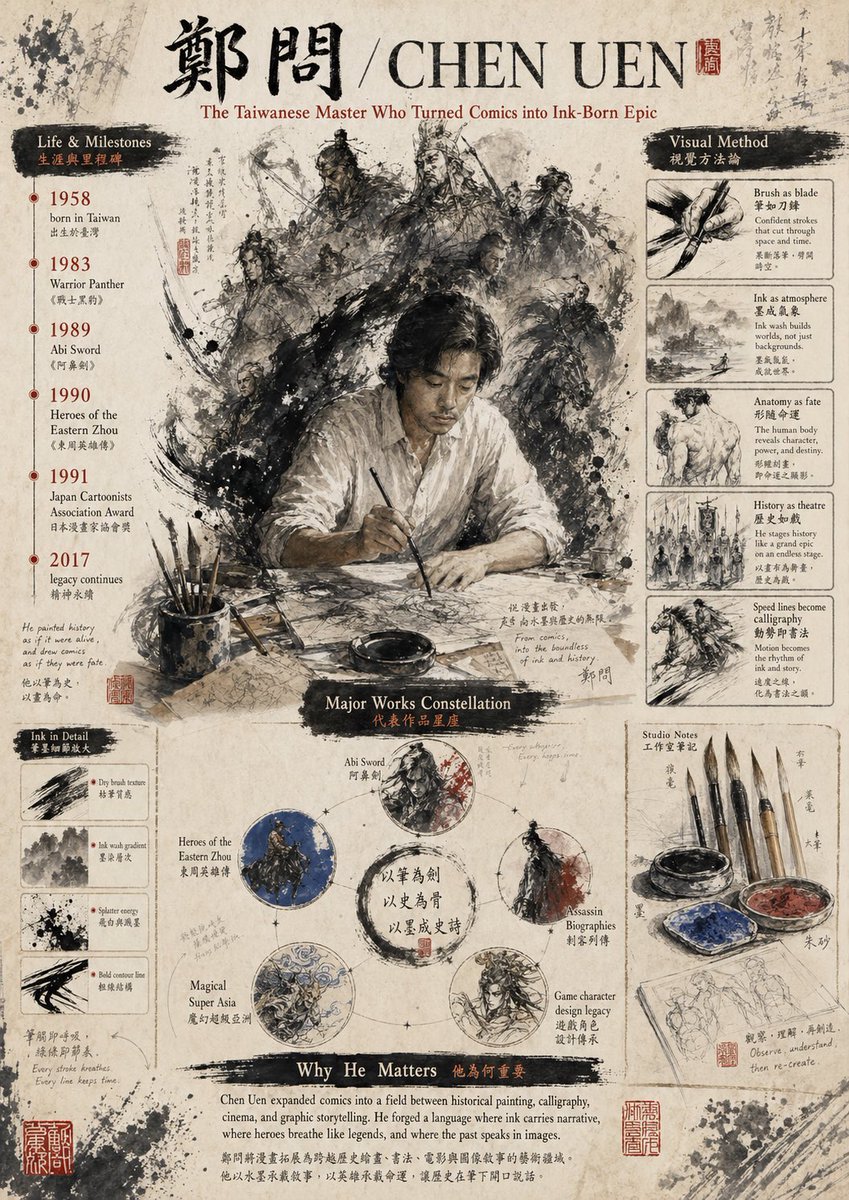
為陳元創作的水墨致敬海報
此提示可產生一張關於陳源的詳盡傳記式博物館風格海報,適用於文化致敬、編輯藝術或歷史藝術家展示。
這是一個平面設計和海報設計的GPT Image 2範例。請使用下方可直接使用的提示資訊產生類似的視覺素材,並在重複使用前查看Awesome GPT Image 2 Prompts署名和商業用途授權資訊。
需要完整的提示符號集?請使用 平面設計和海報設計 主題中心提供更多相關範例,或打開 GPT Image 2 提示庫 有關完整範例索引、可重複使用結構和來源歸屬的資訊。
Free 1K preview
Generate one preview image instantly, no sign-up required.
3358/4000
提示詞
可直接複製的提示
Create a retro editorial poster printed on aged Xuan paper to commemorate {argument name="artist name" default="CHEN UEN"}. The design style blends museum infographics, Chinese ink wash illustration, and calligraphy. The poster is a single vertical composition with a weathered parchment background, featuring ink splatters, faded handwritten annotations, and red seals, creating a scholarly archival atmosphere. At the top, place a prominent black calligraphic font “Zheng Wen,” followed by a slash and a large serif Romanized {argument name="romanized name" default="CHEN UEN"}, accompanied by a small red seal. Below the title, add the subtitle {argument name="subtitle text" default="The Taiwanese Master Who Turned Comics into Ink-Born Epic"} using an elegant reddish-brown serif font. The center of the image showcases a dramatic, freehand scene: a male artist wearing a loose white shirt sits at a desk, holding a brush suspended over paper, Show every face clearly with natural, detailed facial features. Behind him, a circle of monochrome ink wash warriors and historical figures surrounds him like a halo: a total of 9 visible figures, including armored generals, swordsmen, and cavalry, emerging from explosive black brushstrokes and smoky ink. On the left side, create a vertical area titled “Life & Milestones” with a black brushstroke title and smaller Chinese subtitle. List 6 timeline entries with red year markers and bilingual descriptions: Born in Taiwan in 1958, “Warrior Leopard” in 1983, “Abi Sword” in 1989, “Heroes of the Eastern Zhou” in 1990, Awarded by the Japan Cartoonist Association in 1991, Legacy Endures in 2017. Add a section below titled “Ink in Detail” containing 4 framed brushstroke studies with short English descriptions: Dry brush texture, Ink wash gradient, Splatter energy, Bold contour line. On the right side, create a vertical area titled “Visual Method” with a black brushstroke title and smaller Chinese subtitle. Include 5 stacked framed studies in a graphic-text layout: Brush as blade, Ink as atmosphere, Anatomy as fate, History as theatre, Speed lines become calligraphy. At the bottom center, create an area titled “Major Works Constellation” with a dark brushstroke title. Arrange 5 circular work nodes around the central ink halo, each containing calligraphic characters. Label the 5 nodes: Abi Sword, Heroes of the Eastern Zhou, Assassin Biographies, Magical Super Asia, Game character design legacy. Each circle contains unique monochrome or low-saturation ink wash illustrations connected by fine lines like a constellation map. In the lower right corner, add an area titled “Studio Notes” containing 6 visible items: 4 hanging brushes, 1 inkstone, and 1 palette with blue and red pigments; place a sketchbook with pencil figure sketches below. At the bottom, add a wide area titled “Why He Matters” with a black brushstroke title and smaller Chinese subtitle, followed by a serif English body text describing his importance in comics, painting, calligraphy, film, and epic storytelling. The color scheme uses restrained browns, ink black, off-white, soft grays, accented with deep reds and a touch of blue. The entire image should present a refined cultural tribute poster feel, with a compact and balanced layout, rich details, a painterly quality, and faithfulness to Chinese ink wash aesthetics.提示變數
提示符號中可編輯的參數佔位符及其預設值。
多變的
artist name
預設
CHEN UEN
多變的
romanized name
預設
CHEN UEN
多變的
subtitle text
預設
The Taiwanese Master Who Turned Comics into Ink-Born Epic
Best for
- - 平面設計和海報設計 visual exploration
- - Image generation and reference-image edits
- - Reusable briefs that keep source attribution visible
Change these parts
- - Subject, product, character, or scene
- - Aspect ratio, camera, lighting, and background
- - Brand, text, color, and output constraints
Recommended model and settings
- - Model: gpt-image-2
- - Input mode: 文生圖
- - Aspect ratio: source
- - Commercial status: review original source
How to use this prompt
- 1. Copy the prompt and preserve its structure for the first test.
- 2. Replace the subject, context, and publishing channel.
- 3. Change one camera, lighting, or style variable per iteration.
- 4. Inspect the output, source, text, and rights before reuse.
Limitations, source, and reuse cautions
- - Generated output is an editable draft, not factual, legal, or rights evidence.
- - Review the linked source, people, brands, logos, text, and third-party media before commercial use.
內容來自Awesome GPT Image 2 Prompts 。必須註明出處。商業用途狀態為allowed ;付費使用前請查看來源版權資訊。
此類案例更多
按類別、輸入模式相容性、品質和低風險進行優先排序。






重用和來源註釋
預覽案例後,請謹慎使用此提示。
- 1.複製提示或直接在 Dovoo 中使用生成按鈕開啟提示。
- 2.根據您的實際使用情況調整變數、寬高比和參考影像。
- 3.發布或付費使用前,請確認版權、署名要求以及品牌或肖像權風險。