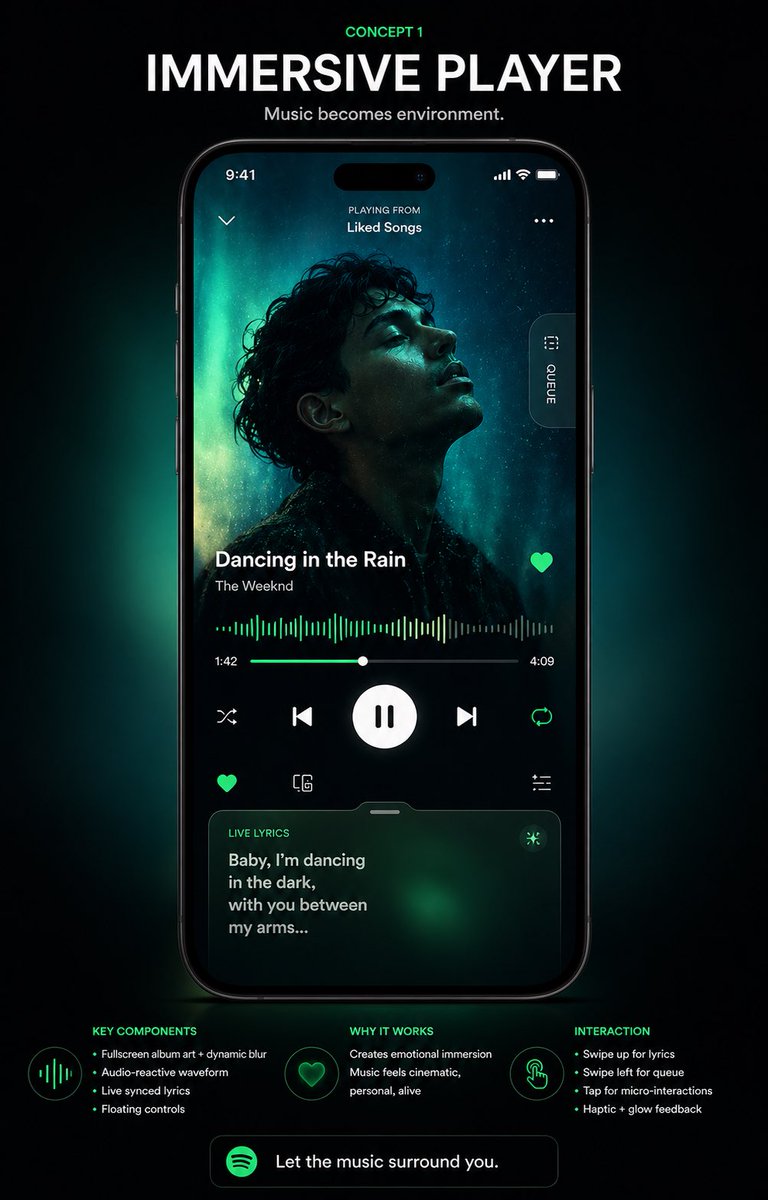
沉浸式音樂播放器使用者介面海報
一張高級概念海報,展示了智慧型手機上未來感十足的沉浸式音樂播放器介面,非常適合用於應用程式重新設計演示、作品集展示和社交媒體設計揭曉。
這是一個平面設計和海報設計的GPT Image 2範例。請使用下方可直接使用的提示資訊產生類似的視覺素材,並在重複使用前查看Awesome GPT Image 2 Prompts署名和商業用途授權資訊。
需要完整的提示符號集?請使用 平面設計和海報設計 主題中心提供更多相關範例,或打開 GPT Image 2 提示庫 有關完整範例索引、可重複使用結構和來源歸屬的資訊。
Free 1K preview
Generate one preview image instantly, no sign-up required.
4000/4000
提示詞
可直接複製的提示
{
  "type": "music app UI concept poster",
  "style": "premium futuristic mobile app showcase, dark mode, cinematic product presentation, Spotify-inspired green neon glow, high contrast, sleek glassmorphism, polished tech advertising aesthetic",
  "format": "vertical poster with centered smartphone mockup on a black background",
  "headline": {
    "kicker": "CONCEPT 1",
    "title": "IMMERSIVE PLAYER",
    "subtitle": "Music becomes environment."
  },
  "device": {
    "type": "modern black smartphone",
    "position": "center",
    "screen": {
      "app": "immersive music player",
      "status_bar": {
        "time": "9:41",
        "icons_count": 3
      },
      "top_area": {
        "left_icon_count": 1,
        "center_text_lines": 2,
        "texts": [
          "PLAYING FROM",
          "Liked Songs"
        ],
        "right_icon_count": 1
      },
      "artwork": {
        "shape": "large full-screen background portrait with a centered square album cover overlay",
        "subject": "moody silhouette portrait of a curly-haired singer against teal aurora-like lighting",
        "dominant_colors": [
          "deep black",
          "cyan",
          "emerald green",
          "cyan glow"
        ]
      },
      "side_tab": {
        "count": 1,
        "label": "QUEUE",
        "orientation": "vertical pill button on right edge"
      },
      "track_info": {
        "song_title": "{argument name=\"song title\" default=\"Dancing in the Rain\"}",
        "artist_name": "{argument name=\"artist name\" default=\"The Weeknd\"}",
        "favorite_icon": true
      },
      "playback": {
        "waveform": "audio-reactive neon green waveform spanning the width",
        "time_labels": [
          "1:42",
          "4:09"
        ],
        "progress_slider": true,
        "main_controls": {
          "count": 5,
          "items": [
            "shuffle",
            "previous",
            "large play/pause button",
            "next",
            "repeat"
          ]
        },
        "secondary_controls": {
          "count": 4,
          "items": [
            "favorite",
            "device or connect icon",
            "settings or sliders icon",
            "small utility icon row integrated above lyrics card"
          ]
        }
      },
      "lyrics_card": {
        "title": "LIVE LYRICS",
        "text": "{argument name=\"lyric text\" default=\"Baby, I’m dancing in the dark, with you between my arms...\"}",
        "style": "rounded translucent card with green atmospheric glow",
        "bottom_position": true
      }
    }
  },
  "layout": {
    "sections": [
      {
        "title": "KEY COMPONENTS",
        "position": "bottom left",
        "count": 4,
        "labels": [
          "Fullscreen album art + dynamic blur",
          "Audio-reactive waveform",
          "Live synced lyrics",
          "Floating controls"
        ]
      },
      {
        "title": "WHY IT WORKS",
        "position": "bottom center",
        "count": 2,
        "labels": [
          "Creates emotional immersion",
          "Music feels cinematic, personal, alive"
        ]
      },
      {
        "title": "INTERACTION",
        "position": "bottom right",
        "count": 4,
        "labels": [
          "Swipe up for lyrics",
          "Swipe left for queue",
          "Tap for micro-interactions",
          "Haptic + glow feedback"
        ]
      }
    ],
    "footer_cta": {
      "count": 1,
      "text": "{argument name=\"cta text\" default=\"Let the music surround you.\"}",
      "icon": "green circular music app logo"
    }
  },
  "lighting": "soft emerald backglow radiating behind the phone, subtle vignette, luminous edges, premium showroom feel",
  "color_palette": [
    "black",
    "charcoal",
    "white",
    "Spotify green",
    "emerald green",
    "cyan"
  ],
  "quality": "high-end UI case study render, sharp typography, realistic device reflections, clean spacing, presentation-ready Behance/Dribbble poster"
}
提示變數
提示符號中可編輯的參數佔位符及其預設值。
多變的
song title
預設
Dancing in the Rain
多變的
artist name
預設
The Weeknd
多變的
lyric text
預設
Baby, I’m dancing in the dark, with you between my arms...
多變的
cta text
預設
Let the music surround you.
Best for
- - 平面設計和海報設計 visual exploration
- - Image generation and reference-image edits
- - Reusable briefs that keep source attribution visible
Change these parts
- - Subject, product, character, or scene
- - Aspect ratio, camera, lighting, and background
- - Brand, text, color, and output constraints
Recommended model and settings
- - Model: gpt-image-2
- - Input mode: 文生圖
- - Aspect ratio: source
- - Commercial status: review original source
How to use this prompt
- 1. Copy the prompt and preserve its structure for the first test.
- 2. Replace the subject, context, and publishing channel.
- 3. Change one camera, lighting, or style variable per iteration.
- 4. Inspect the output, source, text, and rights before reuse.
Limitations, source, and reuse cautions
- - Generated output is an editable draft, not factual, legal, or rights evidence.
- - Review the linked source, people, brands, logos, text, and third-party media before commercial use.
內容來自Awesome GPT Image 2 Prompts 。必須註明出處。商業用途狀態為allowed ;付費使用前請查看來源版權資訊。
此類案例更多
按類別、輸入模式相容性、品質和低風險進行優先排序。






重用和來源註釋
預覽案例後,請謹慎使用此提示。
- 1.複製提示或直接在 Dovoo 中使用生成按鈕開啟提示。
- 2.根據您的實際使用情況調整變數、寬高比和參考影像。
- 3.發布或付費使用前,請確認版權、署名要求以及品牌或肖像權風險。