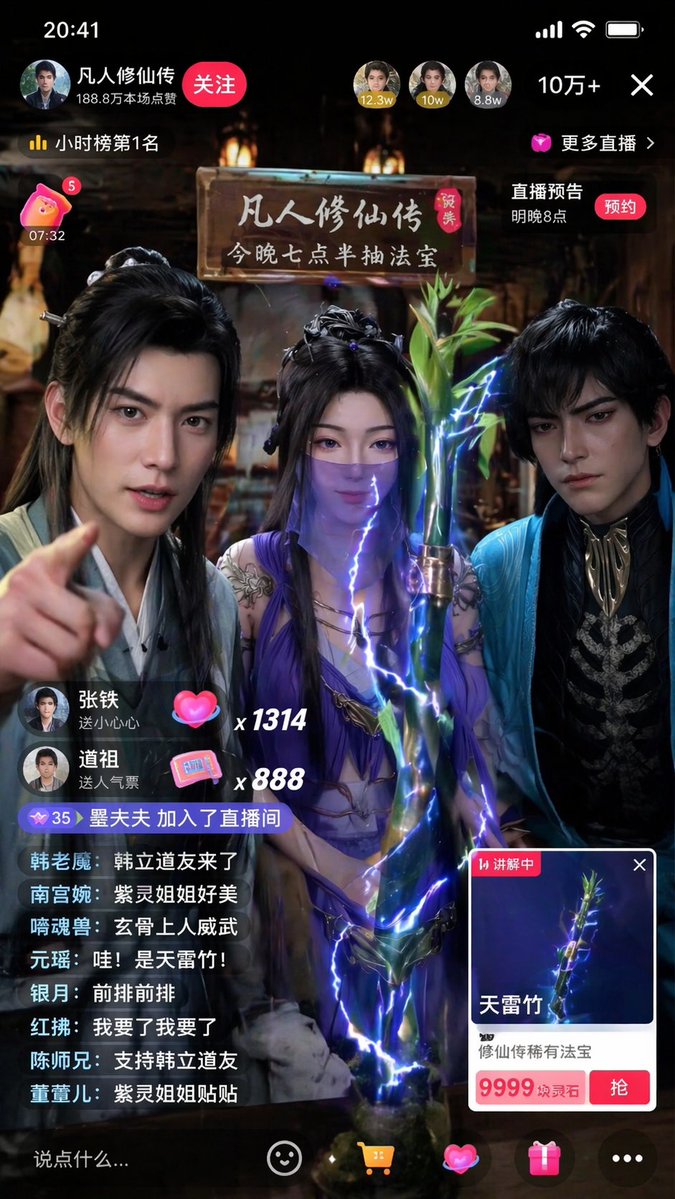
沉浸式修仙小說直播提示
一個非常詳細的提示,用於產生一段直播畫面的垂直螢幕智慧型手機截圖,畫面內容為《永恆的意志》中的角色正在出售魔法物品。
這是一個肖像與人物的GPT Image 2範例。請使用下方可直接使用的提示資訊產生類似的視覺素材,並在重複使用前查看Awesome GPT Image 2 Prompts署名和商業用途授權資訊。
需要完整的提示符號集?請使用 肖像與人物 主題中心提供更多相關範例,或打開 GPT Image 2 提示庫 有關完整範例索引、可重複使用結構和來源歸屬的資訊。
Free 1K preview
Generate one preview image instantly, no sign-up required.
1362/4000
提示詞
可直接複製的提示
Generate a 9:16 vertical smartphone screenshot of a realistic Douyin livestream. The theme is {argument name="livestream theme" default="three characters from 'A Record of a Mortal's Journey to Immortality' selling magical treasures"}. Three people are in the frame, with their temperaments from left to right referencing Han Li, Zi Ling, and Xuan Gu. Do not show character names or use anime style; they should look like immortal cultivation streamers with a strong sense of reality. Clothing, makeup, and temperament should retain the Eastern immortal style while fitting realistic camera effects. The current item on display is {argument name="displayed item" default="'Thunderbolt Bamboo'"}, placed prominently in the foreground center. The item card should clearly display 'Thunderbolt Bamboo' and {argument name="item price" default="'9999 Spirit Stones'"}. The bamboo should have a rare treasure texture with clear details and a subtle, realistic lightning aura. The atmosphere should be lively with realistic UI, bullet comments, likes, and viewer counts. Bullet comments should feature relevant character nicknames like real fan interaction. The overall effect must look like a popular Chinese livestream screenshot—real, bustling, and having a mobile feel. No anime illustrations, movie posters, or game art. No English UI or exaggerated magic effects.提示變數
提示符號中可編輯的參數佔位符及其預設值。
多變的
livestream theme
預設
three characters from 'A Record of a Mortal's Journey to Immortality' selling magical treasures
多變的
displayed item
預設
'Thunderbolt Bamboo'
多變的
item price
預設
'9999 Spirit Stones'
Best for
- - 肖像與人物 visual exploration
- - Image generation and reference-image edits
- - Reusable briefs that keep source attribution visible
Change these parts
- - Subject, product, character, or scene
- - Aspect ratio, camera, lighting, and background
- - Brand, text, color, and output constraints
Recommended model and settings
- - Model: gpt-image-2
- - Input mode: 文生圖
- - Aspect ratio: source
- - Commercial status: review original source
How to use this prompt
- 1. Copy the prompt and preserve its structure for the first test.
- 2. Replace the subject, context, and publishing channel.
- 3. Change one camera, lighting, or style variable per iteration.
- 4. Inspect the output, source, text, and rights before reuse.
Limitations, source, and reuse cautions
- - Generated output is an editable draft, not factual, legal, or rights evidence.
- - Review the linked source, people, brands, logos, text, and third-party media before commercial use.
內容來自Awesome GPT Image 2 Prompts 。必須註明出處。商業用途狀態為allowed ;付費使用前請查看來源版權資訊。
此類案例更多
按類別、輸入模式相容性、品質和低風險進行優先排序。






重用和來源註釋
預覽案例後,請謹慎使用此提示。
- 1.複製提示或直接在 Dovoo 中使用生成按鈕開啟提示。
- 2.根據您的實際使用情況調整變數、寬高比和參考影像。
- 3.發布或付費使用前,請確認版權、署名要求以及品牌或肖像權風險。